 by cooked
how to trench on solana: a beginner's path through axiom
Trenching is trading brand-new memecoins straight from the launch feed, on launchpads like Pump, often minutes after they're created. Learn it in order: fund an account, learn Pulse's three columns, set your presets and filters, check every coin before you buy, make small first trades with the exit planned, then read the meta, track wallets and find people to trade with. Give it a few weeks before you size up.
what trenching is
Every second someone launches a coin. Most get no buyers at all. A few catch attention and run. Trenching is sitting in that feed, sorting the few from the rest, and getting in and out while the attention lasts.
Orangie, on his channel Orangie Web3, puts it simply: memecoins are an attention game. You're betting a coin gets more attention, not less. Everything below is about seeing where attention goes, faster and more calmly than the next person.
the path, in order
- Sign up and fund it. Sign up with email, Google or Phantom. Axiom makes a wallet for your account and shows you its recovery phrase. Sign up through a referral link and your trading fees come down 10%. Then press Deposit in the top bar and send SOL to the address on its Deposit tab. the referral discount · where deposit is
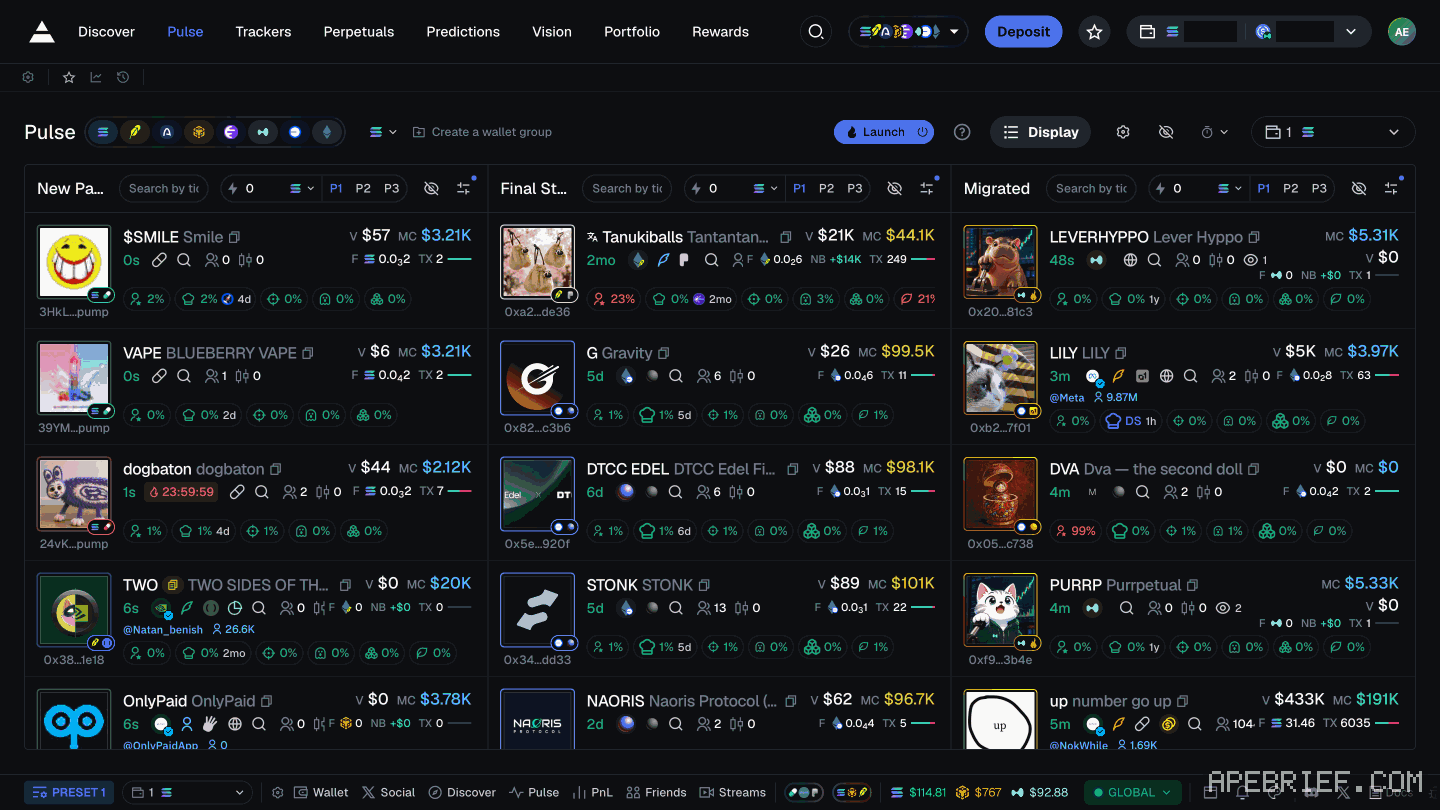
- Learn Pulse and its three columns. Pulse is the live feed of new coins, second in the top nav. New Pairs holds coins just created, Final Stretch holds coins close to finishing their launchpad's bonding curve, and Migrated holds coins that made it to a DEX pool. Spend your first sessions just watching coins move across. what pulse is · what each column means
- Set your presets. A token's trade panel has PRESET 1, PRESET 2 and PRESET 3, each with its own line of slippage, priority fee, bribe and MEV protection. Set all three before your first trade, so you're never changing fees mid-launch. set up your presets
- Set your filters. Each Pulse column has a filters button. The panel screens coins by launchpad, holder shares, size and socials, column by column. There's no permanent best setup: start from one, then change one thing a week. a setup to start from
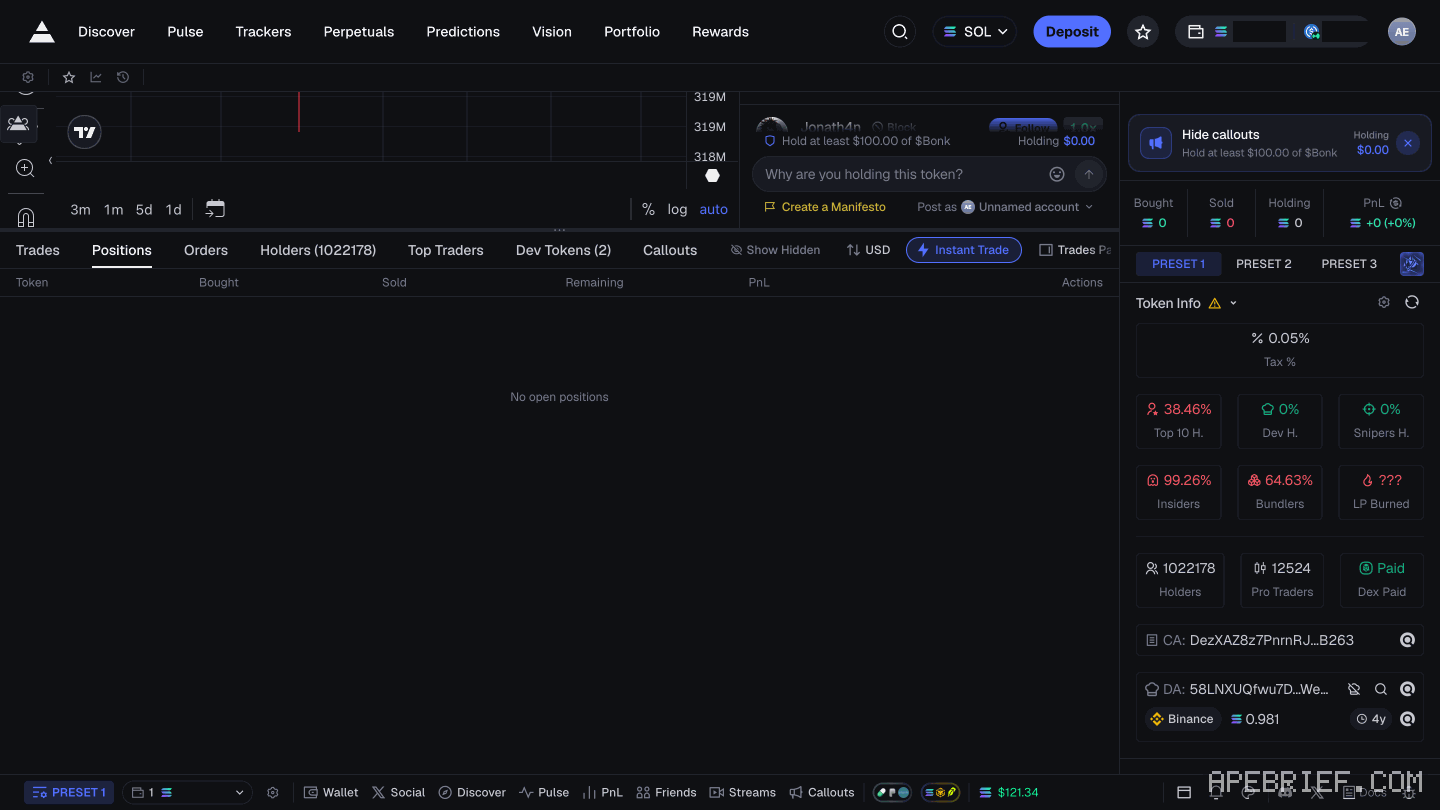
- Check every coin before you buy. Open the token and read its Token Info panel: Top 10 H., Dev H., Snipers H., Insiders, Bundlers and the rest. Filters sort the feed; they don't make a coin safe. If a developer's coins keep looking wrong, Blacklist dev hides them for good. check a coin for a rug · how to read the holder numbers
- Make a small first trade. Use an amount you'd be fine losing entirely. Not too small, though: Orangie's point on stream is that at around $10 a trade, fees can cost more than the trade makes. Instant Trade buys and sells in one click from beside the chart, and slippage is the Max % in your settings. instant trade · slippage
- Plan your exit before you buy. Write down two things: where you take some off, and the sign that says you're wrong, like volume drying up. Instant Trade's Sell row has 10%, 25%, 50% and 100%, so you can take part off and let the rest ride. When the sign hits, follow it. taking profits
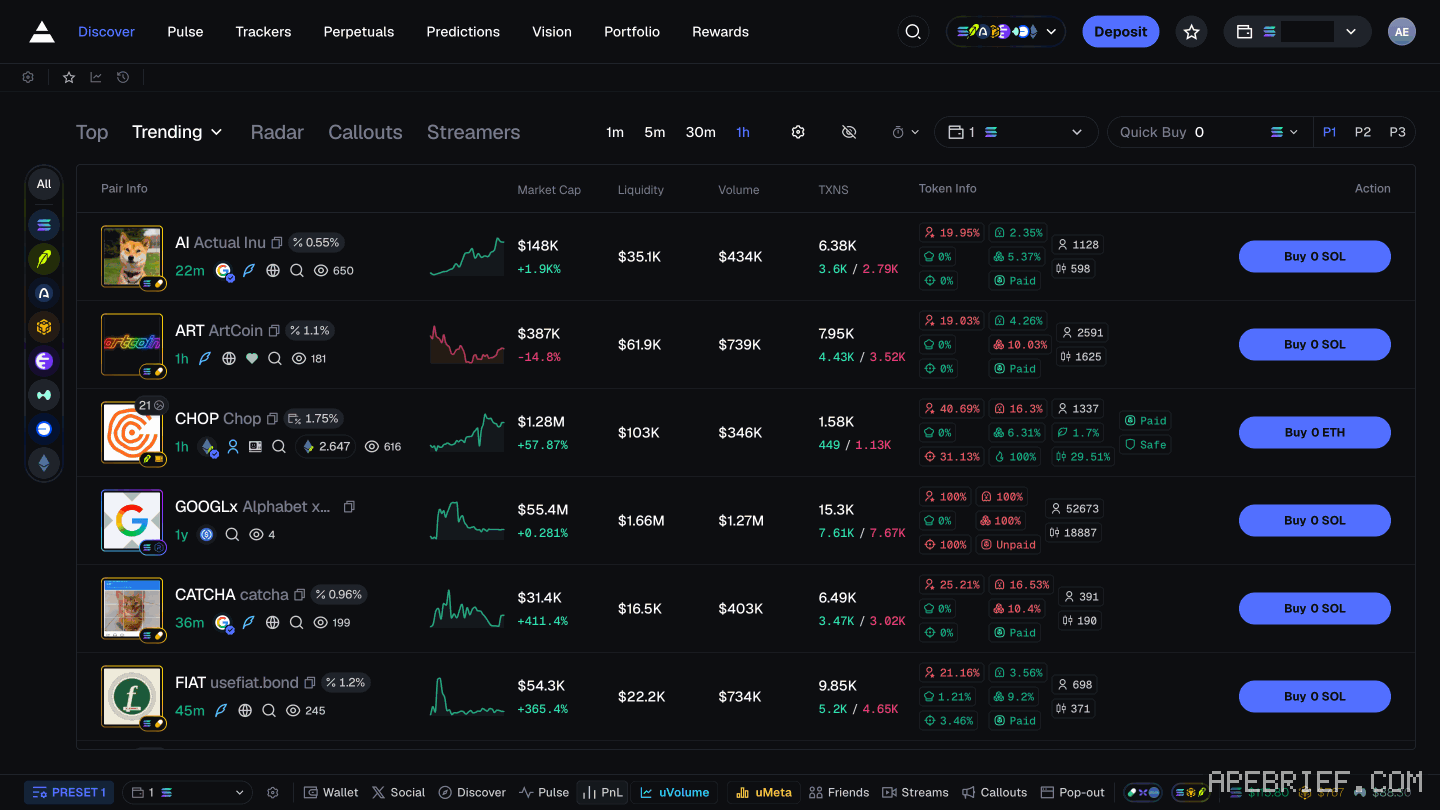
- Read the meta. A meta is whatever the market is paying attention to right now: a theme, a kind of coin, a new launchpad. Open Discover before Pulse. Trending ranks coins by trading activity over the time frame you pick. metas on axiom
- Track wallets and accounts. Add the wallets of traders you want to learn from to the wallet tracker under Trackers. Their buys then show live while you're on Pulse. Add X accounts to the Twitter tracker so the posts that start metas reach you fast. Track to learn how they read a coin, not to follow them in. find wallets worth tracking · the wallet tracker · the twitter tracker
- Find people to trade with. Watch traders stream, talk to people, swap notes. Discover has a Streamers tab, and Orangie points to Twitch's crypto category too. Later, if you want a tighter circle: how cook groups recruit
what orangie and cented tell beginners
Two traders people follow have put out beginner advice, and it lines up.
Orangie, in his free beginners course on Orangie Web3:
- Treat memecoins as an attention game, and trade what's going viral.
- Don't trade alone. Make friends, meet people, watch streams. It's how you pick up the narratives.
- Watch streamers, naming Cented and Deku. A week watching a good one teaches pace, entries and taking profits.
- Don't copy trade them. Streamers know they have viewers, and you can't tell whose intentions are good.
- The number one mistake is buying something because you're desperate to trade.
- His summary: "play small, give it a few weeks."
Cented, who streams his trading, gave his top five tips for beginners in a TikTok clip:
- Nothing comes easy. It takes hard work.
- Don't copy trade.
- Start by paper trading.
- "Take the time to figure out what narratives are good."
- Watch the scope all day, and don't jump straight into buying.
He adds that the market is harder now than it used to be. Both say the same three things: don't copy, watch before you buy, learn the narratives.
One place they differ: Cented says watch all day. Orangie burned out watching new pairs around the clock, and noticed many of the best traders don't. Watch a lot while you're learning; once your filters do the sorting, you can step back.
your first few weeks
- Paper trade first. Pick coins off Pulse, write down where you'd buy and where you'd sell, and check back. Do it until your picks make sense to you.
- Then go small and stay small. Same size every trade while you learn, so the results tell you about your reads, not your sizing.
- Keep a log. One line per trade: why you bought. When one loses, find the one thing that went wrong: size, entry, or no reason at all. Fix that, then the next.
- Don't copy. Orangie's line in his video with Brez Scales is "never copy anyone blindly." Look into a trade yourself before you take it.
- Retune as the meta moves. Luke Giroud opens Discover first when he sits down, and says a few weeks later it could be a whole different meta. Your filters and your reads should move with it.
before you put money in
Only trade what you can afford to lose. Most new coins never get a single buy, and Orangie's view is that nearly all of them rug. Set the amount you're comfortable losing first, as he puts it, and keep to it while you learn.
If you're new to Axiom, the link below is our referral link.
Signing up through this link takes 10% off your Axiom trading fees, which signing up without one does not. We get a commission from Axiom, which helps support our work, at no extra cost to you. We might add tools for people who used our code.
Tapping the button puts on your clipboard and opens Axiom. Where the signup shows a code field, paste it there.
People also ask
What is Pulse on Axiom?
Axiom's live feed of new tokens in three columns: New Pairs, Final Stretch and Migrated. Every chain you leave switched on feeds the same columns, so one column mixes SOL, ETH, BNB, HYPE and USDC quotes. It is the second item in the top nav, after Discover.
the full answerI swapped on Axiom and the token is gone
Check the tx on a Solana explorer first. Destination address and mint are the ground truth. Then enable that mint in the wallet. Do not swap again to find it.
the full answerHow we know: every number on this page
24 sources
- Orangie: memecoins are an attention game; you are betting something gets more attention; trade what's viral attention · source2026-10-07
- Orangie: don't trade alone; meet people, watch streamers, play small, give it a few weeks play · source2026-10-07
- Orangie: traders stream every day on Twitch's crypto category, naming Cented and Deku; don't copy trade them, learn by watching; a week of a good streamer teaches pace, entries, taking profits Deku · source2026-10-07
- Orangie: the number one mistake is buying a coin out of desperation to trade something number · source2026-10-07
- Orangie: he burned out watching new pairs all day; many of the greatest traders don't new · source2026-10-07
- Cented, on his own TikTok (posted 26 Jul 2026): five tips for beginners: hard work, don't copy trade, paper trade first, work out which narratives are good, watch the scope all day, don't jump straight into buying; the market is harder than before paper · source2026-10-07
- Orangie, with Brez Scales: a coin is deployed every second; much of the memecoin game is filtering out the slop, most new coins rug; set an amount you're comfortable losing; never copy anyone blindly never · source2026-10-07
- Orangie, on stream (clip posted 7 Oct 2025): with trades of around $10 the fees can cost more than you make; set a priority fee and keep MEV protection on $10 · source2026-10-07
- Axiom generates a wallet at signup and shows a recovery phrase for it seed · source2026-09-23
- the Deposit button opens a panel titled Exchange with Convert, Deposit and Buy tabs, and the card route in it is Onramper Exchange · our screenshot Sep 2026: panel title Exchange; tabs Convert, Deposit, Buy; card purchase through Onramper2026-09-22
- referee discount on trading fees for signing up through a referral 10% · source2026-09-23
- Pulse is the second item in the header nav, after Discover; the page is headed Pulse and has three columns, New Pairs, Final Stretch and Migrated, with rows as young as 0s Pulse · our screenshot Sep 2026: nav reads Discover, Pulse, Trackers, Perpetuals, Predictions, Vision, Portfolio, Rewards; heading 'Pulse'; three columns New Pairs, Final Stretch, Migrated; row ages such as 0s, 1m, 2mo2026-09-24
- what Axiom's docs say each Pulse table holds New · source2026-10-07
- the token page: Blacklist dev in the header; trade panel with Market, Limit and Adv., a settings line of slippage, priority fee, bribe and MEV protection, PRESET 1 to 3; Token Info labels; Instant Trade's Sell row of 10%, 25%, 50% and 100% PRESET · our screenshot, 7 Oct 2026, Axiom token page: 'Header buttons: Hide token, Blacklist dev, Show communities.' 'Trade panel: Buy / Sell; order types Market, Limit, Adv. (NEW). Amount buttons 0.01 / 0.1 / 1 / 10 with a settings line under them showing slippage %, priority fee, bribe and MEV protection (e.g. \"20% | 0.001 | 0.01 | On\"), ... PRESET 1 / PRESET 2 / PRESET 3.' 'Token Info panel: Tax %, Top 10 H., Dev H., Snipers H., Insiders, Bundlers, LP Burned, Holders, Pro Traders, Dex Paid, CA: (contract address), DA: (developer address) with \"Scan developer address\"' 'Instant Trade window: P1 P2 P3, edit pencil; Buy row (SOL / USDC / uSOL) 0.01 / 0.1 / 1 / 10 + settings line; \"Adv.\" checkbox; Sell row 10% / 25% / 50% / 100% + settings line'2026-10-07
- the Pulse Filters panel opens from a column header's filters button, has column tabs New Pairs, Final Stretch and Migrated, sub-tabs Protocols, Audit, $ Metrics and Socials, and a Protocols list of launchpads led by Pump Apply · our screenshot, 7 Oct 2026: Pulse filter panel opened with 'Open Final Stretch filters'. Header: 'Pulse Filters', preset buttons 1 2 3. Column tabs with count badges: New Pairs, Final Stretch, Migrated. Boxes: Search Keywords, Exclude Keywords (placeholder 'keyword1, keyword2...'). Sub-tabs: Protocols, Audit, $ Metrics, Socials. Footer button: Apply All. Protocols sub-tab: Select All; Pump, Mayhem, Bags, Bonk, Bonkers, Printr, Liquid, …, Surge, Soar, Moonshot, Heaven, Daos.fun, Candle, Sugar, Believe, Jupiter Studio, Moonit, Boop, LaunchLab, Dynamic BC, 'Show more'.2026-10-07
- Luke Giroud: blacklist dev means never seeing that developer's coins again; filters don't make every coin profitable or rule out a rug pull, but filter out most of the garbage; he opens Discover first to see what's been trending; the meta changes within weeks Discover · source2026-10-07
- Instant Trade is a popup next to the chart that buys and sells in one click one · source2026-10-07
- the slippage field name and what it does slippage · source2026-08-28
- Discover is first in the top nav; tabs Top, Trending, DEX, Surge, Live, Radar, Callouts, Streamers Streamers · our screenshot, 7 Oct 2026, https://axiom.trade/discover: 'Top nav: Discover, Pulse, Trackers, Perpetuals, Predictions, Vision, Portfolio, Rewards.' 'Tabs: Top, Trending, DEX, Surge, Live, Radar (NEW), Callouts, Streamers (NEW). Time frames 1m, 5m, 30m, 1h.' 'Streamers: Watch Stream; tabs Home, Live, Featured, Up & Coming, Favorites, All'2026-10-07
- Trending ranks tokens by trading activity over a chosen time period Trending · source2026-10-07
- the wallet tracker shows what added wallets are buying in real time while you're on Pulse real · source2026-10-07
- Axiom's Twitter monitor scans key crypto accounts in real time and takes your own handles Add · source2026-10-07
- Insentos (clip posted 29 Sep 2026): thousands of coins launch an hour and almost none get a single buy single · source2026-10-07
- Trackers' wallet tracker has Manager, Live Trades, Transfers, Monitor and KOLs tabs, with Import, Export and Add Wallet KOLs · our screenshot, 7 Oct 2026, https://axiom.trade/trackers: 'Wallet tracker tabs: Manager, Live Trades, Transfers, Monitor, KOLs (NEW). Buttons: Import, Export, Add Wallet'2026-10-07
next
- What is Pulse on Axiom?Pulse is Axiom's live feed of new tokens in three columns, New Pairs, Final Stretch and Migrated, mixed from every chain you leave switched on.
- What are the best Pulse filters on Axiom?There's no permanent best filter setup on Axiom.
- How do I read bundles, snipers, insiders and dev hold on Axiom?Read them as Axiom's filters, not verdicts: each is a share of a token's supply or of its traders, defined by Axiom in one line.
- how to track twitter accounts on axiomClick Social, the X logo in Axiom's bottom bar. In the Social Tracker, open My List, then Top Tracked: handles ranked by supports, each with an Add button.
- compareAxiom Pulse or Photon Memescope?Axiom Pulse if you trade launches on more than one chain: eight chains feed the same three columns, and every column carries its own filters and three presets.