 by cooked
what instant trade is on axiom, and how its hotkeys work
Instant Trade is a popup beside the chart that buys and sells with a single click. To turn on hotkeys, click the hotkey button, then press Space along with the key for the action you want, like buy x SOL or sell x%.
what's in the panel
The panel, top to bottom:
- P1, P2, P3 and a pencil. Axiom doesn't explain them for this panel. What Axiom says about presets elsewhere: presets P1 to P3.
- A wallet picker.
- Buy, with four amount buttons.
- Sell, with 10%, 25%, 50% and 100%.
- A settings line under each row, plus an Adv. box and Sell Init.
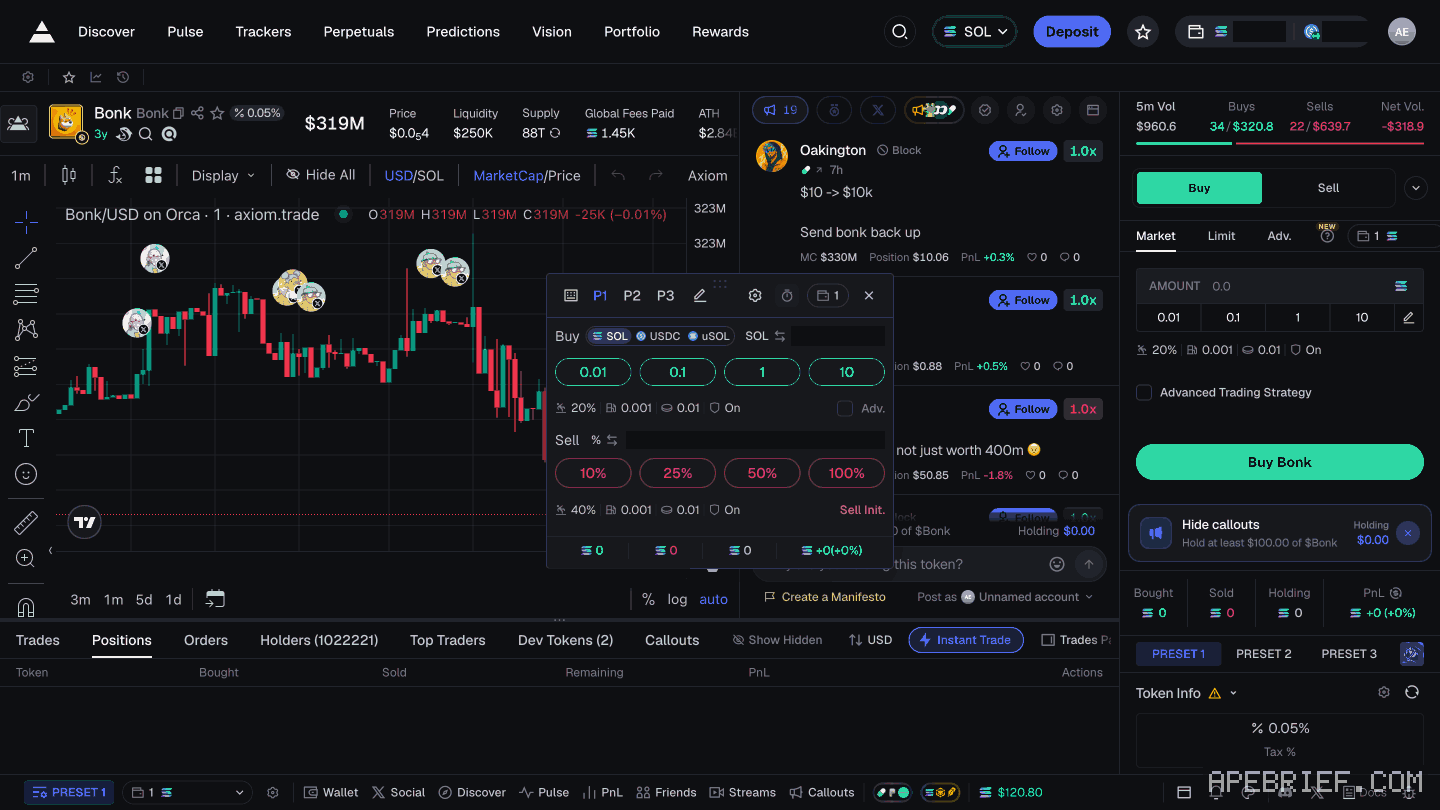
switch hotkeys on
- Click the hotkey button. It's a keyboard icon, at the left of the P1 row.
- Hold Space and press the key for the action.
Axiom doesn't list the default keys, or how to change them.
One click is the trade. Axiom describes no confirm step, for a button or a hotkey. Set your amounts before the panel is open on a chart you care about.
what axiom doesn't explain
- Adv. and Sell Init. Shown, not explained.
- The wallet picker. Axiom documents switching between wallets. It doesn't describe buying from several at once, so this page doesn't either.
- Fees on a one-click buy. Axiom doesn't tie the settings line to a preset. Slippage and priority are on where to change slippage on axiom and where the priority fee is.
If you're new to Axiom, the link below is our referral link.
Signing up through this link takes 10% off your Axiom trading fees, which signing up without one does not. We get a commission from Axiom, which helps support our work, at no extra cost to you. We might add tools for people who used our code.
Tapping the button puts apebrief on your clipboard and opens Axiom. Where the signup shows a code field, paste it there.
People also ask
What does Axiom actually charge?
Platform fee starts at 1% of the fill, plus priority you set, plus impact. A referral is a fee cut on the account if the field shows the code. Gas is separate.
the full answerHow do I use Pulse filters on Axiom?
Click the filters button in a column's header. The panel has a tab per column, chain icons across the top, include and exclude keywords, and Protocols, Audit, $ Metrics and Socials tabs. Axiom's docs don't say what Apply All covers, so check each column after.
the full answerI swapped on Axiom and the token is gone
Check the tx on a Solana explorer first. Destination address and mint are the ground truth. Then enable that mint in the wallet. Do not swap again to find it.
How we know: every number on this page
6 sources
- Instant Trade is a popup next to the chart that buys and sells in one click one · source2026-09-24
- hotkeys are switched on with the hotkey button, then used as Space plus the action's key Space · source2026-09-24
- the panel's figure: a keyboard icon, P1 P2 P3 and an edit pencil, a wallet picker, a Buy row of four amount buttons, a Sell row of 10% 25% 50% 100%, a settings line under each row, an Adv. box and Sell Init. Last · source2026-09-27
- the page does not list the default hotkeys, how to change them, what Adv. or Sell Init. do, or what the wallet picker does Newest · source2026-09-27
- Axiom's multi-wallet page documents switching between wallets, not buying from several at once switch · source2026-09-24
- Axiom gives users who sign up through a referral link a 10% discount on trading fees 10% · source2026-09-24
next
- open a dexscreener pair in axiomCopy the token address from the DexScreener page, not the address in its URL: the URL carries the pair, and Axiom's search takes a ticker or a contract address.
- how to track twitter accounts on axiomClick Social, the X logo in Axiom's bottom bar. In the Social Tracker, open My List, then Top Tracked: handles ranked by supports, each with an Add button.
- How do you get into a cook group?Cook groups are small, invite-only groups of active traders, and they find you on X.
- Someone DMed me their Axiom filters. Is the link safe?Axiom's filters live in its own Pulse Filters panel, opened from each Pulse column's header: ranges, keywords and toggles you set there yourself, with its own Import button.
- compareAre Axiom perps just Hyperliquid?Hyperliquid directly if the fee decides it: Axiom's Perpetuals screen trades on Hyperliquid, and Axiom adds 0.01% per transaction on top of Hyperliquid's own fee.