 by cooked
how to trade perps on axiom: fund it, go long or short, cash out
Axiom's Perpetuals tab trades on Hyperliquid. Fund it by converting SOL to USDC on Hyperliquid: the Sol - USDC button, top right, then Swap, then Convert. Pick a market, choose Long or Short, set your leverage (up to 50x) and a Buy Amount in USDC, and place the order. Axiom takes 0.01% per transaction. When you're done, convert the USDC back the same way and it arrives on Solana in about 5 minutes.
fund it
Perps run on USDC on Hyperliquid, not on the SOL in your wallet. Move some across first:
- Click the Sol - USDC button, top right.
- Click Swap.
- Convert SOL to USDC on Hyperliquid: type the amount of SOL and click Convert.
Hyperliquid sits in Convert's chain picker beside Solana, Base, Ethereum and the rest. No SOL on Axiom yet? where deposit is
open a position
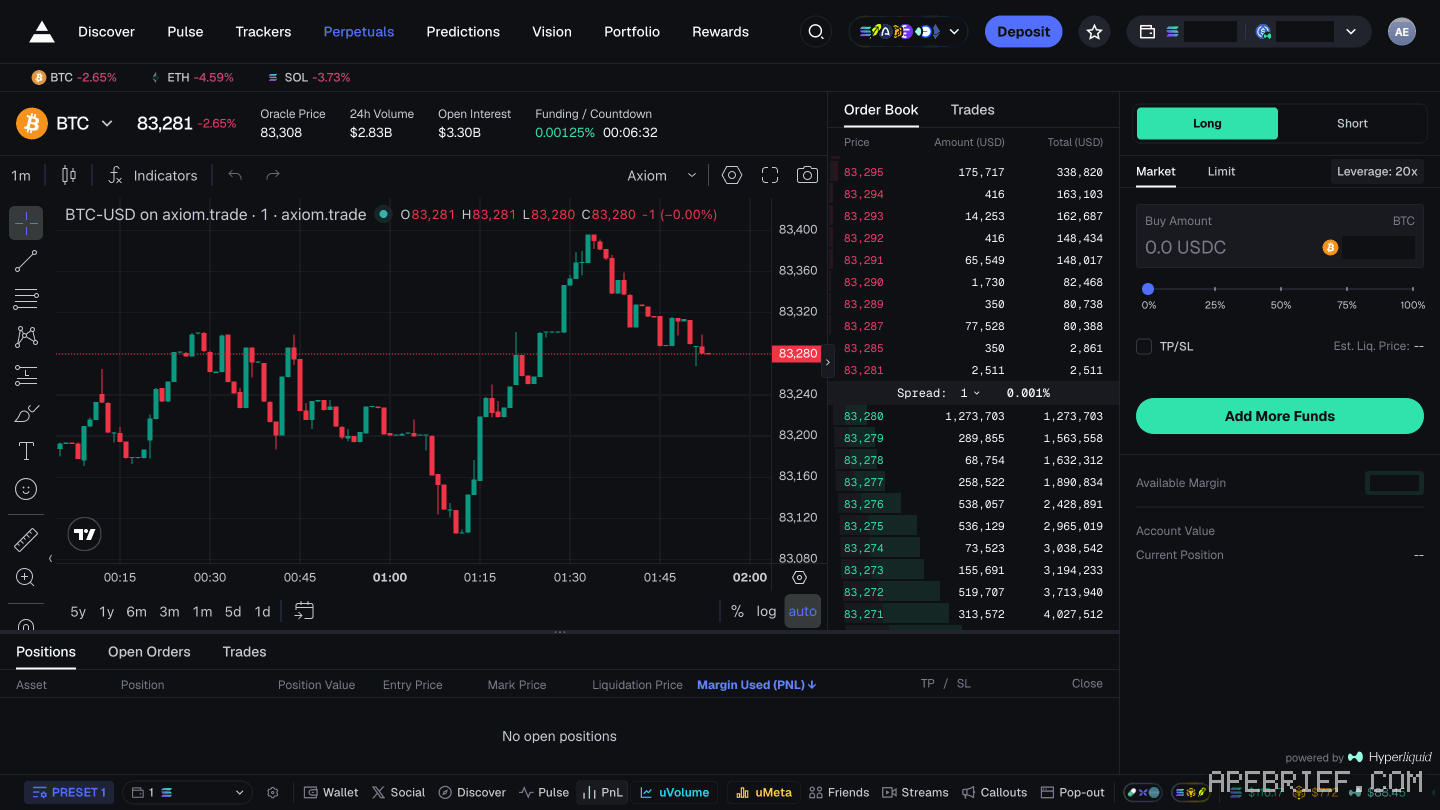
- Open the Perpetuals tab. BTC, ETH and SOL have their own tabs along the top.
- Choose Long if you're betting the price goes up, Short if you're betting it goes down.
- Pick Market or Limit.
- Set Leverage. On BTC the panel shows 20x before you touch it; Axiom allows up to 50x.
- Type your Buy Amount in USDC.
- Optional: open TP/SL and set a take profit and a stop loss, each as a price (TP Price, SL Price) or a percentage (TP %, SL %).
- Read Est. Liq. Price and Available Margin in the panel, then press Long or Short.
the rest of the screen
The market header carries Oracle Price, 24h Volume, Open Interest and Funding / Countdown, then Order Book and Trades. The order panel also holds Add More Funds, Account Value and Current Position, and its footer reads "powered by" Hyperliquid.
watch and close
Three tabs keep track:
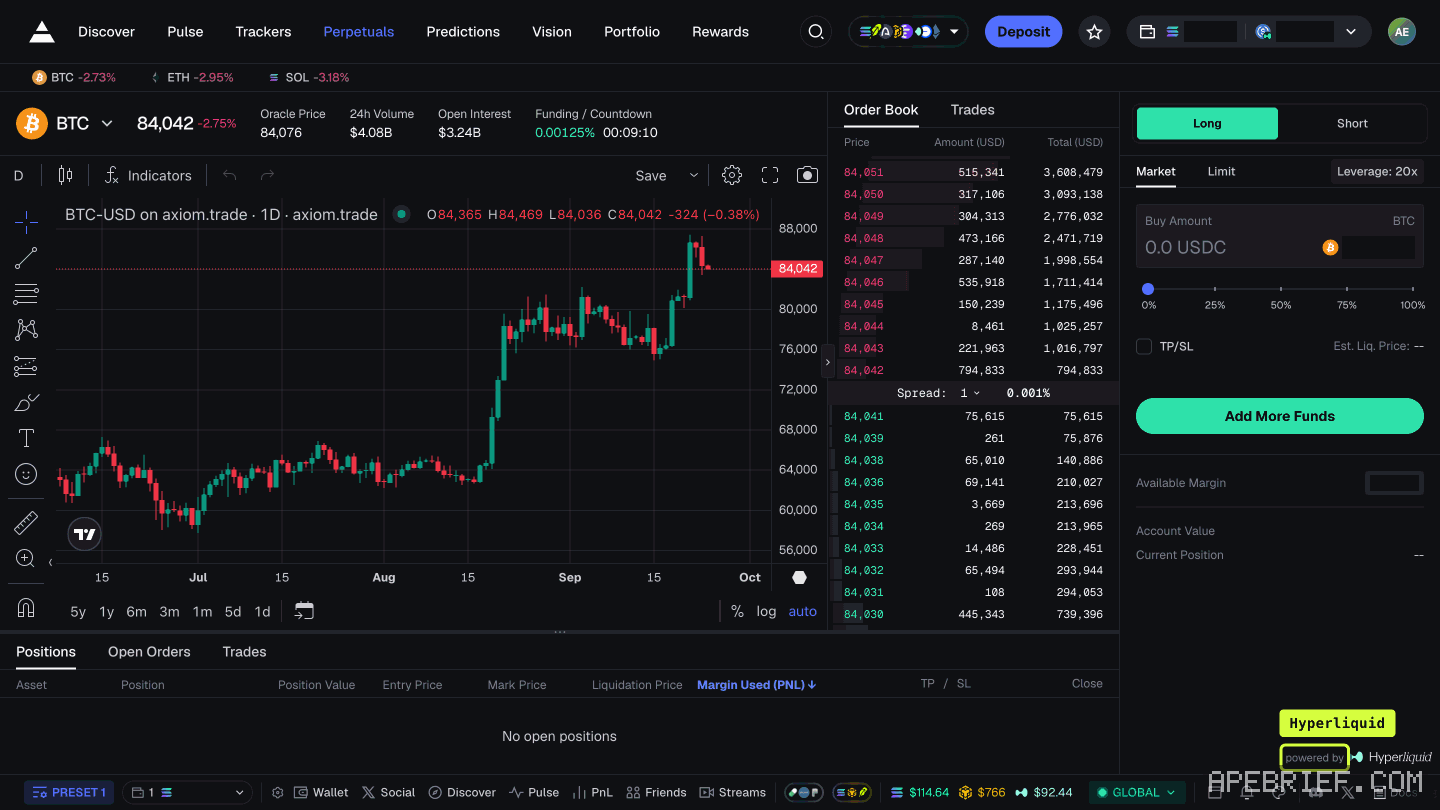
- Positions: what you're in right now. Each row runs Asset, Position, Position Value, Entry Price, Mark Price, Liquidation Price, Margin Used (PNL), then TP, SL and Close.
- Open Orders: orders you've placed that haven't filled.
- Trades: every fill on your account, with its PNL.
Plan the exit before you open, the same way you would on a memecoin. how to take profits
the fee
Axiom's own fee on perps is 0.01% per transaction.
cash out
Same button, reversed: Sol - USDC, then Swap, then convert your USDC to USDC on SOL. It lands in about 5 minutes. To move it off Axiom from there: how to withdraw
leverage, calmly
Leverage multiplies both ways. Axiom's own warning is that many traders lose everything by overleveraging in volatile markets. So start lower than the panel offers, size each trade at an amount you're fine losing, and set the stop loss in TP/SL before you press the button. Change the leverage, then read Est. Liq. Price again before you commit.
If you're new to Axiom, the link below is our referral link.
Signing up through this link takes 10% off your Axiom trading fees, which signing up without one does not. We get a commission from Axiom, which helps support our work, at no extra cost to you. We might add tools for people who used our code.
Tapping the button puts on your clipboard and opens Axiom. Where the signup shows a code field, paste it there.
People also ask
Where is deposit on Axiom?
Click the labelled Deposit button in the top bar, not an arrow. It opens a panel titled Exchange, and its Deposit tab shows the address of the wallet Axiom generated for your account. Send SOL there, on Solana. Your old wallet's balance is not your Axiom balance.
the full answerWhat does Axiom actually charge?
Platform fee starts at 1% of the fill, plus priority you set, plus impact. A referral is a fee cut on the account if the field shows the code. Gas is separate.
the full answerHow do I withdraw on Axiom?
Tokens sit in the connected wallet. Open that wallet and send. Axiom is not holding a queue. If the token is hidden, enable the mint in the wallet list.
How we know: every number on this page
10 sources
- perps are funded by converting SOL to USDC on Hyperliquid: the Sol - USDC button top right, Swap, then Convert Sol · source2026-10-08
- Axiom's perps are powered by Hyperliquid, allow up to 50x leverage, and Axiom takes 0.01% per transaction 0.01% · source2026-10-08
- Axiom's own warning: leverage amplifies gains and losses, and many traders lose everything by overleveraging overleveraging · source2026-10-08
- open the Perpetuals tab, pick a pair, choose Long or Short, type the buy amount in USDC and choose leverage; long bets on a rise, short on a fall Long/Short · source2026-10-08
- positions, open orders and trades each have a tab Open · source2026-10-08
- withdrawing converts USDC on Hyperliquid back to USDC on Solana through the same button, in about 5 minutes 5 · source2026-10-08
- the Perpetuals page: BTC, ETH and SOL tabs; header, order book and trades; the order panel's Long/Short, Market/Limit, Leverage 20x on BTC, Buy Amount, TP/SL fields, Est. Liq. Price, margin lines; footer powered by Hyperliquid 20x · our screenshot, 8 Oct 2026, Perpetuals: 'Markets BTC / ETH / SOL tabs; header Oracle Price, 24h Volume, Open Interest, Funding / Countdown; Order Book / Trades;' 'Order panel: Long / Short, Market / Limit, \"Leverage: 20x\" (default shown on BTC),' 'Buy Amount, TP/SL with TP Price, TP %, SL Price, SL %, \"Est. Liq. Price\", \"Add More Funds\", \"Available Margin ... USDC\",' '\"Account Value ... USDC\", \"Current Position\", footer \"powered by\" Hyperliquid.'2026-10-08
- the Positions, Open Orders and Trades tabs, and the position columns from Asset to Close Liquidation · our screenshot, 8 Oct 2026, Perpetuals: 'Positions, Open Orders, Trades; position columns Asset, Position, Position Value, Entry Price, Mark Price, Liquidation Price,' 'Margin Used (PNL), TP, SL, Close.'2026-10-08
- Hyperliquid is one of the chains in Convert's picker Hyperliquid · our screenshot, 8 Oct 2026: 'Convert's chain picker lists: Solana, Robinhood, HyperEVM, Base, Ethereum, Hyperliquid, Polymarket.'2026-10-08
- Axiom gives users who sign up through a referral link a 10% discount on trading fees 10% · source2026-09-24
next
- Where is deposit on Axiom?Deposit is a labelled button in Axiom's top bar, not an arrow, and it opens a panel titled Exchange whose Deposit tab shows the address of the wallet Axiom generated for your account.
- How do I withdraw on Axiom?Axiom's screens show no control that sends funds to an outside address: Transfer moves funds between your own Axiom wallets and Convert is a cross-chain swap.
- How do I take profits on Axiom?Decide your exit before you buy: where you take money off, and what tells you you're wrong. Then let Axiom make it mechanical. Sell Init.
- how to add wallets and move SOL between them on axiomYour wallets are on Portfolio's Wallets tab.
- compareis photon better than axiom, on fees and the wallet pathAxiom if the fee decides it: signing up through a referral link takes 10% off trading fees, and cashback in SOL takes the net fee to 0.75% at the top tier.