 by cooked
how to take profits on memecoins with axiom: sell init., the sell row and limit sells
Decide your exit before you buy: where you take money off, and what tells you you're wrong. Then let Axiom make it mechanical. Sell Init. on Instant Trade is the button labelled for your initial, the stake you put in, and taking that back is what traders mean by "selling initials". The 10%, 25%, 50% and 100% buttons scale out the rest, and a limit sell waits at your target while you're away.
write the exit before the entry
Before you click buy, write three lines:
- Size. What you're putting in. Orangie's advice is to set the amount you're comfortable losing first, and to play small for your first few weeks.
- Where your initial comes out. A price or market cap you picked before you bought, not one you pick once it's green.
- What says you're wrong. Volume drying up, a level that held getting lost, the theme's leader breaking down. If it hits, you sell, up or down.
A plan you wrote down is one you can follow while the chart is moving fast. One you make up as you go is just hope.
take your initial out with sell init.
- Open the token's page. Instant Trade is the popup next to the chart.
- Find the Sell row: 10%, 25%, 50% and 100%, with a settings line under it.
- Sell Init. sits with that row. Init. is short for initial.
- When your first target hits, take your initial out.
Once your stake is back, a bad turn costs you what you were up, not what you put in. The Trades Panel on the token page shows Bought, Sold and Remaining, so you can see what went in and what's left.
Before you rely on any one-click sell, try it once on a tiny position so you know exactly what it does on your screen.
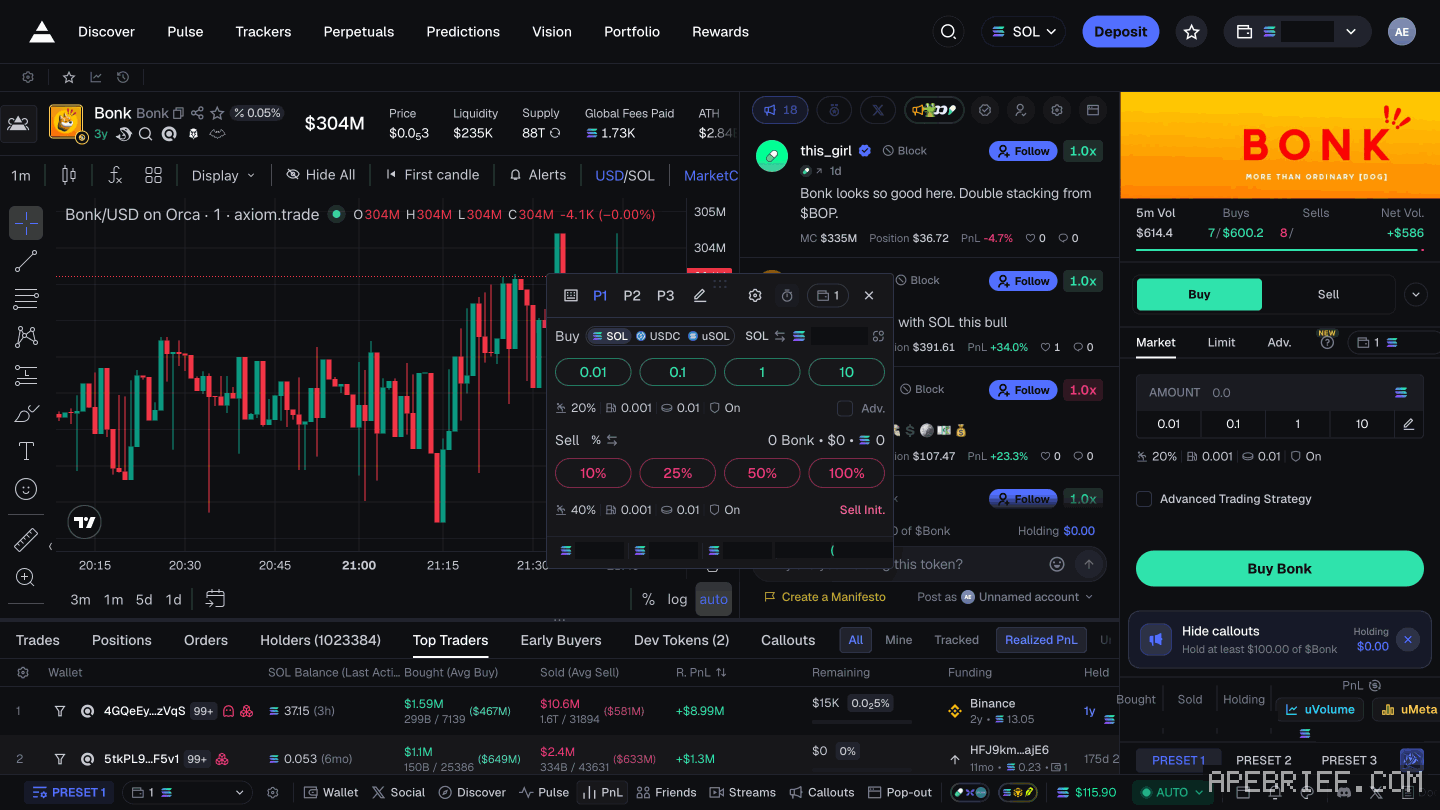
scale out with the sell row
Selling in pieces beats guessing the top. A simple ladder: initial out at your first target, 25% at each target after that, and the last piece held until your exit signal shows. The targets are yours to pick. The point is you picked them before you bought.
- Hotkeys. Switch them on with the hotkey button, then press Space plus the key for sell x%. instant trade and hotkeys
- Sell settings. The sell row has its own settings line. MEV protection matters on buys, not on most sells. Set the sell side once in a preset so you're not fiddling mid-exit. setting up presets · slippage
- Concentration. Take profit faster when one position is most of your stack. The bigger its share, the less room you have to wait.
set a limit sell at your target
A limit sell sits at your price and fills only there, so you can step away instead of watching every candle.
- On the token page, pick Sell in the trade panel, then Limit.
- Set the level with the slider bar, or drag the price line on the chart.
- Check the axis. The chart can read MarketCap or Price, and the line sits on whichever is showing.
- Enter how much to sell and place it.
Place one at your first target right after you buy, and the hard decision is already made. limit orders on axiom
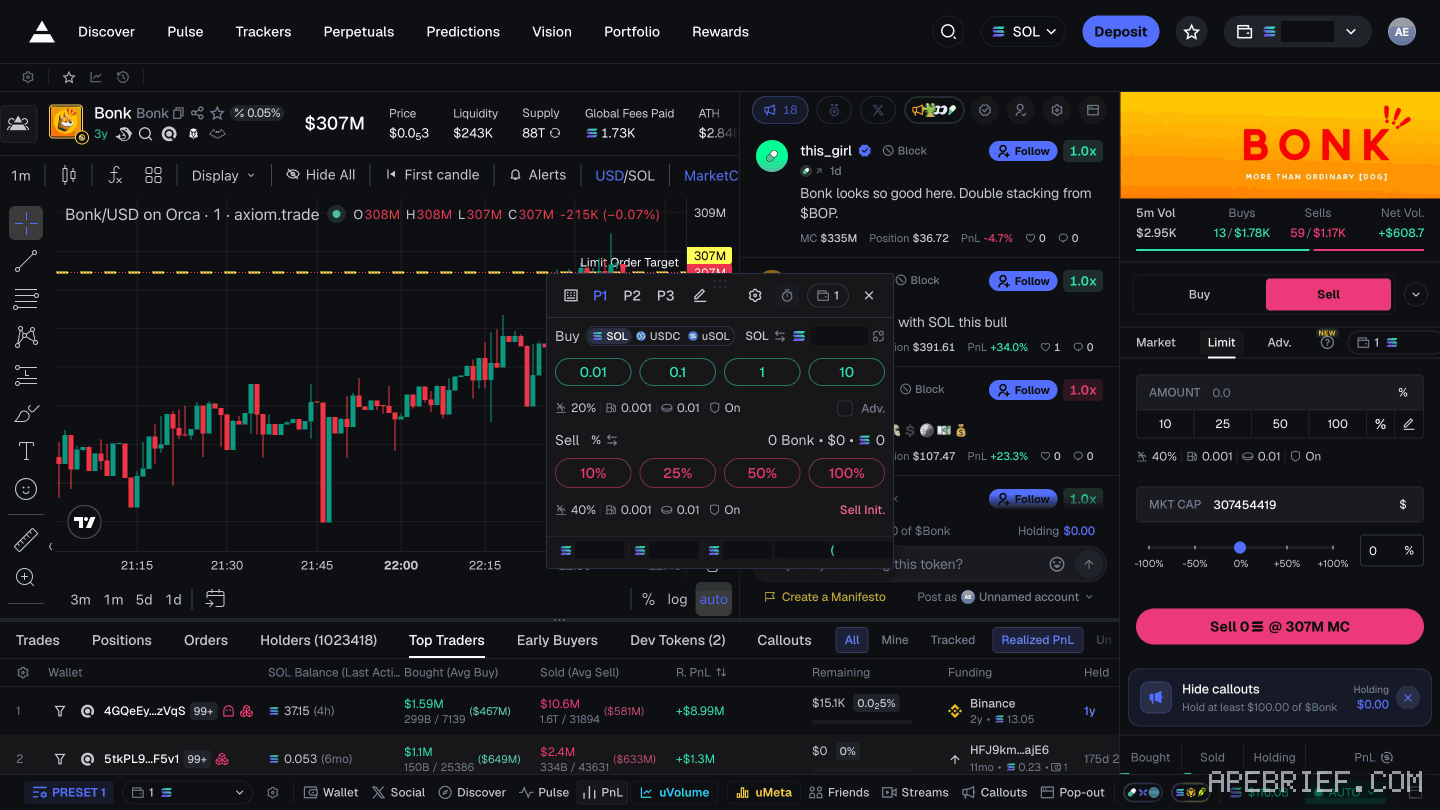
Next to Limit is Adv. Its order types are Dev Sell, DCA and TWAP, and Dev Sell has a Min Dev Sell % field. The Buy side has an Advanced Trading Strategy checkbox that adds an Add row. Try each on a small size before you build a plan around it.
when to sell the rest
The last piece is where people hand it all back. Sell when two things turn together:
- Volume flips. Sells start outweighing buys.
- Structure breaks. A level that held gets lost, or price fails at the last high and sells off hard.
One alone is noise. Both together is your exit. Other tells: new highs on shrinking volume, repeated failed tries at the high, and the theme's leader stalling while its copies slow with it. how a meta fades
If your invalidation hits first, sell. Don't renegotiate with a plan you wrote calm.
learn the pace from people who do it
Orangie's tip is to watch a good streamer for a week. He says it teaches "pace, entries, taking profits", and names Cented and Deku, live in Twitch's crypto category. Watch when they sell, not just when they buy.
Don't copy their trades. Orangie asks viewers not to, because you can't tell whose intentions are good. Cented's own beginner tips say the same, and add: start by paper trading. Practise your exits there first.
review every loser
Keep a one-line reason for every trade, next to the exit you wrote. After each loser, ask which part broke: size too big, entry too high, no exit set, or an exit you didn't follow. Fix that one thing, then the next.
Memecoins can fall faster than any plan fills. Size every buy at an amount you'd be fine losing outright.
If you're new to Axiom, the link below is our referral link.
Signing up through this link takes 10% off your Axiom trading fees, which signing up without one does not. We get a commission from Axiom, which helps support our work, at no extra cost to you. We might add tools for people who used our code.
Tapping the button puts on your clipboard and opens Axiom. Where the signup shows a code field, paste it there.
People also ask
What is Pulse on Axiom?
Axiom's live feed of new tokens in three columns: New Pairs, Final Stretch and Migrated. Every chain you leave switched on feeds the same columns, so one column mixes SOL, ETH, BNB, HYPE and USDC quotes. It is the second item in the top nav, after Discover.
the full answerI swapped on Axiom and the token is gone
Check the tx on a Solana explorer first. Destination address and mint are the ground truth. Then enable that mint in the wallet. Do not swap again to find it.
the full answerHow we know: every number on this page
12 sources
- the Instant Trade window has a Sell row of 10%, 25%, 50% and 100% with a settings line, a Sell Init. button, P1 P2 P3 and an Adv. checkbox Sell · our screenshot, 7 Oct 2026, Axiom token page: 'Instant Trade window: P1 P2 P3, edit pencil; Buy row (SOL / USDC / uSOL) 0.01 / 0.1 / 1 / 10 + settings line; \"Adv.\" checkbox; Sell row 10% / 25% / 50% / 100% + settings line (sell slippage shown 40% in this preset); \"Sell Init.\" button.'2026-10-07
- Instant Trade is a popup next to the chart that buys and sells in one click; hotkeys are switched on with the hotkey button, then Space plus the key for an action such as sell x% Space · source2026-10-07
- the token page's trade panel has Buy and Sell, order types Market, Limit and Adv.; the Adv. tab lists Dev Sell, DCA and TWAP, with a MIN DEV SELL % field and Place Order; an Advanced Trading Strategy checkbox adds an Add row; PRESET 1 to 3 and a settings line Dev · our screenshot, 7 Oct 2026, Axiom token page: 'Trade panel: Buy / Sell; order types Market, Limit, Adv. (NEW).' 'a checkbox \"Advanced Trading Strategy\" that, when ticked, adds an \"Add\" row; PRESET 1 / PRESET 2 / PRESET 3.' 'Adv. tab: order types \"Dev Sell\", \"DCA\", \"TWAP\"; Dev Sell has a \"MIN DEV SELL %\" field and \"Place Order\".'2026-10-07
- the token page shows a Trades Panel with Bought, Sold, Remaining and PnL Remaining · our screenshot, 7 Oct 2026, Bonk's token page, Sell tab open, button labels: 'Instant Trade | Trades Panel | Bought | Sold | Remaining | PnL'2026-10-07
- a limit order sets a precise sell price and executes only at that level; it lets you step away from the screen; place it with the slider bar or by dragging the price line on the chart slider · source2026-10-07
- Axiom's figure labels the dashed line Limit Order Target, on a chart whose axis is set to MarketCap rather than Price Last · source2026-09-27
- MEV protection is only necessary for buys, not for selling on most tokens only · source2026-10-07
- the Brez video: set the amount you're comfortable losing first comfortable · source2026-10-07
- Orangie: play small, give it a few weeks play · source2026-10-07
- Orangie: traders stream every day on Twitch's crypto category, naming Cented and Deku; don't copy trade them, learn by watching; a week of a good streamer teaches pace, entries, taking profits taking · source2026-10-07
- Cented's beginner tips include not copy trading and starting with paper trading paper · source2026-10-07
- Axiom gives users who sign up through a referral link a 10% discount on trading fees 10% · source2026-09-24
next
- how to set a limit order on axiomAxiom's docs give two ways: the slider bar in the trading menu, or dragging the price line on the chart.
- axiom instant trade: how the panel and hotkeys workInstant Trade is a popup next to the chart that buys and sells in one click.
- What is a meta in memecoins?A meta is whatever the memecoin market is paying attention to right now: a theme, a kind of coin, a new launchpad.
- Axiom referral code, which one is real?Axiom attaches a referral at signup: sign up through a referral link, and the Sign Up box has a text field labelled Invite code (optional).
- compareAxiom Pulse or Photon Memescope?Axiom Pulse if you trade launches on more than one chain: eight chains feed the same three columns, and every column carries its own filters and three presets.