 by cooked
best axiom settings: how to set up presets p1, p2 and p3
There's no single best setting on Axiom. The right slippage and fees depend on how contested the coin is and how big your trade is. So set it up once: each preset, P1 to P3, carries a slippage, a priority fee, a bribe and an MEV protection setting, with its own line for buys and for sells. Make one calm, one normal and one fast, then switch between them with one click on the trade panel or in Instant Trade.
what each field in a preset does
| Field | What it does | Axiom's default or advice |
|---|---|---|
| Slippage (Max %) | the most the price can move before your trade cancels | raise it for volatile coins to cut failed trades; keep it low with MEV protection off. 1000% accepts up to a 10x move |
| Priority fee (PRIO) | an extra payment to validators for a faster confirmation | 0.001. Raise it when the network is busy |
| Bribe | a second incentive to validators to put your trade first | 0.001, optional, recommended for high volume trades |
| MEV protection | guards a buy against front-running and sandwiches | Off, Reduced or Secure. Axiom recommends Secure |
Axiom also works out a recommended priority fee and bribe from current transactions. That's a sound base for your calm preset.
The three MEV modes:
- Off: fastest, with your trades exposed to front-running.
- Reduced: goes through Jito. Rogue validators can still get involved.
- Secure: waits for a whitelisted validator, so it can be slower.
A higher bribe makes protection more likely to hold, never certain. The hand-and-coin icon in the top right shows the current minimum MEV bribe. Keep yours above it.
Buys and sells are set apart. Each side has its own settings line. MEV protection is only needed on buys for most tokens, so a sell side can run without it. Slippage often differs too: a buy line might read 20% while the sell line reads 40%.
The longer version of each field: slippage, priority fee and bribe, MEV protection.
where your presets show
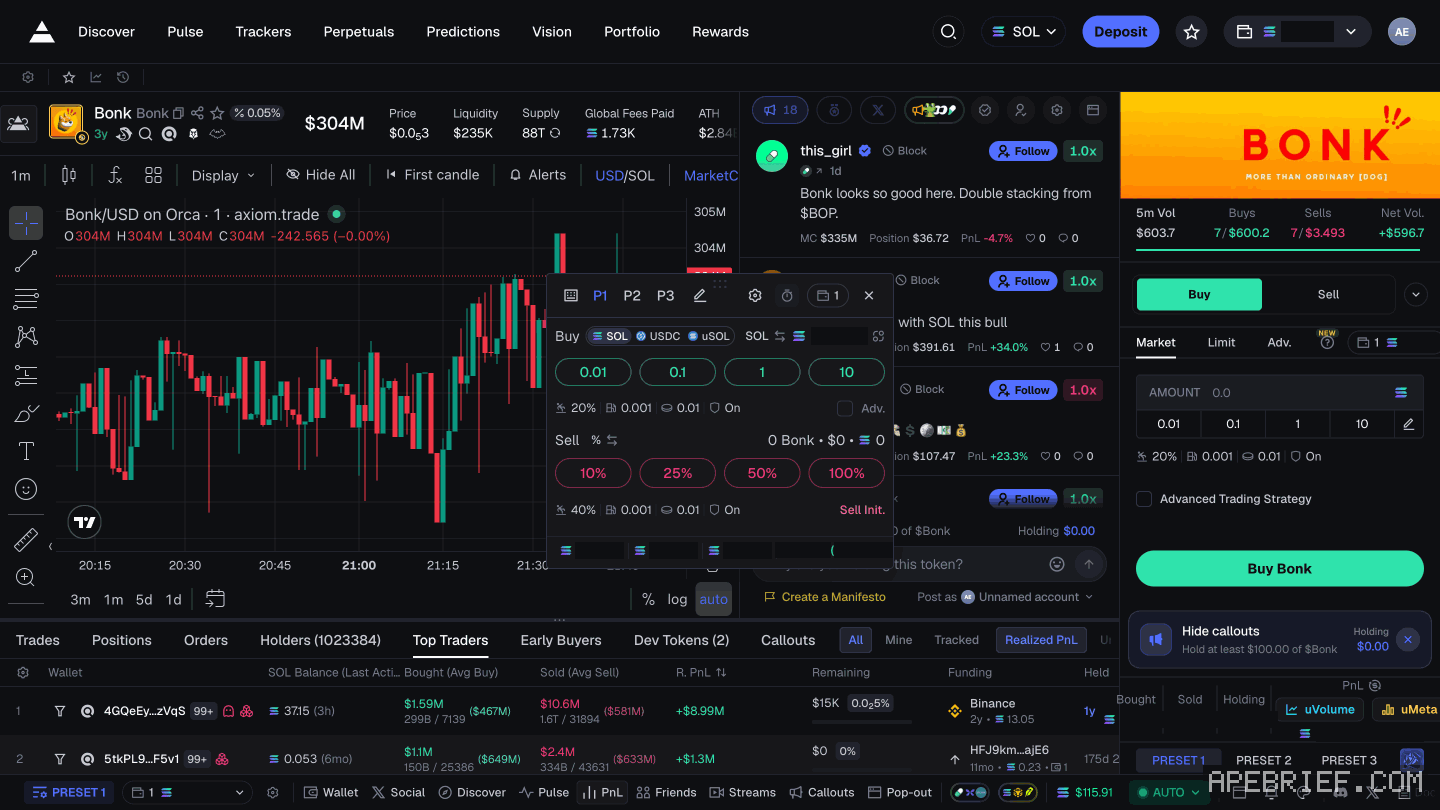
- The trade panel on a token page. Under the Buy amounts sits the settings line: slippage, priority fee, bribe, MEV. An example reads
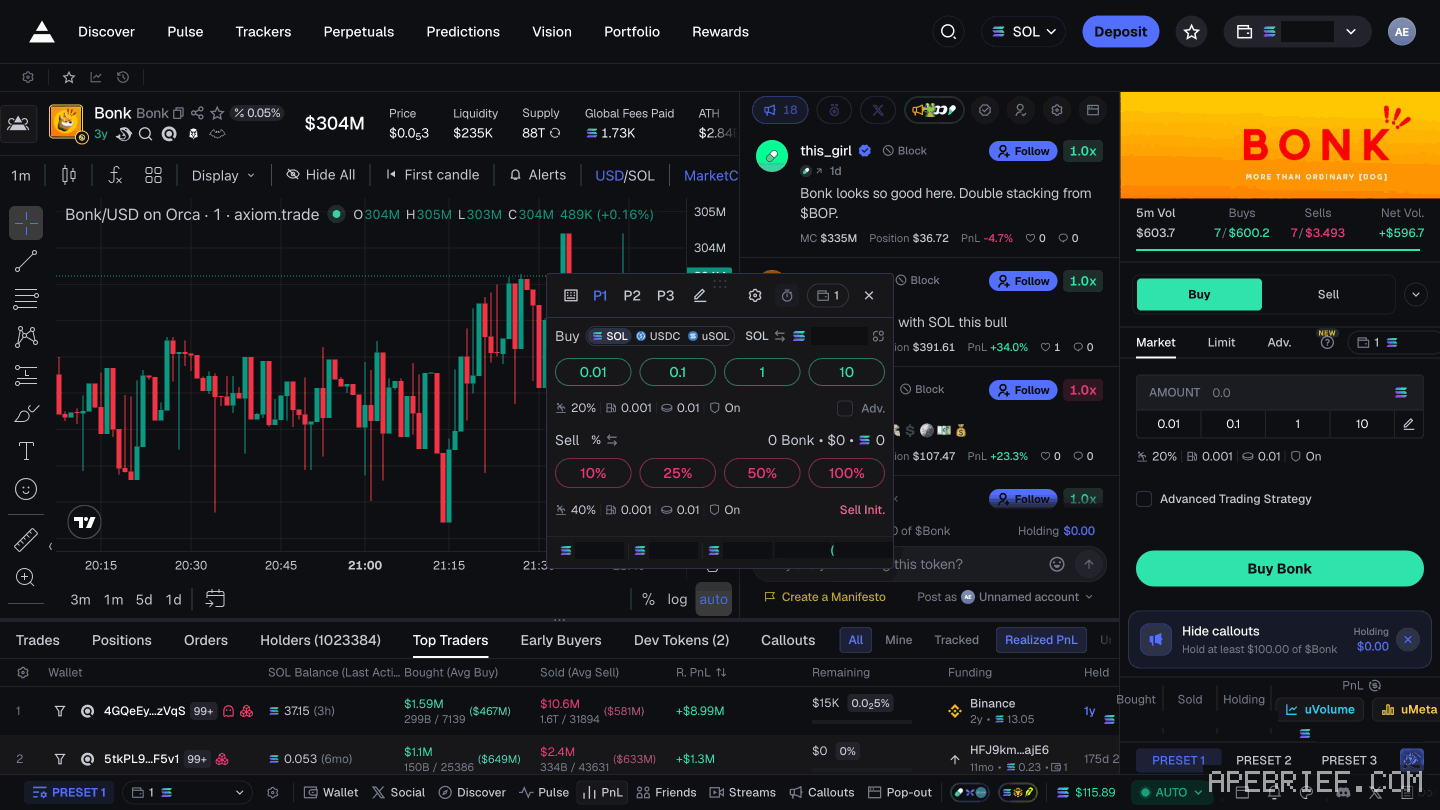
20% | 0.001 | 0.01 | On. Below it, PRESET 1, PRESET 2 and PRESET 3. - Instant Trade, the popup beside the chart. P1, P2 and P3 run along the top with a pencil. The Buy row and the Sell row each have their own settings line.
- Discover, where Quick Buy carries P1, P2 and P3.
- The status bar at the bottom, which shows PRESET 1.
The 1 2 3 at the top of the Pulse Filters panel are filter presets. They don't touch your trade settings: best pulse filters.
set them up once
- Open the settings: the settings button in the top right, or the pencil beside P1 P2 P3 in Instant Trade.
- Pick P1. Fill in slippage, priority fee, bribe and MEV protection for buys.
- Do the same for sells.
- Repeat for P2 and P3.
- Open a token page and read the settings line under the Buy amounts. Click each preset and check the line changes to what you set.
Check the line every time you sit down. One click is the trade, and the line shows what that click will pay.
one way to split the three
Axiom pitches presets as a quick way to move your fees with the market. One way to use the three slots, as an idea to tune:
| When | Buy side | |
|---|---|---|
| P1, calm | older coins, nothing contested | Axiom's recommended priority and bribe, Secure, low slippage |
| P2, normal | most of your trades | a bit more priority, Secure or Reduced |
| P3, fast | fresh launches where everyone's buying at once | priority and bribe raised, slippage wider |
The trade-off sits in P3. Secure waits for a whitelisted validator, and on a contested launch that wait can cost you the fill. Off is faster but exposed. If you go wider on slippage, keep protection on, because wide slippage with protection off is what a sandwich feeds on.
On the sell side of each preset, protection matters less. The one thing you don't want is a sell that fails on a falling coin, so give sells room on slippage.
Orangie's take on priority, in a stream clip from October 2025: he opens the gas settings in the top right, points to the priority fee, and calls the value he shows "the absolute minimum that I would recommend to be at." He calls MEV protection very important. His other habit: work out what the fee is in dollars before you trade.
quick-buy amounts and quick-sell percentages
The Buy row has four amounts: 0.01, 0.1, 1 and 10. The Sell row has 10%, 25%, 50% and 100%. In Instant Trade, one click on either buys or sells at once, on the settings shown in the line under that row.
- Pick one buy button and stick to it. It should be an amount you're comfortable losing, as Orangie puts it in his video with Brez Scales. Switching sizes between trades makes your results hard to read.
- Use the sell percentages as steps. 25% or 50% takes some off the table and leaves the rest running. 100% is the exit. How to plan those steps: take profits on axiom.
- Hotkeys. Switch them on with the hotkey button in Instant Trade, then hold Space and press the key for the action: instant trade and hotkeys.
Under the Buy amounts there's also an Advanced Trading Strategy checkbox. Tick it and an Add row appears.
fees on small trades
Priority fee and bribe are flat amounts. They cost the same on a tiny buy as on a big one, and a sell pays them again. Orangie's point in the same clip: trade with about $10 and you may lose money to fees, more so on a coin with heavy volume.
So the smaller your buy, the bigger the share those two fields take. Before you lower your buy buttons, look at what your preset adds to every trade. Axiom's platform fee, 1% of the trade, comes on top.
A failed trade still pays its network fee. A fast preset on a buy that keeps failing costs you each time, so check slippage before you raise priority again. Size your buy button and your fast preset together.
None of this is a setup to copy. As Orangie says, never copy anyone blindly: start from Axiom's recommended values, trade small, and adjust one field at a time.
If you're new to Axiom, the link below is our referral link.
Signing up through this link takes 10% off your Axiom trading fees, which signing up without one does not. We get a commission from Axiom, which helps support our work, at no extra cost to you. We might add tools for people who used our code.
Tapping the button puts on your clipboard and opens Axiom. Where the signup shows a code field, paste it there.
People also ask
What does Axiom actually charge?
Platform fee starts at 1% of the fill, plus priority you set, plus impact. A referral is a fee cut on the account if the field shows the code. Gas is separate.
the full answerI swapped on Axiom and the token is gone
Check the tx on a Solana explorer first. Destination address and mint are the ground truth. Then enable that mint in the wallet. Do not swap again to find it.
the full answerHow we know: every number on this page
13 sources
- the token page's trade panel has Buy and Sell, order types Market, Limit and Adv., amount buttons 0.01, 0.1, 1 and 10 with a settings line under them showing slippage, priority fee, bribe and MEV protection, an Advanced Trading Strategy checkbox that adds an Add row, and PRESET 1, PRESET 2 and PRESET 3; the status bar also shows PRESET 1 20% · our screenshot, 7 Oct 2026, Axiom token page: 'Trade panel: Buy / Sell; order types Market, Limit, Adv. (NEW). Amount buttons 0.01 / 0.1 / 1 / 10 with a settings line under them showing slippage %, priority fee, bribe and MEV protection (e.g. \"20% | 0.001 | 0.01 | On\"), a checkbox \"Advanced Trading Strategy\" that, when ticked, adds an \"Add\" row; PRESET 1 / PRESET 2 / PRESET 3.' 'Status bar (footer): PRESET 1, Wallet, Social, Discover, Pulse, PnL, ... Pop-out.'2026-10-07
- the Instant Trade window has P1 P2 P3 and an edit pencil, a Buy row in SOL, USDC or uSOL with 0.01, 0.1, 1 and 10 and its own settings line, an Adv. checkbox, a Sell row of 10%, 25%, 50% and 100% with its own settings line (sell slippage 40% in the preset read), and Sell Init. 40% · our screenshot, 7 Oct 2026: 'Instant Trade window: P1 P2 P3, edit pencil; Buy row (SOL / USDC / uSOL) 0.01 / 0.1 / 1 / 10 + settings line; \"Adv.\" checkbox; Sell row 10% / 25% / 50% / 100% + settings line (sell slippage shown 40% in this preset); \"Sell Init.\" button.'2026-10-07
- Discover has a Quick Buy with P1 P2 P3; the Pulse Filters panel has its own preset buttons 1 2 3 P1 · our screenshot, 7 Oct 2026, Discover: 'Columns: Pair Info, Market Cap, Liquidity, Volume, TXNS, Token Info, Action. Quick Buy, P1 P2 P3, Filter.' Pulse filter panel: 'Header: \"Pulse Filters\", preset buttons 1 2 3.'2026-10-07
- the priority fee is PRIO, an extra payment to validators for faster confirmation, default 0.001; settings sit behind the settings button in the top right; raise it when the network is congested; presets let you adapt fees to the market quickly 0.001 · source2026-10-07
- slippage is the Max % field; Axiom's example is that 1000% accepts up to a 10x move before cancelling; raise it for volatile coins to cut failures, keep it low without MEV protection so you don't get sandwiched 1000% · source2026-10-07
- the bribe is an extra incentive to validators, default 0.001, optional but recommended for high volume trades; MEV modes Off, Reduced (via Jito) and Secure (waits for a whitelisted validator, may be slower); Axiom recommends Secure; a higher bribe increases safety but is not 100% effective; with protection disabled, transactions go to Jito and standard leaders for speed; Axiom calculates a recommended bribe and priority fee Secure · source2026-10-07
- the hand-and-coin icon in the top right shows the current minimum MEV bribe, and your MEV fee should sit above it; MEV protection is only needed on buys for most tokens minimum · source2026-10-07
- Instant Trade is a popup next to the chart that buys and sells in one click; hotkeys are switched on with the hotkey button, then Space plus the action's key Space · source2026-10-07
- Solana charges the fee whether the transaction succeeds or fails fails · source2026-09-28
- Axiom platform fee used throughout its own referral worked example 1% · source2026-08-24
- Orangie, stream clip posted 7 Oct 2025: trading with about $10 can lose money to fees, especially on high-volume coins; the gas settings sit top right, the gas station is the priority fee and the value he shows is the absolute minimum he'd recommend; work out what it is in USD; MEV protection is very important $10 · source2026-10-07
- Orangie, with Brez Scales: set the amount you're comfortable losing; never copy anyone blindly comfortable · source2026-10-07
- Axiom gives users who sign up through a referral link a 10% discount on trading fees 10% · source2026-09-24
next
- axiom instant trade: how the panel and hotkeys workInstant Trade is a popup next to the chart that buys and sells in one click.
- What are the best Pulse filters on Axiom?There's no permanent best filter setup on Axiom.
- What does Axiom actually charge?Axiom's platform fee starts at 1% of the trade.
- how to set a limit order on axiomAxiom's docs give two ways: the slider bar in the trading menu, or dragging the price line on the chart.
- compareis photon better than axiom, on fees and the wallet pathAxiom if the fee decides it: signing up through a referral link takes 10% off trading fees, and cashback in SOL takes the net fee to 0.75% at the top tier.