 by cooked
where deposit is on axiom
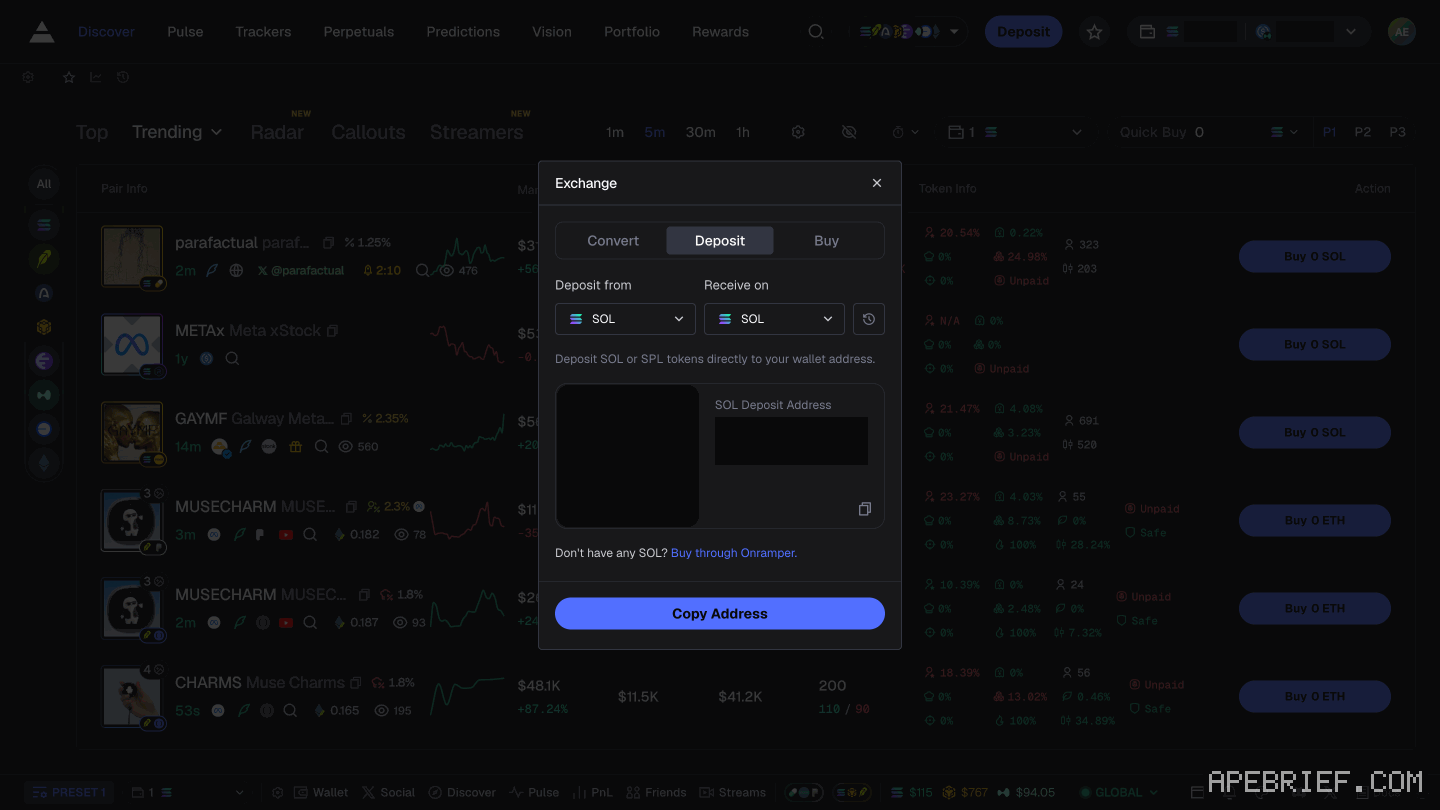
Deposit is a labelled button in Axiom's top bar, not an arrow, and it opens a panel titled Exchange whose Deposit tab shows the address of the wallet Axiom generated for your account. Send SOL there. The same panel has a Buy tab if you would rather pay by card, and the card route there is Onramper.
funding it
- Click the Deposit button at the top right of the page.
- The panel that opens is titled Exchange. Stay on its Deposit tab. It shows the address of your Axiom wallet.
- Send SOL to that address from wherever it currently is, on Solana. Check the first four and last four characters against the panel before you send.
- Or open the Buy tab in the same panel to pay by card. That route is Onramper.
the wallet you are funding
Axiom is a trading app and a wallet at the same time. When you sign up, whether by email, Google or Phantom, Axiom generates a wallet and shows you its recovery phrase. That generated wallet is your account. It is not the Phantom wallet you already had, even if you used Phantom to sign up.
So your existing wallet full of SOL is not your Axiom balance until you move funds into the wallet Axiom made. That is what Deposit does.
Axiom shows the recovery phrase at signup, says you can reach it again in settings, and recommends importing it into a standard wallet like Phantom or Solflare. Doing that takes two minutes and lets you reach the same funds outside Axiom.
if the balance still reads zero
- Confirm you sent to the address the Deposit tab displays, not to an address you had saved from something else.
- Confirm you sent on Solana. SOL bridged or wrapped onto another chain will not appear here, and that is a wrong-network problem rather than a missing button.
- If you bought SOL on an exchange, it is still on the exchange until you withdraw it. Axiom cannot see an exchange balance.
- If you signed up twice, with email once and with Google once, those are two accounts with two wallets. Check which one you are logged into.
The only deposit address to use is the one your own Deposit tab shows you; nobody legitimate sends one by DM.
there is no arrow
If you've seen instructions that say to click an arrow button in the top right corner, then Deposit, then Buy, with Coinbase as the card partner up to $500 without KYC, the screen no longer matches. It has no arrow. The control is a button labelled Deposit; the panel it opens is titled Exchange, with Convert, Deposit and Buy tabs, and the card route inside it is Onramper.
Go by the screen. The $500 no-KYC ceiling is the figure given for Coinbase, not for Onramper.
An earlier version of this page said there was no deposit on Axiom and no address to send to. That was wrong. Axiom generates a wallet for you at signup, complete with a recovery phrase, and Deposit funds it.
If you're setting up a new account, the link below is our referral link.
Signing up through this link takes 10% off your Axiom trading fees, which signing up without one does not. We get a commission from Axiom, which helps support our work, at no extra cost to you. We might add tools for people who used our code.
Tapping the button puts apebrief on your clipboard and opens Axiom. Where the signup shows a code field, paste it there.
People also ask
I swapped on Axiom and the token is gone
Check the tx on a Solana explorer first. Destination address and mint are the ground truth. Then enable that mint in the wallet. Do not swap again to find it.
the full answerHow do I withdraw on Axiom?
Tokens sit in the connected wallet. Open that wallet and send. Axiom is not holding a queue. If the token is hidden, enable the mint in the wallet list.
the full answerDid the Axiom code attach?
Axiom attaches a referral when you sign up through a referral link, and offers no documented way to add one later or confirm it on screen.
What does Axiom actually charge?
Platform fee starts at 1% of the fill, plus priority you set, plus impact. A referral is a fee cut on the account if the field shows the code. Gas is separate.
How we know: every number on this page
10 sources
- Axiom generates a wallet at signup and shows a recovery phrase for it seed · source2026-09-23
- the documented way to fund the account: deposit to the wallet shown, or buy through Coinbase deposit · source2026-09-23
- where the deposit panel lives, per Axiom's own step list, which the current screen no longer matches arrow · source2026-09-23
- card purchase ceiling the docs give for the Coinbase integration, without KYC 500 · source2026-09-23
- Axiom describes itself as a trading app and a wallet, non-custodial, with key management through Turnkey wallet · source2026-09-23
- Axiom recommends importing the recovery phrase into a standard wallet, and the phrase stays reachable in settings import · source2026-09-23
- referee discount on trading fees for signing up through a referral 10% · source2026-09-23
- the only attachment mechanism Axiom documents is signing up through a referral link; the page describes no referee-side code field, no post-signup entry, no retroactive attachment and no cookie, wallet or device behaviour signup · source2026-09-23
- the deposit control is a button labelled Deposit at the top right of the header, and there is no arrow button Deposit · our capture, shot axiom-deposit, 22 Sep 2026: the header carries a labelled Deposit button beside the favourites star2026-09-22
- the Deposit button opens a panel titled Exchange with Convert, Deposit and Buy tabs, and the card route in it is Onramper Exchange · our screenshot Sep 2026: panel title Exchange; tabs Convert, Deposit, Buy; card purchase through Onramper2026-09-22
next
- I swapped on Axiom and the token is goneThe fill landed in the Axiom wallet that was active when you placed it, and the transaction on a Solana explorer is the only ground truth here.
- How do I withdraw on Axiom?Axiom's screens show no control that sends funds to an outside address: Transfer moves funds between your own Axiom wallets and Convert is a cross-chain swap.
- Did the Axiom code attach?Axiom attaches a referral at signup, through a referral link. That is the only mechanism it describes.
- where to change slippage on axiomSlippage is the Max % field in the settings panel behind the button in the top right, and Axiom's own example is that 1000% accepts up to a 10x price move before it cancels.
- compareAxiom Pulse or Photon Memescope?Axiom Pulse if you trade launches on more than one chain: eight chains feed the same three columns, and every column carries its own filters and three presets.