 by cooked
how to withdraw from axiom: the recovery phrase route
tldr: Axiom's screens show no control that sends funds to an outside address: Transfer moves funds between your own Axiom wallets, and Convert is a cross-chain swap. The exit route Axiom documents is the recovery phrase: import it into a standard wallet and send from there. There is no withdrawal queue and no approval, since nothing is held for you.
Axiom is non-custodial. It says the assets you hold are always in your control, and that control lives in the recovery phrase Axiom showed you at signup and keeps available in settings.
what the screens show
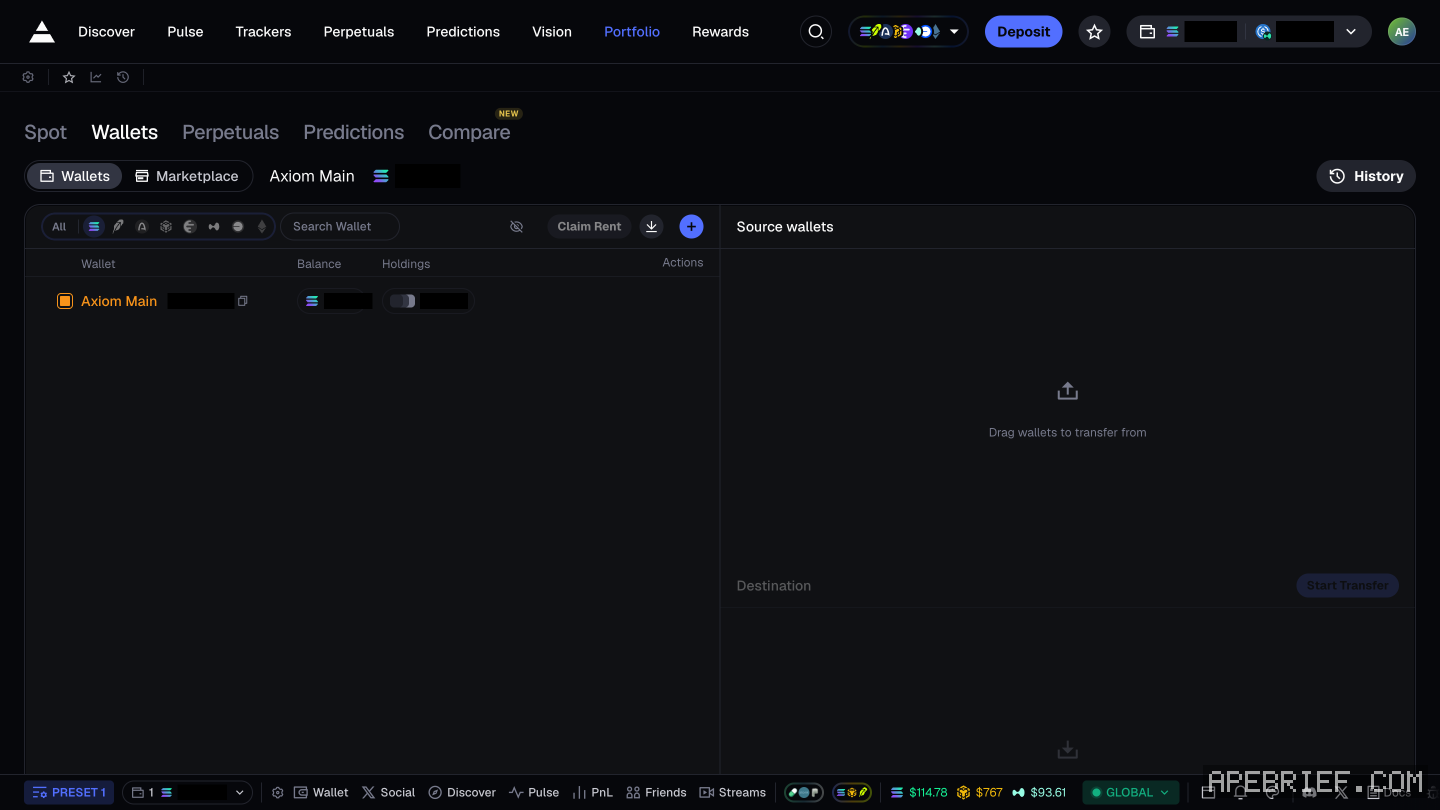
Nothing in the portfolio sends funds to an address outside Axiom.
- Wallets tab. This shows your Axiom wallets, along with Claim Rent, an import button and an add-wallet button, next to a transfer panel: drag a wallet into Source wallets, select a Destination, then Start Transfer. This moves funds between Axiom wallets you own.
- Convert. A tab inside the panel that the Deposit button opens. It is a cross-chain swap: it changes what you hold and the chain it is on, within Axiom. Nothing leaves.
- Spot tab. Balances, positions, history and activity. There is no send control.
That covers those screens, not every corner of the app, and Axiom changes its interface often.
what axiom documents
Axiom documents one Withdraw, under Perpetuals. It converts USDC on Hyperliquid back to USDC on Solana through the Sol - USDC button and the swap button. That is a move between two places inside your Axiom account, not a send to an outside address, and Axiom describes no other.
What Axiom does document is enough to get funds out:
- Convert first, if you want to. Axiom documents Convert, reached from the wallet button then the swap button, which moves crypto to USDC inside the app. Do this if the thing you hold is volatile and you want it stable before it moves.
- Get the recovery phrase. Click your avatar, top right, then Account and Security, then View Recovery Key. Axiom's own advice is to import it into a standard wallet such as Phantom, Rabby or Solflare. The full steps are in how to export your axiom private key.
- Import and send. Once that phrase is in a standard wallet, the Axiom wallet is just a Solana wallet you hold the keys to. Send from there to an exchange or wherever you want it. Axiom is not in that path and does not need to be.
Import the phrase only into a wallet app you installed yourself. Anything asking for it to "unlock" or "release" a withdrawal is a theft.
if you cannot see the token
Check the wallet you are actually in first. Axiom supports several wallets on one account with a switcher, so the balance can be in one you are not currently looking at. After that, the transaction on a Solana explorer is the ground truth, not any interface.
the route above is the one Axiom documents, which is the recovery phrase in a wallet you hold. if View Recovery Key won't open for you, ask Axiom directly: the same Account and Security panel has a Support Code that lets their team look at your account, so nobody needs your phrase to help. nothing on this page can recover it. if you are new to Axiom, the link below is our referral link.
Signing up through this link takes 10% off your Axiom trading fees, which signing up without one does not. We get a commission from Axiom, which helps support our work, at no extra cost to you. We might add tools for people who used our code.
Tapping the button puts on your clipboard and opens Axiom. Where the signup shows a code field, paste it there.
People also ask
How do I withdraw on Axiom?
Tokens sit in the connected wallet. Open that wallet and send. Axiom is not holding a queue. If the token is hidden, enable the mint in the wallet list.
the full answerI swapped on Axiom and the token is gone
Check the tx on a Solana explorer first. Destination address and mint are the ground truth. Then enable that mint in the wallet. Do not swap again to find it.
the full answerWhere is deposit on Axiom?
Click the labelled Deposit button in the top bar, not an arrow. It opens a panel titled Exchange, and its Deposit tab shows the address of the wallet Axiom generated for your account. Send SOL there, on Solana. Your old wallet's balance is not your Axiom balance.
How we know: every number on this page
13 sources
- Axiom generates the wallet and shows a recovery phrase for it at signup seed · source2026-09-23
- the recovery phrase stays reachable, and Axiom recommends importing it into a standard wallet import · source2026-09-23
- Axiom is non-custodial and holds the assets in your control non-custodial · source2026-09-23
- Axiom documents Convert, reached from the wallet button, as the way to move crypto to USDC inside the app convert · source2026-09-23
- multiple wallets can be held on one account, with a switcher and labels multi · source2026-09-23
- the only attachment mechanism Axiom documents is signing up through a referral link; the page describes no referee-side code field, no post-signup entry, no retroactive attachment and no cookie, wallet or device behaviour signup · source2026-09-23
- the Wallets tab offers Claim Rent, import, create and a transfer between your own Axiom wallets, and no send to an outside address Transfer · our capture, shot axiom-withdraw, 22 Sep 2026: Portfolio, Wallets tab: Claim Rent, an import and an add-wallet button, Source wallets ('Drag wallets to transfer from'), Destination, Start Transfer2026-09-22
- the Spot portfolio shows balances, positions and activity, with no send control Spot · our capture, shot axiom-token-list, 22 Sep 2026: Portfolio, Spot tab: Balance, Realized PNL, Performance, Active Positions, History, Show Hidden, Activity and Transfers lists2026-09-22
- Convert, a tab in the panel the Deposit button opens, is a cross-chain swap inside Axiom, not a send Convert · our screenshot Sep 20262026-09-22
- the docs' only page titled Withdraw sits under Perpetuals and converts USDC on Hyperliquid back to USDC on Solana USDC · source2026-09-23
- Axiom's referral terms: current or former users cannot qualify as new users; a second account for the same person is void void · source2026-09-23
- the recovery phrase sits in the account menu: Account and Security, Recovery Key, View Recovery Key; the same panel offers a Support Code for Axiom's support team View · our screenshot, 8 Oct 2026: account menu (avatar, top right) 'Account and Security'; rows 'Recovery Key' - 'Access your seed phrase to export your accounts. DO NOT SHARE!' [View Recovery Key] and 'Support Code' - 'Authorize our support team to help troubleshoot your account' [Generate Code]2026-10-08
- Axiom gives users who sign up through a referral link a 10% discount on trading fees 10% · source2026-09-24
next
- I swapped on Axiom and the token is goneThe fill landed in the Axiom wallet that was active when you placed it, and the transaction on a Solana explorer is the only ground truth here.
- how to track twitter accounts on axiomClick Social, the X logo in Axiom's bottom bar. In the Social Tracker, open My List, then Top Tracked: handles ranked by supports, each with an Add button.
- How do I trade perps on Axiom?Axiom's Perpetuals tab trades on Hyperliquid. Fund it by converting SOL to USDC on Hyperliquid: the Sol - USDC button, top right, then Swap, then Convert.
- How do I trade Robinhood Chain on Axiom?Pick HOOD in Axiom's chain selector, fund the Robinhood wallet from the Deposit panel, which takes ETH sent on Ethereum and bridges it for you from a $3 minimum, and the chain's tokens show up in Pulse under New Pairs, Final Stretch and Migrated.
- compareis photon better than axiom, on fees and the wallet pathAxiom if the fee decides it: signing up through a referral link takes 10% off trading fees, and cashback in SOL takes the net fee to 0.75% at the top tier.