 by cooked
how to use pulse on axiom: filters, presets and quick buy
Every Pulse column has its own controls in its header: a search box, a quick-buy amount, presets P1 to P3, and a filters button. The filters panel has a tab per column, include and exclude keywords, and Protocols, Audit, $ Metrics and Socials sub-tabs. Axiom defines the filters and says nothing about Apply All or the per-column presets, so this page marks each gap.
The header also has "Search by ticker or name" and "Hide all New Pairs tokens", the same on the other two columns. New to the page itself? Start here.
set a column's filters
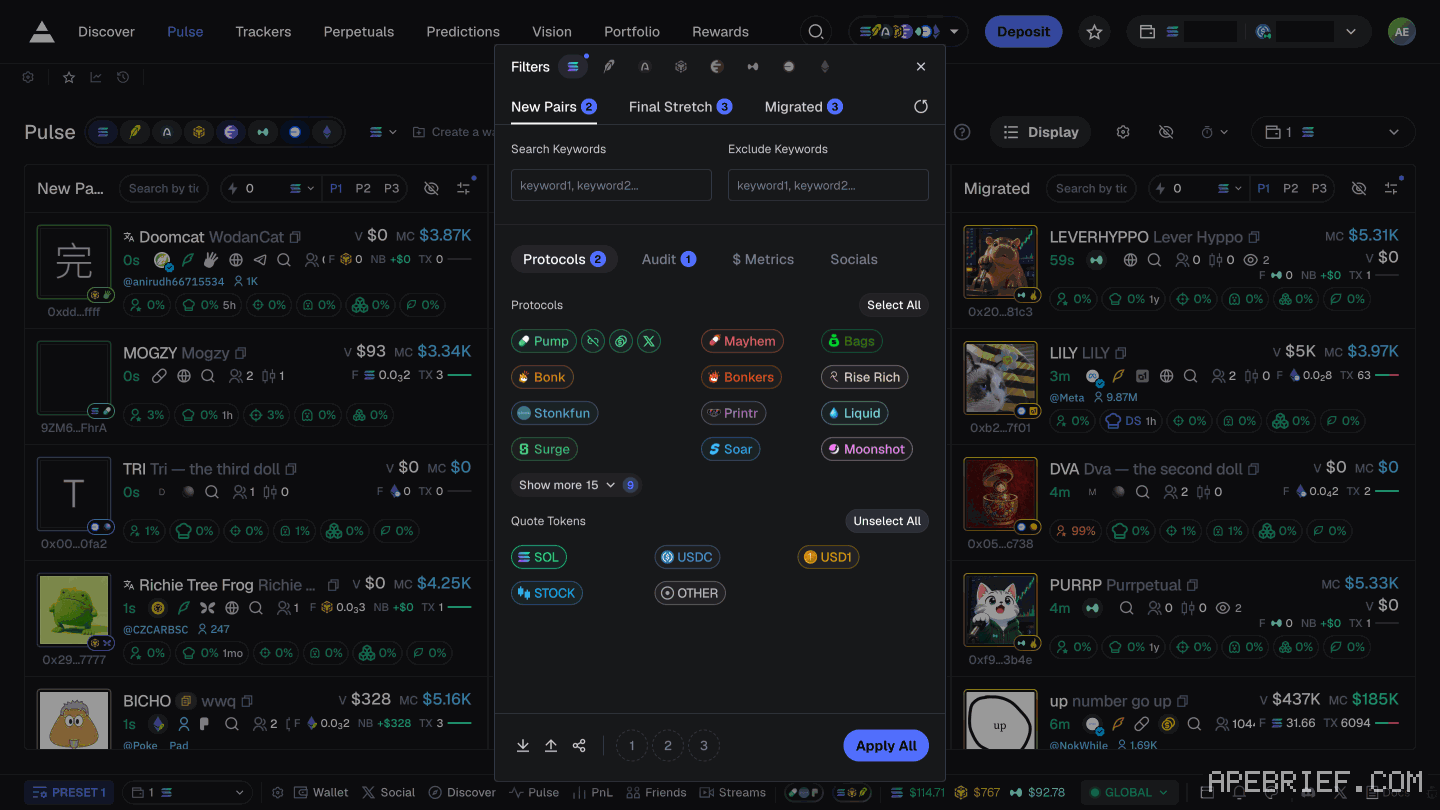
- In the column header, press the filters button. Its label gives the column name: "Open New Pairs filters", and the same goes for Final Stretch and Migrated.
- The panel's title is Filters, with a row of chain icons along the top. Filters are set per chain, so choose the chain first.
- Choose the column's tab: New Pairs, Final Stretch or Migrated.
- Fill in Search Keywords, Exclude Keywords or both. The placeholder "keyword1, keyword2..." shows a comma-separated list.
- Go through the sub-tabs:
- Protocols lists Pump, Mayhem, Bags, Bonk, Bonkers, Rise Rich, Stonkfun, Printr, Liquid, Surge, Soar and Moonshot, along with Select All. The rest are behind "Show more 15".
- Quote Tokens lists SOL, USDC, USD1, STOCK and OTHER, along with Unselect All.
- Socials contains Dex Paid, next to Twitter and Website. What that flag checks, and what it doesn't.
- Audit and $ Metrics: Axiom doesn't describe either.
- Press Apply All in the footer.
the drawer, annotated
These are the panel's own controls, one line each. Axiom gives no recommended values, and neither do we.
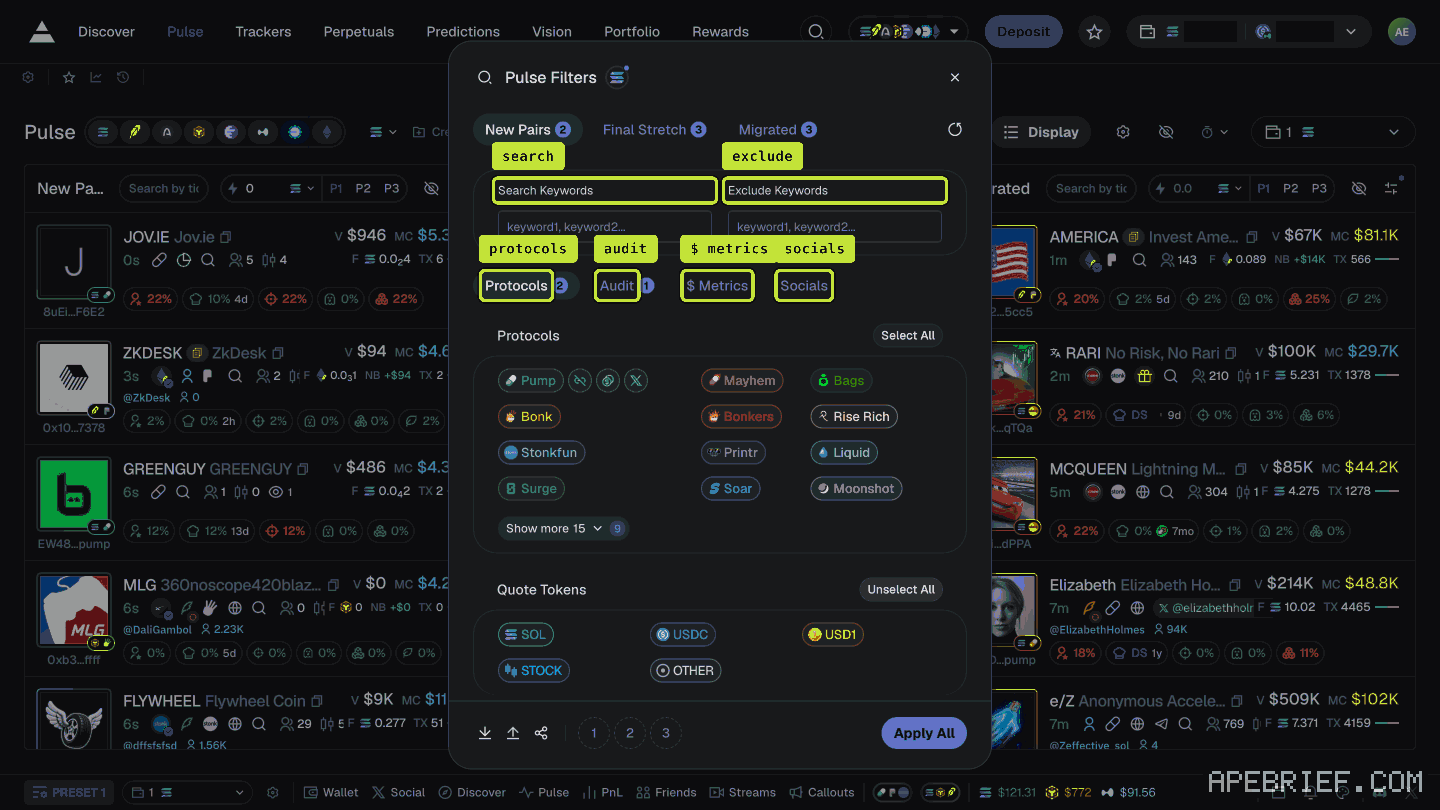
- Chain icons, across the top: which chain's filters you're editing. Each chain keeps its own.
- New Pairs, Final Stretch, Migrated: which column the settings are for. Each tab carries a count badge, unlabelled.
- Search Keywords: a comma-separated list, per its "keyword1, keyword2..." placeholder. Undocumented: whether it matches ticker, name or both.
- Exclude Keywords: the same box, for words to drop. Same gap.
- Protocols: a tick-list of protocols, Pump, Bonk, Moonshot and the rest behind "Show more 15", with Select All.
- Quote Tokens, on the same tab: SOL, USDC, USD1, STOCK and OTHER, with Unselect All.
- Audit: Axiom doesn't describe it.
- $ Metrics: not described either. The name matches Axiom's Liquidity ($), Volume ($) and Market Cap ($) filters; unverified.
- Socials: Twitter, Website and Dex Paid.
- Footer: import, export and share icons, presets 1 to 3, and Apply All. All undocumented; what apply all does covers the gap.
What the holder filters measure, and don't, is on how to read bundles, snipers, insiders and dev hold.
what apply all does
Axiom doesn't say. The panel opens from one column but holds all three columns' tabs, and the footer has one button, Apply All. Whether it applies every tab at once, or every chain, isn't stated, so look at each column after you apply. The footer's 1, 2 and 3 preset buttons and its import, export and share icons are undocumented too.
what the filters mean, per axiom
Axiom defines fourteen Pulse filters without saying which tab holds which. The ones about who holds the supply:
- Top 10 Holders %: "Lower values indicate more decentralization."
- Dev Holding %: "Helps assess potential risks from large dev-controlled holdings."
- Snipers %: "High sniper percentage may indicate bot activity."
- Insiders %: the portion "held by insiders (private sales, team members)".
- Bundle %: the portion "held in bundle wallets".
- Pro Traders: "Indicates traders using other platforms."
The rest are sizes and counts: Age (mins), Holders, Liquidity ($), Volume ($), Market Cap ($), Txns, Num Buys and Num Sells.
presets P1 to P3
Every column header includes its own P1, P2 and P3. This is what Axiom has written:
- On fees: "Presets are available to users to make it extremely accessible to adapt your fees to the market status quickly!" Its fee settings show Preset 1, 2 and 3, each with buy and sell values for slippage, priority and bribe, plus an MEV protection box.
- On screen, a first-visit tip on the Robinhood view: "New: a preset's Tax trigger makes its quick buys wait, then buy the moment the tax drops to your level."
Not documented: whether picking P2 in one column changes the other two.
quick buy
The amount field sits in each column's header: a lightning icon, a "0.0" placeholder, and a picker for the chain and currency. Axiom: "you can Quick Buy on these tables by simply clicking on the lightning bolt!"
No undo past this step: clicking the lightning bolt is the buy.
Which column a token lands in is on the columns page.
If you're new to Axiom, the link below is our referral link.
Signing up through this link takes 10% off your Axiom trading fees, which signing up without one does not. We get a commission from Axiom, which helps support our work, at no extra cost to you. We might add tools for people who used our code.
Tapping the button puts apebrief on your clipboard and opens Axiom. Where the signup shows a code field, paste it there.
People also ask
What is Pulse on Axiom?
Axiom's live feed of new tokens in three columns: New Pairs, Final Stretch and Migrated. Every chain you leave switched on feeds the same columns, so one column mixes SOL, ETH, BNB, HYPE and USDC quotes. It is the second item in the top nav, after Discover.
the full answerWhat do New Pairs, Final Stretch and Migrated mean on Axiom?
New Pairs: just created. Final Stretch: close to completing the launchpad's bonding curve. Migrated: liquidity moved to a DEX pool. The launchpad sets the rule; for pump.fun that pool is PumpSwap, not the Raydium Axiom's docs still name. Axiom gives no Final Stretch threshold.
the full answerWhat does Axiom actually charge?
Platform fee starts at 1% of the fill, plus priority you set, plus impact. A referral is a fee cut on the account if the field shows the code. Gas is separate.
I swapped on Axiom and the token is gone
Check the tx on a Solana explorer first. Destination address and mint are the ground truth. Then enable that mint in the wallet. Do not swap again to find it.
How we know: every number on this page
12 sources
- each Pulse column header carries a search box, a quick-buy amount field with a chain and currency picker, presets P1 P2 P3, a hide-all control and a filters button 0.0 · our screenshot Sep 2026: each column header has a 'Search by ticker or name' box; a quick-buy amount field (lightning icon, '0.0' placeholder) with a chain/currency picker; presets P1 P2 P3; 'Hide all <column> tokens'; 'Open <column> filters'2026-09-24
- the filters panel: titled Filters, chain icons across the top with filters set per chain, a tab per column, include and exclude keyword boxes, and four sub-tabs Filters · our screenshot Sep 2026: opened with 'Open New Pairs filters'; title 'Filters' with a row of chain icons across the top (the filters are per chain); tabs New Pairs, Final Stretch, Migrated, each with a count badge; 'Search Keywords' and 'Exclude Keywords' boxes with placeholder 'keyword1, keyword2...'; sub-tabs Protocols, Audit, $ Metrics, Socials2026-09-24
- the Protocols list and the Quote Tokens list as shown 15 · our screenshot Sep 2026: Protocols: Pump, Mayhem, Bags, Bonk, Bonkers, Rise Rich, Stonkfun, Printr, Liquid, Surge, Soar, Moonshot, 'Show more 15', 'Select All'. Quote Tokens: SOL, USDC, USD1, STOCK, OTHER, 'Unselect All'.2026-09-24
- the Socials sub-tab holds Dex Paid, beside Twitter and Website Dex · our capture, shot axiom-dex-paid-filter, 24 Sep 2026: the filters panel opened from New Pairs, Socials sub-tab clicked, 'Dex Paid' beside Twitter and Website2026-09-24
- the panel footer: import, export and share icons, preset buttons 1 2 3, and one button, Apply All Apply · our screenshot Sep 2026: footer with import, export and share icons, presets 1 2 3, and 'Apply All'2026-09-24
- Axiom's docs do not describe Apply All, the footer presets, import, export or share, the keyword boxes, the Protocols or Quote Tokens lists, or the Audit, $ Metrics and Socials tabs Pulse · source2026-09-27
- Axiom's Pulse docs list fourteen filters, with these definitions, and do not say which tab holds which 14 · source2026-09-24
- Axiom's current docs mention fee presets, and their settings figure shows three presets, each with buy and sell settings for slippage, priority and bribe, and an MEV protection box Presets · source2026-09-24
- a first-visit tip ties a preset's Tax trigger to its quick buys Tax · our screenshot, 24 Sep 2026 (session record, Robinhood view; not in a still): 'New: a preset's Tax trigger makes its quick buys wait, then buy the moment the tax drops to your level.'2026-09-24
- Axiom's Pulse docs say you quick-buy by clicking the lightning bolt, and link to a Quick Buy page on a domain that no longer resolves lightning · source2026-09-24
- the only attachment mechanism Axiom documents is signing up through a referral link signup · source2026-09-24
- Axiom gives users who sign up through a referral link a 10% discount on trading fees 10% · source2026-09-24
next
- What do New Pairs, Final Stretch and Migrated mean on Axiom?New Pairs is tokens just created, Final Stretch is tokens close to completing their launchpad's bonding curve, and Migrated is tokens whose liquidity has moved to a DEX pool.
- what dex paid means on axiomDex Paid is an Axiom filter for, in Axiom's words, tokens that have paid for DEX listings.
- What is Pulse on Axiom?Pulse is Axiom's live feed of new tokens in three columns, New Pairs, Final Stretch and Migrated, mixed from every chain you leave switched on.
- open a dexscreener pair in axiomCopy the token address from the DexScreener page, not the address in its URL: the URL carries the pair, and Axiom's search takes a ticker or a contract address.
- compareAxiom Pulse or Photon Memescope?Axiom Pulse if you trade launches on more than one chain: eight chains feed the same three columns, and every column carries its own filters and three presets.