 by cooked
kol wallets to track on axiom: the kols list, and how to use it
Axiom keeps a KOL wallet list for you: open Trackers, then the KOLs tab. Pick a period (2d, 24h, 7d, 30d or Max) and a source (All, Axiom, FOMO or Pump App), and each row shows a trader's name, X handle and wallet, with PnL 7d, Trades, Volume and Followers. Pick the few whose style fits yours, vet them, add them to your tracker with a clear label, and watch their buys as alerts. The list rotates, so treat it as a place to find names, not a list to copy.
open the kols list
- Open Trackers from the top nav.
- Click KOLs. If it isn't in the tab row, it's under More.
- Pick a period: 2d, 24h, 7d, 30d or Max.
- Pick a source: All, Axiom, FOMO or Pump App.
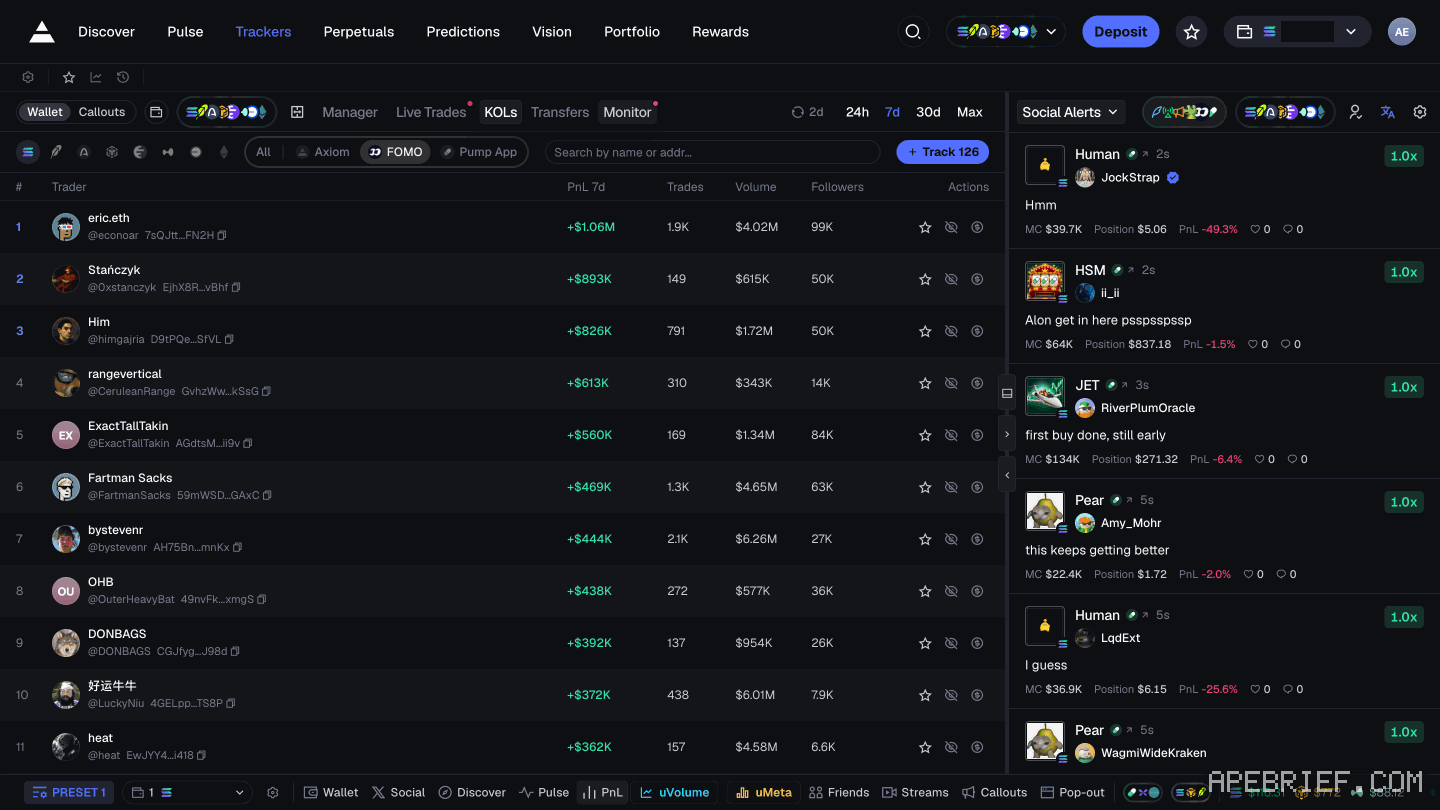
read a row
Each row is one trader: their name, X handle and a shortened wallet address. Then PnL 7d, Trades, Volume, Followers and Actions.
- Followers is reach, not skill. A big audience means a lot of people buy right after them.
- Trades and Volume show the style. Lots of trades on small volume is someone flipping fast. Few trades on big volume is someone sizing up and holding. Follow the ones who trade the way you can.
- One period is one snapshot. A good day or a good week can be luck. Check the same name under 7d, 30d and Max before you trust it.
- Wallet not resolved. Some rows show this instead of an address. There's no wallet to track there yet, so skip them.
pick a few, then vet them
The Track button at the top reads Track 126. You don't need 126 wallets: alerts from that many are noise you'll stop reading. Pick three to five traders whose style matches yours.
Then vet each one on coins it actually traded before you add it. how to vet a wallet
add them to your tracker
- In Trackers, open Manager and click Add Wallet.
- Pick an emoji, then fill in the name and the wallet's full address.
- Click Add Wallet.
Make the label do the work. Put the X handle and where you found it, like "kol" and the month. Give KOLs their own emoji, so they sort apart from wallets you found on runners yourself.
import a list you already have
Import and Export sit next to Add Wallet. If you tracked wallets on another platform like Bullx, Import brings the list across instead of adding them one by one. Export takes your list with you. the full tracker walkthrough
watch their buys
Tracked buys show up as live alerts on charts, and in Live Trades, which you can keep open while you're on Pulse.
One KOL buying is a note. Two or three from your list buying the same coin, or the same theme, is worth opening. Open it and check the coin yourself first: how to check a coin before you buy. Watching which themes your list moves into is also how you spot a meta forming: what a memecoin meta is.
Prune every couple of weeks. Sort Manager by Last Active, and turn on Show wallets that haven't traded in 30 days to find the quiet ones.
learn from them, don't copy them
A KOL's buy reaches your screen after it lands. They're in at a better price, they know people are watching, and they exit on their own plan, not yours.
The traders people track say so themselves. One of Cented's tips for beginners, in a TikTok clip, is "Don't copy trade." Orangie, on his channel Orangie Web3, says the same, and adds that you can't tell whose intentions are good. His advice is to learn from these traders by watching them.
So take the method: how soon after launch they get in, how long they hold, where they sell, and which themes they move into next. If one leads you to a trade, make it yours, with your size and your exit written down before you buy.
If you're new to Axiom, the link below is our referral link.
Signing up through this link takes 10% off your Axiom trading fees, which signing up without one does not. We get a commission from Axiom, which helps support our work, at no extra cost to you. We might add tools for people who used our code.
Tapping the button puts on your clipboard and opens Axiom. Where the signup shows a code field, paste it there.
People also ask
What is Pulse on Axiom?
Axiom's live feed of new tokens in three columns: New Pairs, Final Stretch and Migrated. Every chain you leave switched on feeds the same columns, so one column mixes SOL, ETH, BNB, HYPE and USDC quotes. It is the second item in the top nav, after Discover.
the full answerI swapped on Axiom and the token is gone
Check the tx on a Solana explorer first. Destination address and mint are the ground truth. Then enable that mint in the wallet. Do not swap again to find it.
the full answerHow we know: every number on this page
7 sources
- Trackers > KOLs: periods 2d, 24h, 7d, 30d, Max; sources All, Axiom, FOMO, Pump App; a Track 126 button; columns Trader (name, X handle, truncated wallet), PnL 7d, Trades, Volume, Followers, Actions; some rows read Wallet not resolved; My List and Social Alerts on the right; the tab can sit under More 126 · our screenshot, 8 Oct 2026: 'Trackers > KOLs (https://axiom.trade/trackers, More > KOLs)' 'Periods: 2d, 24h, 7d, 30d, Max. Sources: All, Axiom, FOMO, Pump App. Button \"Track 126\".' 'Columns: Trader (name, X handle, truncated wallet), PnL 7d, Trades, Volume, Followers, Actions. Some rows: \"Wallet not resolved\".' 'Right side: My List; Social Alerts / Socials.'2026-10-08
- Trackers is in the top nav; it has tabs Manager, Live Trades, Transfers, Monitor and KOLs (marked NEW); buttons Import, Export and Add Wallet; sort by Created, Name, Balance and Last Active; Remove All; a toggle to show wallets that haven't traded in 30 days 30 · our screenshot, 7 Oct 2026, https://axiom.trade/trackers: 'Top nav: Discover, Pulse, Trackers, Perpetuals, Predictions,' 'Wallet tracker tabs: Manager, Live Trades, Transfers, Monitor, KOLs (NEW). Buttons: Import, Export, Add Wallet; sort Created / Name / Balance / Last Active; Remove All; \"Show wallets that haven't traded in 30 days\";'2026-10-07
- to add a wallet you fill in an emoji, a name and the wallet address, then click Add Wallet; added wallets give live alerts on charts while influencers and smart money wallets buy; wallets can be imported from platforms like Bullx Add · source2026-10-07
- you can watch tracked wallets' buys in real time while on Pulse, in the Live Trades tab Live · source2026-09-24
- Cented's tips for beginners: don't copy trade; start by paper trading; take the time to figure out what narratives are good Don't · source2026-10-07
- Orangie: don't copy trade people; streamers know they have viewers, so you never know who has good intentions; learn from them by watching don't · source2026-10-07
- Axiom gives users who sign up through a referral link a 10% discount on trading fees 10% · source2026-09-24
next
- How do I find good wallets to track on Axiom?Good wallets show up on coins that already ran. Open a runner's Top Traders and Early Buyers tabs and note the wallets that turn up on more than one.
- how to track a wallet on axiomOpen the Wallet Tracker in the bottom left corner, click Add Wallet, fill in an emoji, a name and the wallet's address, then click Add Wallet again.
- How do I check if a memecoin is a rug on Axiom?Before you buy, read the token page in one order: the Token Info panel's holder rows (Top 10 H., Dev H., Snipers H., Insiders, Bundlers), then the contract rows, then the dev (the DA line and the Dev Tokens tab), then who got in first (Early Buyers and Top Traders).
- axiom mev protection: off, reduced, secureAxiom has three MEV modes, Off, Reduced and Secure, and Secure is the one it recommends, at the cost of waiting for a whitelisted validator.
- compareIs GMGN better than Axiom?Both start at 1% a trade.