 by cooked
how to find good wallets to track on axiom
Good wallets show up on coins that already ran. Open a runner's Top Traders and Early Buyers tabs and note the wallets that turn up on more than one. Then check them on those coins' Trader Scan: how long they held, their realized PnL, and whether they sold into the people buying after them. Add the ones that hold up in Trackers with a name that says why, and drop any that go quiet for 30 days. Use them to learn how good traders read a coin, not as buy signals.
where good wallets show up
On coins that already ran. Pick three or four coins that made a real move this week. Discover's Top and Trending tabs are a quick place to find them. On each token page, open Top Traders and Early Buyers in the tabs along the bottom. Copy the wallets into a note. A wallet that turns up on several runners is worth a closer look. One that turns up once is a lucky hit until it shows you otherwise.
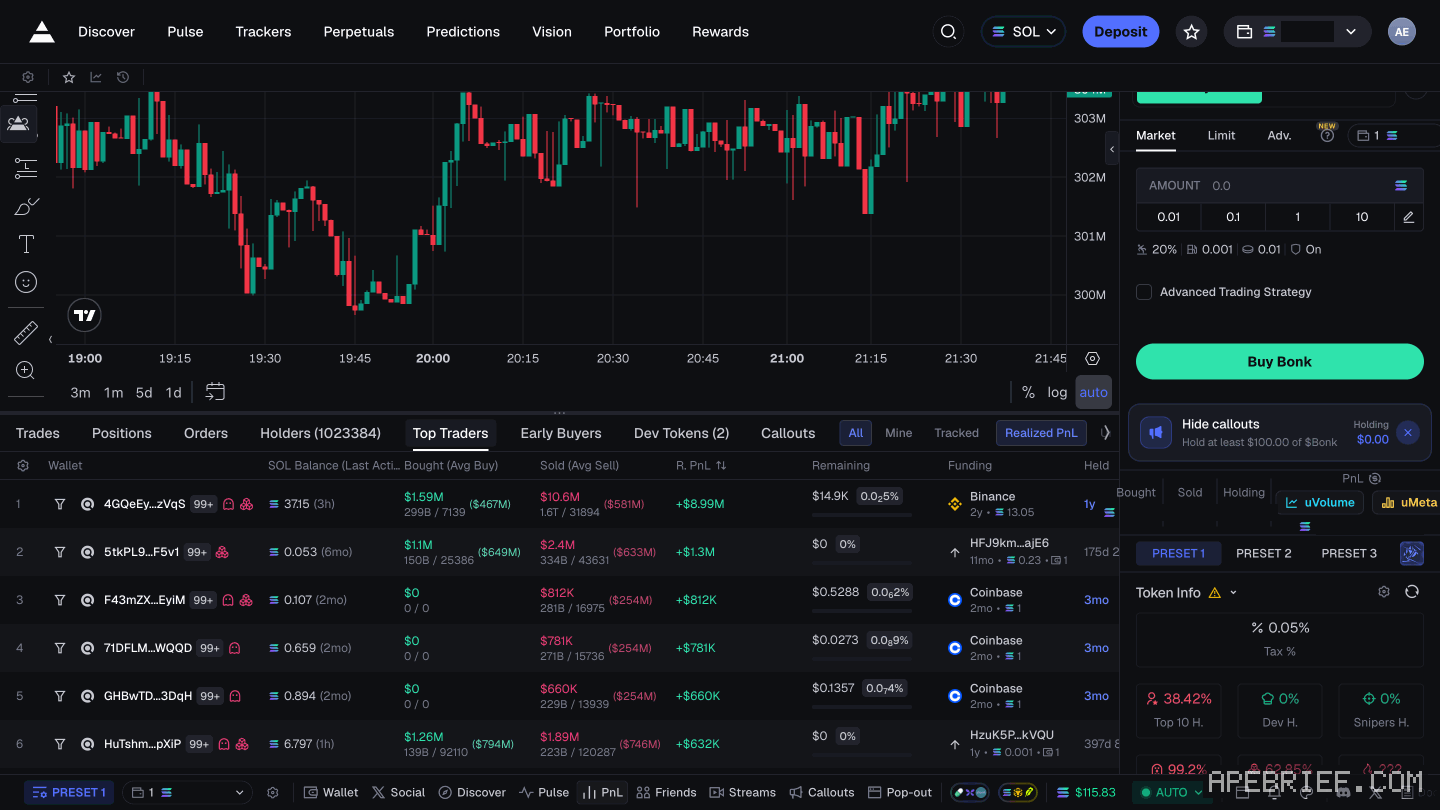
In Trader Scan. It sits in the token's orderbook view and lists every wallet trading that coin: what it bought and sold, its current balance, its realized PnL and how long it's held. It shows you at a glance whether a wallet is accumulating, offloading or flipping.
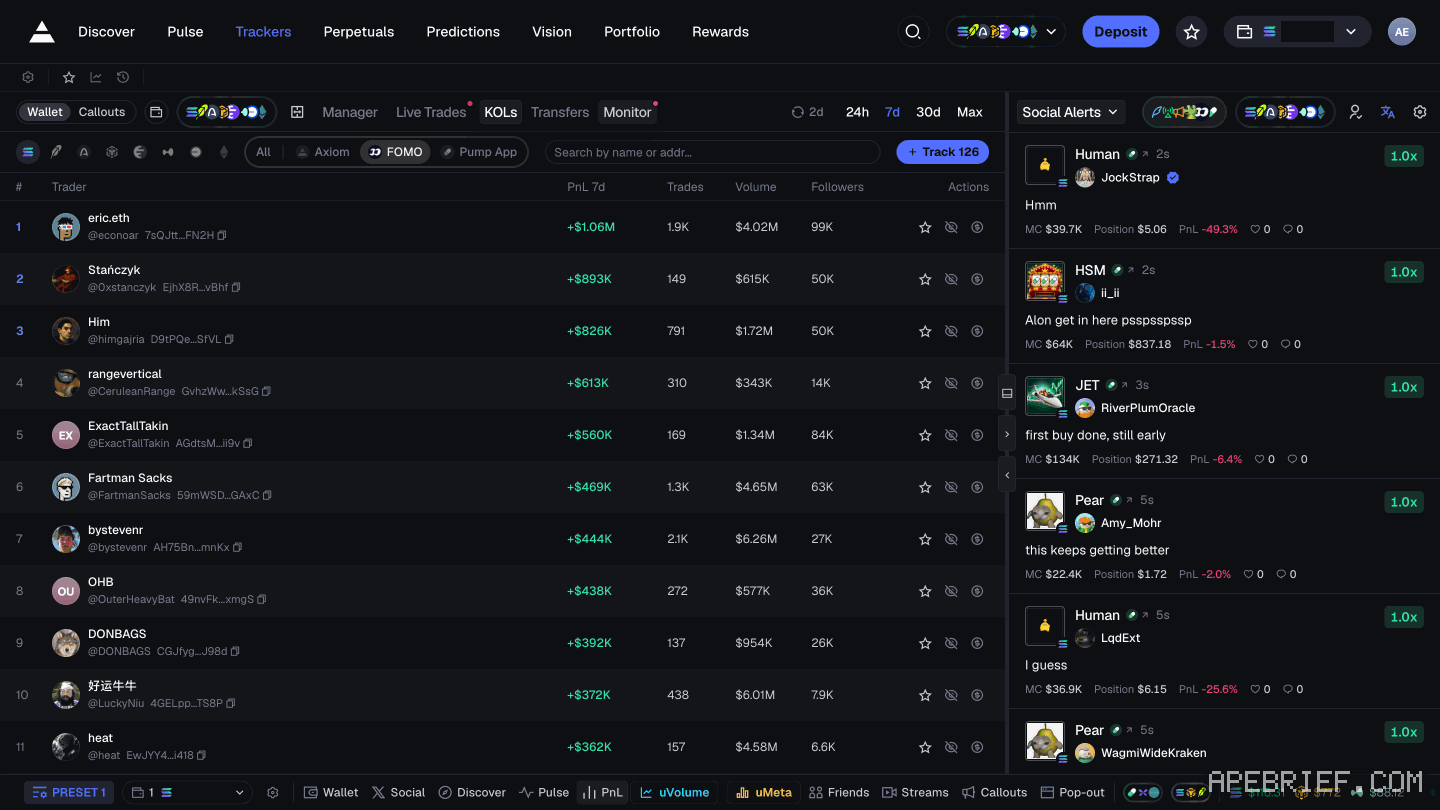
In Social Alerts. On the Trackers page, Social Alerts runs callout cards from X accounts: the caller, their win rate, the market cap they called at, their size and PnL, and whether they're still holding. Discover has a Callouts tab too, and so does each token page. A caller is a wallet with an audience. Their win rate across many calls tells you more than one big call.
In the KOLs tab. Trackers has a KOLs tab, marked new, beside Manager, Live Trades, Transfers and Monitor. Anything you find there is a name to vet, the same as a wallet off a runner.
vet a wallet before you add it
Check it on the coins you found it on, then on a few more.
- Consistency. Does it get in early on more than one runner? Several repeatable entries say more than one huge hit. Realized PnL on one coin is one coin.
- Hold time. Trader Scan shows how long it held. A wallet that's in and out in seconds is playing a game you can't follow by hand. Look for holds you could actually match.
- Does it sell into its followers? Watch for a wallet that buys, gets noticed, then offloads as the buyers pile in behind it. On Trader Scan, that's a wallet selling just as volume arrives. For callers, the card shows whether they still hold after the call. Orangie makes the same point about streamers on his channel, Orangie Web3: many know they have viewers, and you can't tell whose intentions are good.
- Does it fit how you trade? A wallet that only buys brand-new launches teaches you little if you trade coins that already migrated.
add it, import it, label it
- Open Trackers from the top nav.
- On Manager, click Add Wallet.
- Pick an emoji, then fill in the name and the wallet's address.
- Click Add Wallet.
Make the name do the work. Put where you found it and when, like the coin it caught early and the month. Use one emoji per kind: early buyers, callers, wallets you're still testing. When you prune later, you'll know why each one is there.
Coming from another tracker? Import brings your list across, from platforms like Bullx. Export saves yours. The full walkthrough: how to track a wallet on axiom.
watch them
Tracked buys show as live alerts on charts and in Live Trades, which you can keep open while you're on Pulse. One wallet buying is a note. Several on your list buying the same coin, or the same theme, is worth opening. Watching where your list moves is also how you see a meta forming: what a memecoin meta is.
An alert is a reason to look, not to buy. Open the coin and check it yourself first: how to check a coin before you buy.
when to drop one
Prune every couple of weeks. Sort Manager by Last Active. Turn on Show wallets that haven't traded in 30 days to see the quiet ones. A wallet that's been silent for a month isn't teaching you anything, so remove it.
Drop the ones that changed, too: holds that shrank to seconds, or a wallet you caught selling into its followers. A short list you read beats a long one you scroll past.
learn from wallets, don't follow them
The tracker shows you a wallet's trades. Placing your own is still on you. And copying them is the habit the traders people track warn against most.
Orangie says it plainly in his beginners course: don't copy trade people. In his video with Brez Scales his line is "never copy anyone blindly." When someone you follow buys, look into the coin yourself, decide if you want the trade, and ask: "are you okay being in that trade when that trader decides to no longer be in?" One of Cented's tips for beginners, in a TikTok clip, is the same: "Don't copy trade." He says paper trade first and learn which narratives are good.
By the time a buy reaches your screen, they're already in at a better price. They size and exit on their plan, not yours. You see the buy; you may not see the sell in time.
So take the method, not the trade. From each wallet, learn how soon after launch it gets in, how long it holds, where it sells, and which themes it moves into next. Over a few weeks that tells you more than any single alert.
If a wallet does lead you to a trade, make it yours: your size, your exit, written down before you buy. Orangie's advice in the Brez video is to set the amount you're comfortable losing first.
If you're new to Axiom, the link below is our referral link.
Signing up through this link takes 10% off your Axiom trading fees, which signing up without one does not. We get a commission from Axiom, which helps support our work, at no extra cost to you. We might add tools for people who used our code.
Tapping the button puts on your clipboard and opens Axiom. Where the signup shows a code field, paste it there.
People also ask
What is Pulse on Axiom?
Axiom's live feed of new tokens in three columns: New Pairs, Final Stretch and Migrated. Every chain you leave switched on feeds the same columns, so one column mixes SOL, ETH, BNB, HYPE and USDC quotes. It is the second item in the top nav, after Discover.
the full answerI swapped on Axiom and the token is gone
Check the tx on a Solana explorer first. Destination address and mint are the ground truth. Then enable that mint in the wallet. Do not swap again to find it.
the full answerHow we know: every number on this page
11 sources
- an Axiom token page has bottom tabs Trades, Positions, Orders, Holders, Top Traders, Early Buyers, Dev Tokens, Callouts and Show Hidden Early · our screenshot, 7 Oct 2026, Axiom token page (read on Bonk's page, nothing bought): 'Bottom tabs: Trades, Positions, Orders, Holders (count), Top Traders, Early Buyers, Dev Tokens (count), Callouts, Show Hidden.'2026-10-07
- Discover is first in the top nav, with tabs Top, Trending, DEX, Surge, Live, Radar, Callouts and Streamers; Callouts shows X accounts' calls with ticker, called-at market cap, win rate, X verified, pinned and sold Callouts · our screenshot, 7 Oct 2026, https://axiom.trade/discover: 'Top nav: Discover, Pulse, Trackers, Perpetuals, Predictions, Vision, Portfolio, Rewards.' 'Tabs: Top, Trending, DEX, Surge, Live, Radar (NEW), Callouts, Streamers (NEW).' 'Callouts: posts by X accounts with the coin's ticker, \"Called @\" market cap, the caller's \"WR\" (win rate), \"X verified\" / \"NOT X VERIFIED\", \"PINNED\", \"Sold\".'2026-10-07
- Trader Scan, in the orderbook interface, shows per wallet what it bought and sold, its current balance, realized PnL and how long it has held; it shows whether a wallet is accumulating, offloading or flipping Trader · source2026-10-07
- Trackers has tabs Manager, Live Trades, Transfers, Monitor and KOLs (marked NEW); buttons Import, Export and Add Wallet; sort by Created, Name, Balance and Last Active; Remove All; a toggle to show wallets that haven't traded in 30 days 30 · our screenshot, 7 Oct 2026, https://axiom.trade/trackers: 'Wallet tracker tabs: Manager, Live Trades, Transfers, Monitor, KOLs (NEW). Buttons: Import, Export, Add Wallet; sort Created / Name / Balance / Last Active; Remove All; \"Show wallets that haven't traded in 30 days\"; \"Sync wallets from your other EVM chains\".'2026-10-07
- Social Alerts on Trackers shows callout cards with the caller, win rate (WR), called-at market cap, size and PnL, and whether the caller is still holding Still · our screenshot, 7 Oct 2026, Trackers: 'Right side: Social Alerts / Socials with source toggles (...), Following (0); callout cards show caller, win rate (WR), called-at market cap, size, PnL.' Card text read on the KOLs tab view: 'Called @' '$37.5K' 'Still holding' '100%' 'PnL'.2026-10-07
- to add a wallet you fill in an emoji, a name and the wallet address, then click Add Wallet; added wallets give live alerts on charts while influencers and smart money wallets buy; wallets can be imported from platforms like Bullx Add · source2026-10-07
- you can watch tracked wallets' buys in real time while on Pulse, in the Live Trades tab Live · source2026-09-24
- Orangie: don't copy trade people; streamers know they have viewers, so you never know who has good intentions; learn from them by watching don't · source2026-10-07
- Orangie, video with Brez Scales: never copy anyone blindly; research any trade by someone you follow and ask if you're okay in it once they're out; set the amount you're comfortable losing first never · source2026-10-07
- Cented's tips for beginners: don't copy trade; start by paper trading; take the time to figure out what narratives are good Don't · source2026-10-07
- Axiom gives users who sign up through a referral link a 10% discount on trading fees 10% · source2026-09-24
next
- how to track a wallet on axiomOpen the Wallet Tracker in the bottom left corner, click Add Wallet, fill in an emoji, a name and the wallet's address, then click Add Wallet again.
- How do I check if a memecoin is a rug on Axiom?Before you buy, read the token page in one order: the Token Info panel's holder rows (Top 10 H., Dev H., Snipers H., Insiders, Bundlers), then the contract rows, then the dev (the DA line and the Dev Tokens tab), then who got in first (Early Buyers and Top Traders).
- What is a meta in memecoins?A meta is whatever the memecoin market is paying attention to right now: a theme, a kind of coin, a new launchpad.
- How do I switch chains on Axiom?The chain button sits in Axiom's header, left of Deposit.
- compareIs GMGN better than Axiom?Both start at 1% a trade.