 by cooked
switching between photon and axiom: what carries over
Only the money and the wallet keys move by a documented route: withdraw SOL from Photon to a wallet you hold and deposit it on Axiom, or move the wallet's key into Phantom. Filters and presets you rebuild by hand, because neither Photon nor Axiom describes exporting or importing them. Axiom's wallet tracker has a documented import, and Photon documents no tracker to export from.
| carries over? | how | |
|---|---|---|
| SOL | yes | Photon's Withdraw to a wallet you hold, then Axiom's deposit address |
| the wallet | the key does | Photon's key into Phantom; Axiom's recovery phrase into a standard wallet |
| memescope filters | no documented route | retype them in Pulse Filters |
| S1 to S3 presets | no documented route | retype them as P1 to P3 |
| tracked wallets | no documented route out of Photon | add each address in Axiom's tracker |
Before you exit Photon, screenshot its filter panel and settings. That screenshot is the only export you can be certain of.
filters, name by name
Both list their filters, and most names line up:
| Photon memescope | Axiom Pulse |
|---|---|
| Top 10 holders | Top 10 Holders % |
| Dev holding % | Dev Holding % |
| Holders count | Holders |
| Current liquidity | Liquidity ($) |
| Volume | Volume ($) |
| Market cap | Market Cap ($) |
| Transactions + Buys + Sells | Txns, Num Buys, Num Sells |
| Tokens with at least 1 social | Socials tab: Twitter, Website, and Dex Paid |
| progress to 100% bonding | no filter listed; the Final Stretch column is tokens "close to completing their bonding curve" |
| not in Photon's list | Age (mins), Snipers %, Insiders %, Bundle %, Pro Traders |
Photon's screen may list more. Same name doesn't promise same math: Photon doesn't define its filters. On Axiom, filters are set per chain, so pick the chain before you type. Every Pulse filter tab.
import, export and share in axiom's filters
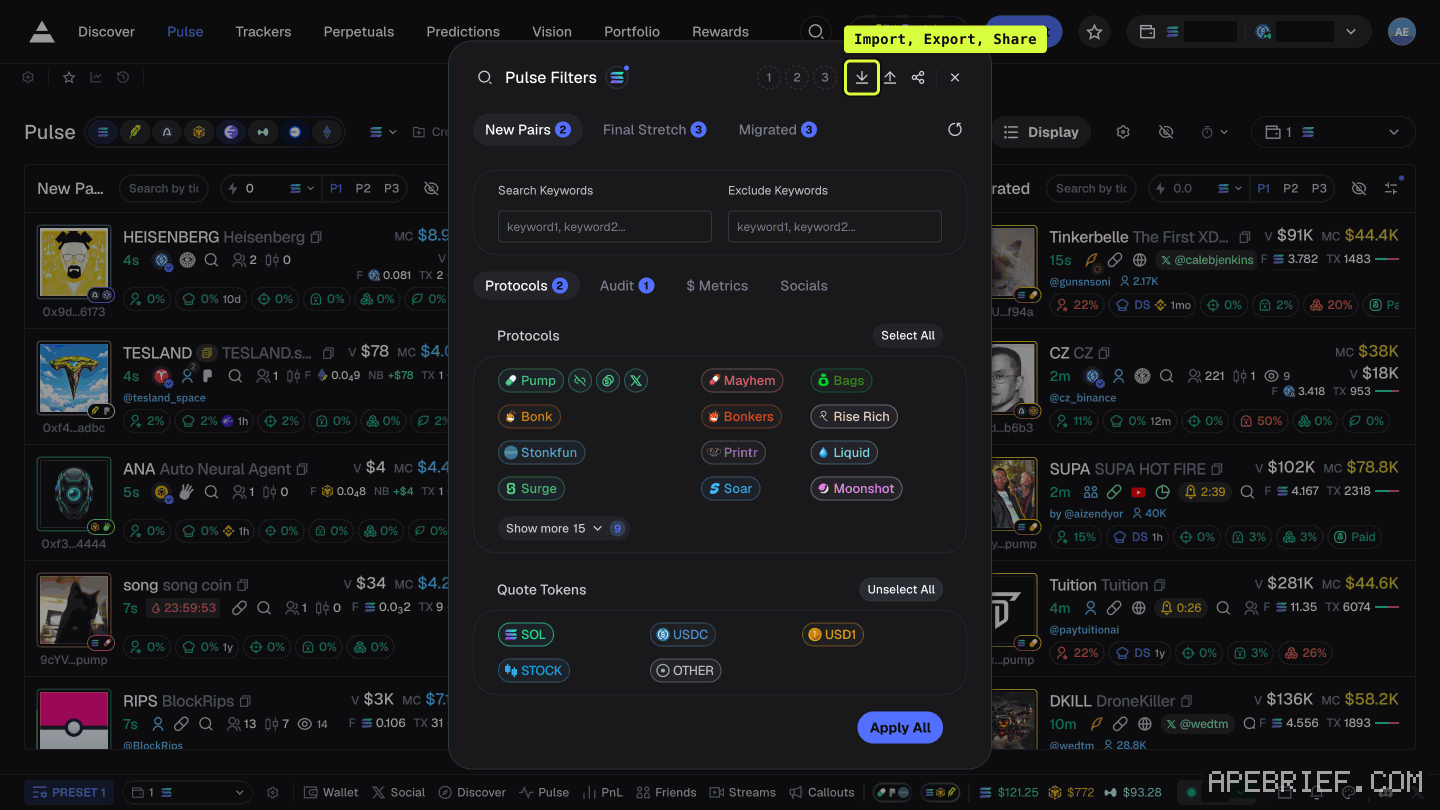
The Pulse Filters header, top right, holds three icon buttons labelled Import (the down arrow), Export (the up arrow) and Share, then preset slots 1, 2 and 3. The footer holds Apply All.
Axiom doesn't describe them, so what Import accepts is unknown. Nothing documents a Photon export for it to read. And a filter file offered by a stranger is its own problem: someone DMed you their filters.
presets
- Photon: up to three, S1/S2/S3, each setting smart-MEV protection, priority, bribe and slippage. It adds per-preset Auto-Buy and Auto-Sell triggers on market-cap change.
- Axiom: P1 to P3 on each Pulse column. Its settings panel has Preset 1 to 3, each with buy and sell slippage, priority and bribe, plus an MEV protection box.
Copy the numbers across by hand. Axiom describes nothing like Photon's per-preset market-cap triggers.
money and wallets
Moving SOL is the plain route. On Photon, Withdraw takes an amount and an address; withdrawing from photon has the minimum to leave behind. Send it to a wallet you hold, then to the wallet Axiom shows under deposit.
Moving the wallet itself means moving its key:
- Photon shows the trading wallet's private key once, at generation. Photon walks you through importing that key into Phantom.
- Axiom shows a recovery phrase at signup, keeps it in settings, and recommends importing it into Phantom, Rabby or Solflare.
- Axiom's Wallets tab has an import button. Axiom doesn't say what it accepts.
A key is the wallet. Import it only into an app you installed yourself, never into a page someone sent you.
tracked wallets
Axiom: "If you were previously on platforms like Bullx, you can directly import wallets in our custom wallet tracker using the import feature!" No file format given. Photon documents no wallet tracker, so there's nothing documented to export. Re-add them one by one: name, emoji, address. The tracker page.
the referral
If you're switching in, sign up through the link below. It's our referral link.
Signing up through this link takes 10% off your Axiom trading fees, which signing up without one does not. We get a commission from Axiom, which helps support our work, at no extra cost to you. We might add tools for people who used our code.
Tapping the button puts apebrief on your clipboard and opens Axiom. Where the signup shows a code field, paste it there.
People also ask
Axiom Pulse or Photon Memescope?
Same three stages of a launch on both. Axiom Pulse runs eight chains through one set of columns, with per-chain filters and P1 to P3 presets. Photon Memescope is Solana only, with its S1 preset. Solana only and already on Photon? Stay put.
the full answerHow do I use Pulse filters on Axiom?
Click the filters button in a column's header. The panel has a tab per column, chain icons across the top, include and exclude keywords, and Protocols, Audit, $ Metrics and Socials tabs. Axiom's docs don't say what Apply All covers, so check each column after.
the full answerHow do I withdraw on Photon?
Use the Withdraw tab: it sends SOL from your Photon trading wallet to a wallet you choose. Leave 0.0025 SOL plus the priority fee behind or the withdrawal fails.
Where is deposit on Axiom?
Click the labelled Deposit button in the top bar, not an arrow. It opens a panel titled Exchange, and its Deposit tab shows the address of the wallet Axiom generated for your account. Send SOL there, on Solana. Your old wallet's balance is not your Axiom balance.
How we know: every number on this page
17 sources
- neither terminal's docs describe exporting or importing filters or presets undocumented · source2026-09-26
- Pulse Filters' header carries three icon buttons labelled Import, Export and Share, then Preset 1, 2 and 3; the footer holds only Apply All Apply · our screenshot Sep 2026: panel titled 'Pulse Filters'; in the header, top right, three icon buttons labelled 'Import' (down arrow), 'Export' (up arrow) and 'Share', then 'Preset 1', 'Preset 2', 'Preset 3'; the footer holds only 'Apply All'. None was clicked.2026-09-27
- Photon's memescope filter list, per its docs 100% · source2026-09-26
- Axiom's Pulse filter list, per its docs, and its Final Stretch column Pro · source2026-09-26
- the Socials tab of Axiom's filter panel holds Twitter, Website and Dex Paid Dex · our capture, shot axiom-dex-paid-filter, 24 Sep 2026: the filters panel opened from New Pairs, Socials sub-tab clicked, 'Dex Paid' beside Twitter and Website2026-09-24
- Photon's presets: S1 to S3, each setting smart-MEV protection, priority, bribe and slippage, with Auto-Buy and Auto-Sell market-cap triggers per preset S1/S2/S3 · source2026-09-26
- Axiom's presets: three, each with buy and sell slippage, priority and bribe and an MEV protection box, per the settings figure in its fee docs Presets · source2026-09-26
- Photon withdraws SOL to an address you enter Withdraw · source2026-09-26
- Axiom is funded by sending SOL to the wallet it shows Deposit · source2026-09-26
- Photon shows the trading wallet's private key once, and its docs walk importing that key into Phantom Import · source2026-09-26
- Photon reveals the trading wallet's private key only once ONLY · source2026-09-26
- Axiom shows a recovery phrase at signup, keeps it in settings, and recommends importing it into a standard wallet recovery · source2026-09-26
- Axiom's Wallets tab has an import button; its docs do not say what it accepts import · our capture, shot axiom-withdraw, 22 Sep 2026: Portfolio, Wallets tab: Claim Rent, an import and an add-wallet button. Axiom's Multi-wallet docs, read 26 Sep 2026, describe switching and labels and no import. The button was not clicked.2026-09-22
- Axiom's wallet tracker imports wallets, naming Bullx as a source, and adds them one at a time by address import · source2026-09-26
- Photon's docs index has no wallet-tracker page Photon · source2026-09-26
- the only attachment mechanism Axiom documents is signing up through a referral link signup · source2026-09-26
- Axiom gives users who sign up through a referral link a 10% discount on trading fees 10% · source2026-09-24
next
- How do I withdraw on Photon?Photon's Withdraw tab sends SOL from a Photon trading wallet to a wallet you choose, and Photon says to leave 0.0025 SOL plus the priority fee in the trading wallet for the withdrawal to succeed.
- Where is deposit on Axiom?Deposit is a labelled button in Axiom's top bar, not an arrow, and it opens a panel titled Exchange whose Deposit tab shows the address of the wallet Axiom generated for your account.
- How do I use Pulse filters on Axiom?Every Pulse column has its own controls in its header: a search box, a quick-buy amount, presets P1 to P3, and a filters button.
- Why did Photon eat the fill?Photon takes 1% of the initial token used on every buy and every sell, collected in SOL.