 by cooked
best photon memescope filters: where to start and how to keep them working
There's no permanent best filter setup on Photon's Memescope. Launchpads rotate and metas change, so filters that suit this month can hide the coins that matter next month. Start small: on NEW, a low floor on bonding progress and holders and no coins with obvious snipers; an age limit on GRADUATING; GRADUATED left open. Then change one thing a week and look at what got through and what got hidden.
the three columns
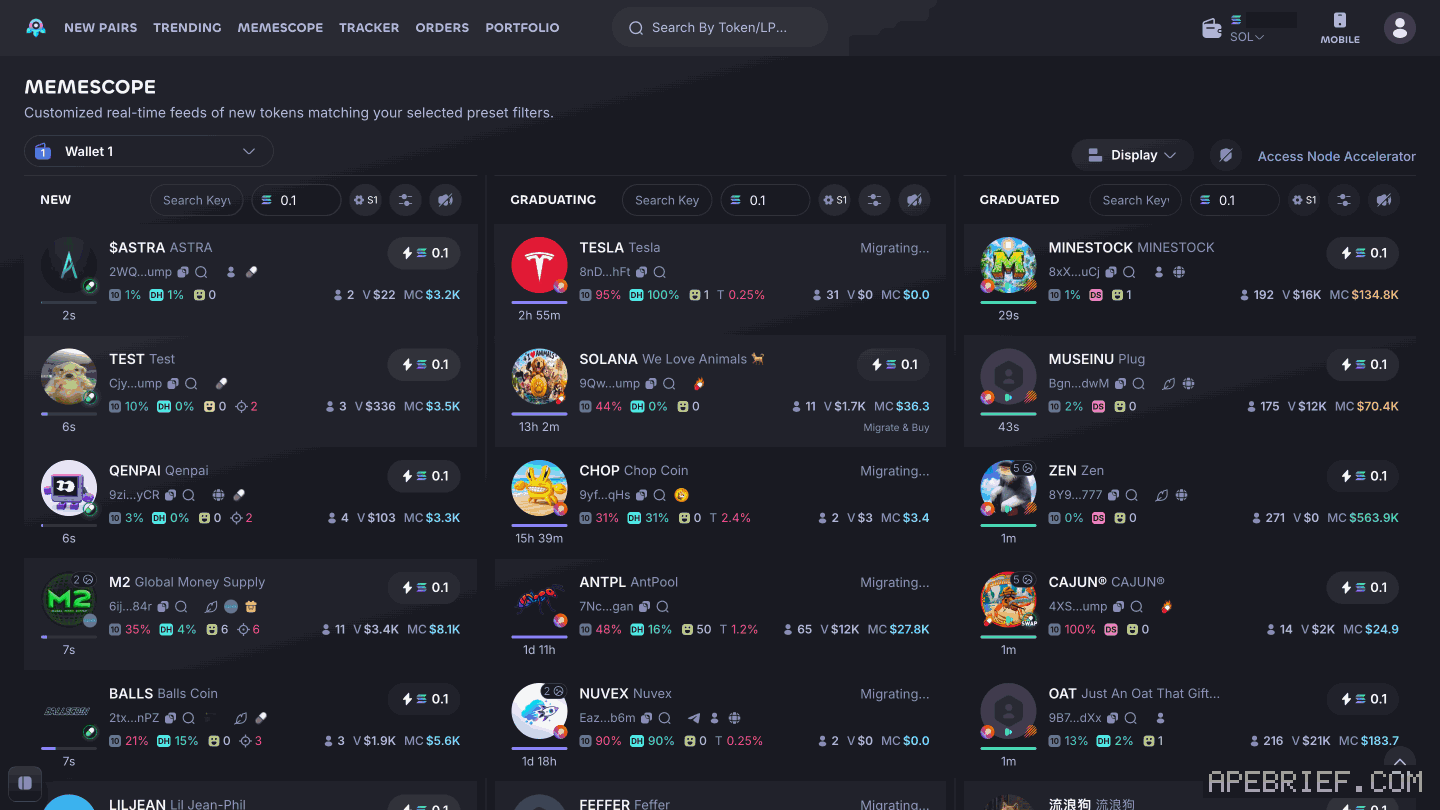
Memescope splits new coins into three live feeds:
- NEW: coins seconds old, still on their bonding curve.
- GRADUATING: coins nearing the end of the curve. A card here can show "Migrating..." or "Migrate & Buy".
- GRADUATED: coins that finished the curve and migrated.
Each column's header has its own quick-buy amount, like 0.1 SOL, a preset (S1), a filters button with a sliders icon, and a pause button. Filters are set per column, so each feed can screen differently.
a starting setup, column by column
| NEW | GRADUATING | GRADUATED | |
|---|---|---|---|
| Dexes | the launchpads you trade | the same | the same |
| Bonding progress | a low minimum | ||
| Holders count | a low minimum | ||
| Snipers | skip obvious ones | ||
| Age | a limit, so stale coins clear | ||
| Socials | optional: Min 1 social | optional |
Why it's set that way:
- NEW gets a small activity floor. A low minimum on bonding progress and holders drops coins nobody has touched, without hiding ones that have started to trade.
- Snipers out. The Audit tab has Snipers and Snipers Holder (%) ranges; keep them low. Frank's reason is below.
- GRADUATING gets an age limit. Coins can sit in that column for hours, some for more than a day. An age limit keeps it to coins that are moving now.
- GRADUATED stays open at first. You see everything that finishes the curve, and tighten only once you know what you're screening out.
Keep the numbers small to start. A floor you set too high hides the coins you came for.
frankdegods' memescope settings, december 2024
Frank (frankdegods) showed his Memescope settings in a clip from 2 Dec 2024. It's an older setup and the screen has changed since, but the idea still holds.
- 5% pump progress and holder count 5. Both small floors: enough to drop coins nobody has touched, low enough to catch coins early.
- Snipers filtered out. His reason: "minus EV to buy coins that have obvious snipers." Some still run, he said, but you're playing with fire.
- Age on the about-to-graduate column, the middle one, GRADUATING on today's screen. He added it to stop seeing a pile of coins he didn't want there. He didn't give a number.
Take the idea, not the numbers: a small activity floor, no obvious snipers, and a clean graduating feed.
setting filters on photon
- Open Memescope from the top bar.
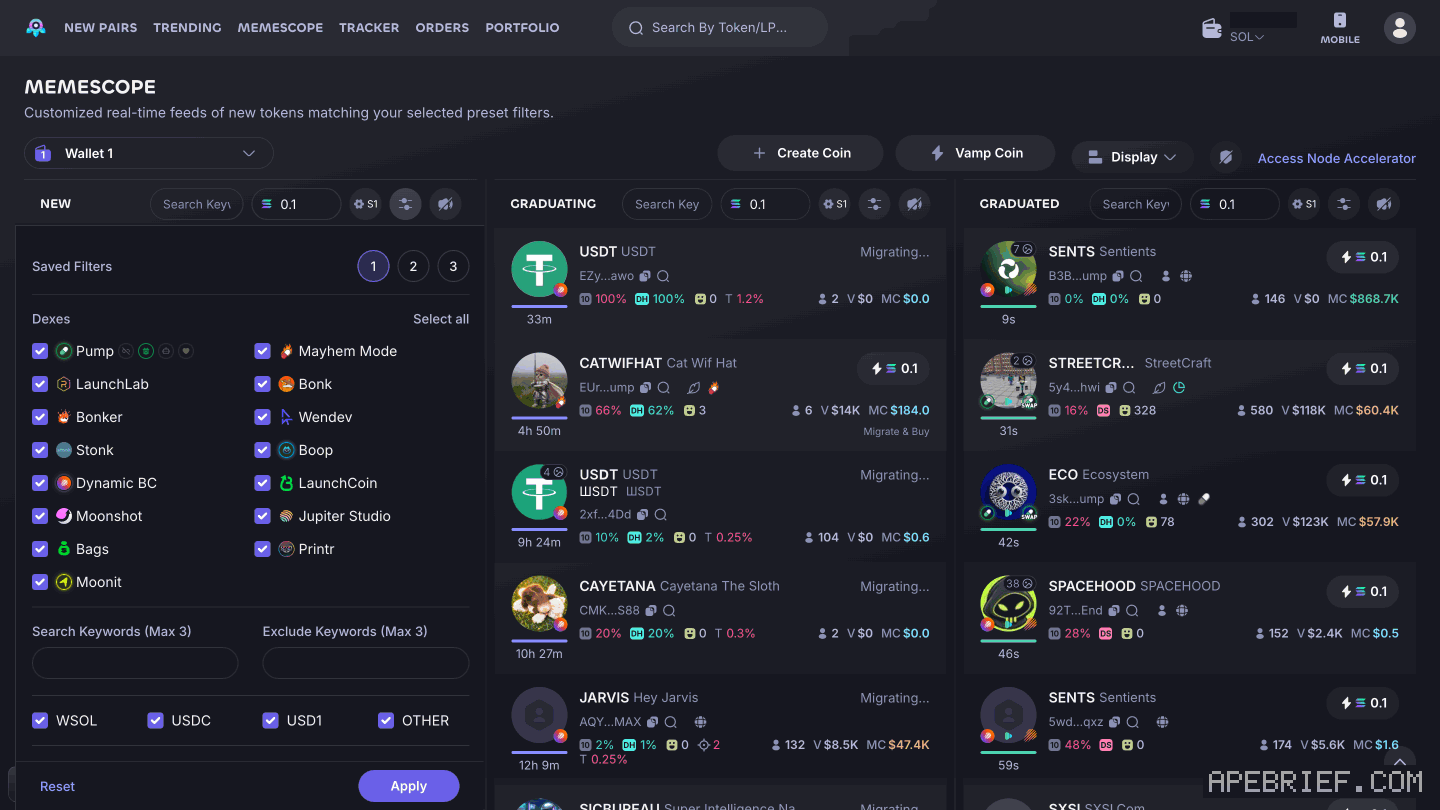
- Click the filters button (the sliders icon) in the header of the column you want to set.
- At the top, Saved Filters has three slots: 1, 2 and 3. Pick one.
- Under Dexes, use Select all or tick the launchpads you trade: Pump, Mayhem Mode, LaunchLab, Bonk, Bonker, Wendev, Stonk, Boop, Dynamic BC, LaunchCoin, Moonshot, Jupiter Studio, Bags, Printr and Moonit.
- Add words to Search Keywords or Exclude Keywords if you want them. Each takes up to three.
- Pick quote tokens: WSOL, USDC, USD1 or OTHER.
- Tick socials if you want them: Twitter, Website, Telegram, Youtube, Tiktok, Instagram, Min 1 social, Dex Paid and Pump Livestream.
- Open the General and Audit tabs and set values. General opens with Market Cap. Audit holds ranges for Bonding Curve (%), Top 10 Hold (%), Age (mins), Dev Hold (%), Dev Created, Dev Migrated, Snipers, Snipers Holder (%), Insiders and Insider Holder (%).
- Click Apply. Reset is there to start over.
- Do the same on the other two columns.
what you can filter on
Photon lists these filters for Memescope:
- Top 10 holders
- At least 1 social
- Progress to 100% bonding, before the coin graduates
- Holders count
- Dev holding %
- Current liquidity
- Volume
- Market cap
- Transactions, buys and sells
Frank's "pump progress" is the bonding progress filter. Dex Paid and Pump Livestream sit with the socials as tick boxes.
hover to pause and quick buy
The feed moves fast. Hover over a card and the feed pauses, so the coin you want doesn't slide away. Then use Quick buy. Each column's header also has a pause button.
Quick buy uses the amount in that column's header. The S1 next to it is a trading preset. Photon holds up to three, S1 to S3, each with its own slippage, priority fee, bribe and smart-MEV protection. What a trade costs on top of that: photon fees. Quick buy needs SOL in your Photon wallet first: how to deposit on photon.
why the best filters keep changing
- Launchpads rotate. The Dexes list now names 15 launchpads, from Pump to Moonit. Which ones matter shifts, and a list ticked for last month's launchpads can hide this month's.
- Metas change. A market cap floor or age limit that suits one kind of coin can screen out the next.
- Your own copy goes stale. A setup someone showed a year ago was right for its moment. Cented puts it bluntly for beginners: don't copy trade.
a weekly routine to test your setup
- Write it down. Each column's Dexes, socials and values, with the date. Keep that baseline in one Saved Filters slot.
- Watch before you buy. Cented's advice to beginners: "Watch the scope all day." Start by paper trading, and work out which narratives are good before you spend.
- Change one thing. One value, on one column, saved in another slot. Change two and you can't tell which did the work.
- Look at what got through. Scroll the filtered column. Coins you'd never touch mean a filter is too loose.
- Look at what got hidden. Switch back to your baseline, or open the column unfiltered, and look for coins that moved. If good ones would have been screened out, a filter is too tight.
- Keep notes. The date, the change, what got through, what got hidden, keep or revert.
Keep your quick-buy amount the same while you test, an amount you're fine losing. Otherwise you're testing two things at once. When you want SOL back out: how to withdraw from photon.
what filters don't do
Filters sort the feed. They don't make a coin safe. A coin that passes every filter can still dump on you.
Whatever gets through, open the token and look at its top 10 holders, dev holding and holders count before you buy. The same goes for anyone's setup, Frank's and this one included. Start from it, then make it yours with the routine above.
If you're new to Photon, the link below is our referral link.
Photon documents no discount for signing up through a link, so it costs you the same either way. It may earn us Photon points, which helps support our work, at no extra cost to you. We might add tools for people who used our code.
Tapping the button puts on your clipboard and opens Photon. Where the signup shows a code field, paste it there.
People also ask
Why did Photon eat the fill?
Photon charges 1% of the SOL or token you put in, on every buy and sell, on top of the priority fee and Jito tip you set yourself in settings.
the full answerWhere is deposit on Photon?
Same shape as every non-custodial Solana terminal. Connect the wallet with SOL. There is no Photon deposit address. We do not send you to Axiom from here.
the full answerHow we know: every number on this page
9 sources
- Memescope has three columns, NEW, GRADUATING and GRADUATED; each header has a quick-buy amount (0.1 shown), preset S1, a filters button and a pause button; graduating cards can show Migrating... and Migrate & Buy 0.1 · our screenshot, 7 Oct 2026, Photon Memescope (signed in, nothing applied): 'Page: \"MEMESCOPE — Customized real-time feeds of new tokens matching your selected preset filters.\"' 'Columns: NEW, GRADUATING, GRADUATED. Each header: quick-buy amount (0.1), preset S1, a filters button (sliders icon), a pause button. Graduating cards can show \"Migrating...\" and \"Migrate & Buy\".'2026-10-07
- the filters panel holds Saved Filters 1 2 3, a Dexes list with Select all, Search and Exclude Keywords (Max 3 each), quote tokens, socials including Dex Paid and Pump Livestream, General and Audit tabs (General opens with Market Cap), and Reset and Apply Max · our screenshot, 7 Oct 2026: 'Filters panel (opened from NEW): \"Saved Filters\" 1 2 3; \"Dexes\" with Select all: Pump, Mayhem Mode, LaunchLab, Bonk, Bonker, Wendev, Stonk, Boop, Dynamic BC, LaunchCoin, Moonshot, Jupiter Studio, Bags, Printr, Moonit; \"Search Keywords (Max 3)\", \"Exclude Keywords (Max 3)\"; quote tokens WSOL, USDC, USD1, OTHER; socials: Twitter, Website, Telegram, Youtube, Tiktok, Instagram, Min 1 social, Dex Paid, Pump Livestream; tabs \"General (0)\" and \"Audit (0)\" (General opens with Market Cap); footer Reset, Apply.'2026-10-07
- derived: the Dexes list in the filters panel names fifteen launchpads 15 · derived: Pump, Mayhem Mode, LaunchLab, Bonk, Bonker, Wendev, Stonk, Boop, Dynamic BC, LaunchCoin, Moonshot, Jupiter Studio, Bags, Printr, Moonit = 152026-10-07
- Photon's memescope filter list: top 10 holders, at least 1 social, progress to 100% bonding before graduating, holders count, dev holding %, liquidity, volume, market cap, transactions, buys and sells; hover-to-pause and Quick buy 100% · source2026-10-07
- Photon's trading presets: up to three, S1 to S3, each with its own smart-MEV protection, priority, bribe and slippage S1/S2/S3 · source2026-10-07
- Frank (frankdegods), clip posted 2 Dec 2024: 5% pump progress, holder count 5, snipers filtered out because buying coins with obvious snipers is minus EV; some run but it's playing with fire; on the about-to-graduate column he added an age-in-minutes filter to stop seeing a bunch of coins there 5% · source2026-10-07
- Cented, on his own account (posted 26 Jul 2026), top tips for beginners: don't copy trade, start by paper trading, figure out which narratives are good, watch the scope all day, don't jump in buying straight away; the market is harder now than before paper · source2026-10-07
- NEW cards are seconds old; GRADUATING cards can be hours or more than a day old 1d · raw capture of https://photon-sol.tinyastro.io/en/memescope, 7 Oct 2026: under NEW, card ages '1s', '2s', '4s', '9s'; under GRADUATING, card ages '20m', '4h 54m', '13h 19m', '1d 2h', '1d 15h'2026-10-07
- the Audit tab of the Memescope filters panel holds min-to-max ranges for Bonding Curve (%), Top 10 Hold (%), Age (mins), Dev Hold (%), Dev Created, Dev Migrated, Snipers, Snipers Holder (%), Insiders and Insider Holder (%) Snipers · our screenshot, 7 Oct 2026: filters panel opened from NEW, Audit (0) tab: Bonding Curve (%), Top 10 Hold (%), Age (mins), Dev Hold (%), Dev Created, Dev Migrated, Snipers, Snipers Holder (%), Insiders, Insider Holder (%), each with two boxes joined by 'to'2026-10-07
next
- Why did Photon eat the fill?Photon takes 1% of the initial token used on every buy and every sell, collected in SOL.
- Where is deposit on Photon?Photon generates its own trading wallet and you fund it with a Deposit from your existing wallet; it is not a front end on the wallet you already have.
- How do I withdraw on Photon?Photon's Withdraw tab sends SOL from a Photon trading wallet to a wallet you choose, and Photon says to leave 0.0025 SOL plus the priority fee in the trading wallet for the withdrawal to succeed.
- compareis photon better than axiom, on fees and the wallet pathAxiom if the fee decides it: signing up through a referral link takes 10% off trading fees, and cashback in SOL takes the net fee to 0.75% at the top tier.