 by cooked
how to withdraw from photon
Photon's Withdraw tab sends SOL from a Photon trading wallet to a wallet you choose, and Photon says to leave 0.0025 SOL plus the priority fee in the trading wallet for the withdrawal to succeed. There is no queue, no approval and no waiting on a desk. It is a send, and it happens from the wallet Photon generated for you rather than the one you already had.
People look for their tokens in Phantom, do not find them, and conclude something is locked. Nothing is locked. You are looking in the funding wallet, and the balance is in the trading wallet.
withdrawing SOL
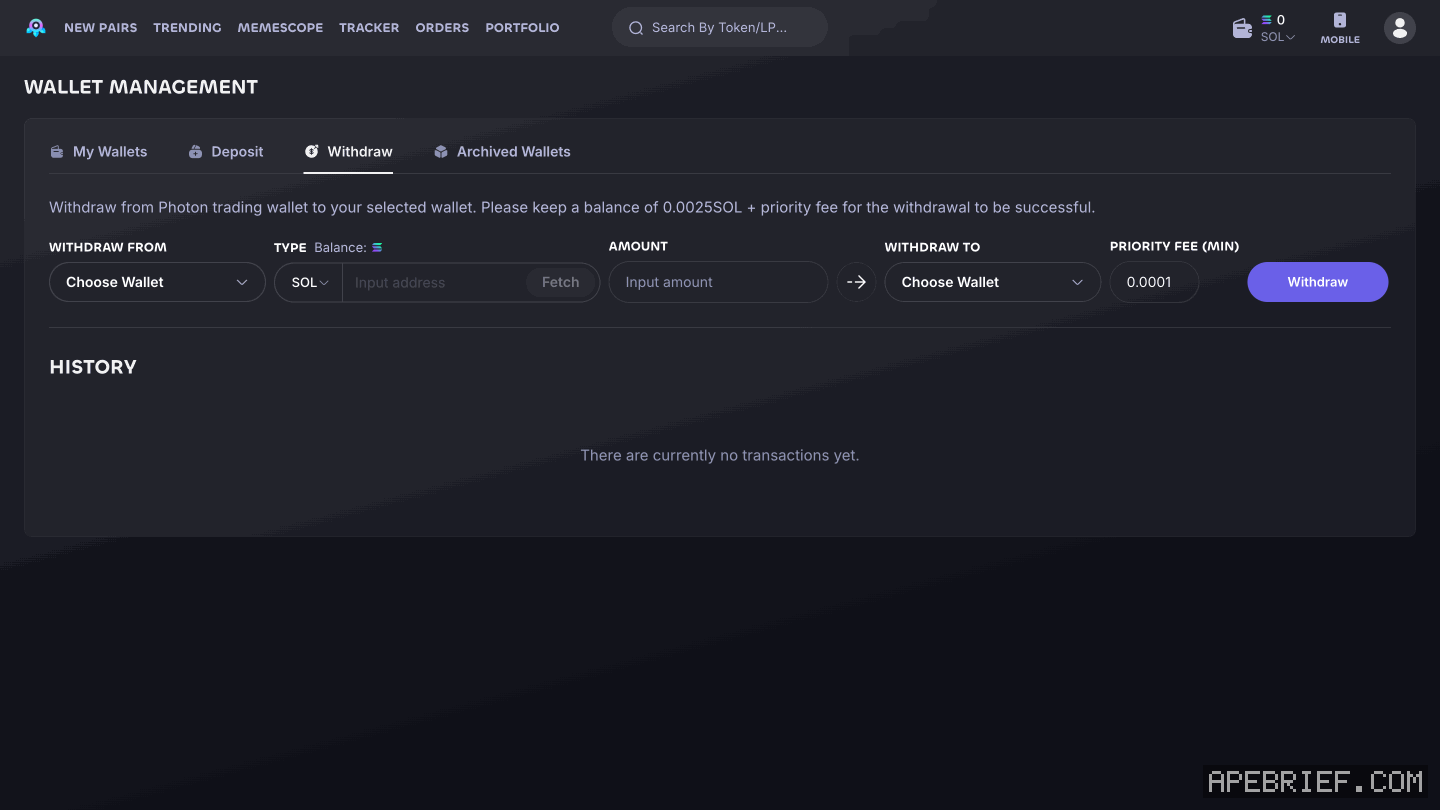
The Withdraw tab, under Wallet Management, shows this above its fields: "Withdraw from Photon trading wallet to your selected wallet. Please keep a balance of 0.0025SOL + priority fee for the withdrawal to be successful."
- Open Wallet Management, then the Withdraw tab.
- Under WITHDRAW FROM, choose the trading wallet holding the balance. If you keep several, check which one first. You can have up to 5 active.
- Leave TYPE on SOL and enter the AMOUNT. Leave at least 0.0025 SOL plus the priority fee in that wallet. To empty it, withdraw the balance minus that, not the whole balance.
- Under WITHDRAW TO, set the destination. Photon describes typing the address you want the SOL sent to. On screen the field is a picker reading Choose Wallet. Whichever way it takes the address, check it against the exchange or wallet you actually want it in.
- PRIORITY FEE (MIN) shows 0.0001. Then click Withdraw.
if you are trying to move a token, not SOL
The other half of the question. Whatever you bought sits in the same Photon trading wallet as the SOL.
The Withdraw tab's TYPE field reads SOL, beside an Input address box and a Fetch button, which looks like a way to pick another token by its address. Photon only describes withdrawing SOL, so the two routes this page stands behind are these: sell the token back to SOL inside Photon and withdraw the SOL, or import the trading wallet's private key into a wallet app and send the token from there.
The second route is only available if you saved the key. Photon reveals it once, at generation, and that is the only time.
If any site or DM asks for that private key or a seed phrase to "unlock" a withdrawal, close it. The withdraw step asks for a wallet, an amount and a destination. Nothing legitimate in this flow asks you to paste a key into a web page.
If you are new to Photon, the link below is our referral link.
Photon documents no discount for signing up through a link, so it costs you the same either way. It may earn us Photon points, which helps support our work, at no extra cost to you. We might add tools for people who used our code.
Tapping the button puts apebrief on your clipboard and opens Photon. Where the signup shows a code field, paste it there.
How we know: every number on this page
6 sources
- the documented withdraw flow withdraw · source2026-09-23
- funds sit in a Photon-generated trading wallet, not in the wallet you already had generate · source2026-09-23
- the private key to that trading wallet is revealed once once · source2026-09-23
- maximum number of Photon trading wallets active at once 5 · source2026-09-23
- the balance Photon says to leave in the trading wallet for a withdrawal to succeed 0.0025 · our capture, shot photon-withdraw, 22 Sep 2026, Wallet Management, Withdraw tab, verbatim: 'Withdraw from Photon trading wallet to your selected wallet. Please keep a balance of 0.0025SOL + priority fee for the withdrawal to be successful.'2026-09-22
- the Withdraw tab's fields, and the value in PRIORITY FEE (MIN) 0.0001 · our capture, shot photon-withdraw, 22 Sep 2026: WITHDRAW FROM (Choose Wallet), TYPE (SOL, an Input address box, Fetch), AMOUNT, WITHDRAW TO (Choose Wallet), PRIORITY FEE (MIN) showing 0.0001, then Withdraw2026-09-22
next
- Where is deposit on Photon?Photon generates its own trading wallet and you fund it with a Deposit from your existing wallet; it is not a front end on the wallet you already have.
- Why did Photon eat the fill?Photon takes 1% of the initial token used on every buy and every sell, collected in SOL.
- compareis photon better than axiom, on fees and the wallet pathAxiom if the fee decides it: signing up through a referral link takes 10% off trading fees, and cashback in SOL takes the net fee to 0.75% at the top tier.