 by cooked
someone DMed you their axiom filters: where settings actually live
Axiom's filters live in its own Pulse Filters panel, opened from each Pulse column's header: ranges, keywords and toggles you set there yourself, with its own Import button. A stranger's DM with a link to import filters is the pattern Axiom, Phantom and MetaMask warn about: a lookalike page that asks you to connect, sign or type your recovery phrase. Don't click it, don't sign, never type the phrase.
Good filters fit in a screenshot. Nobody needs your wallet to show you a number.
where the settings actually live
- On Pulse, every column header ends in its own filters button: "Open New Pairs filters", and the same for Final Stretch and Migrated.
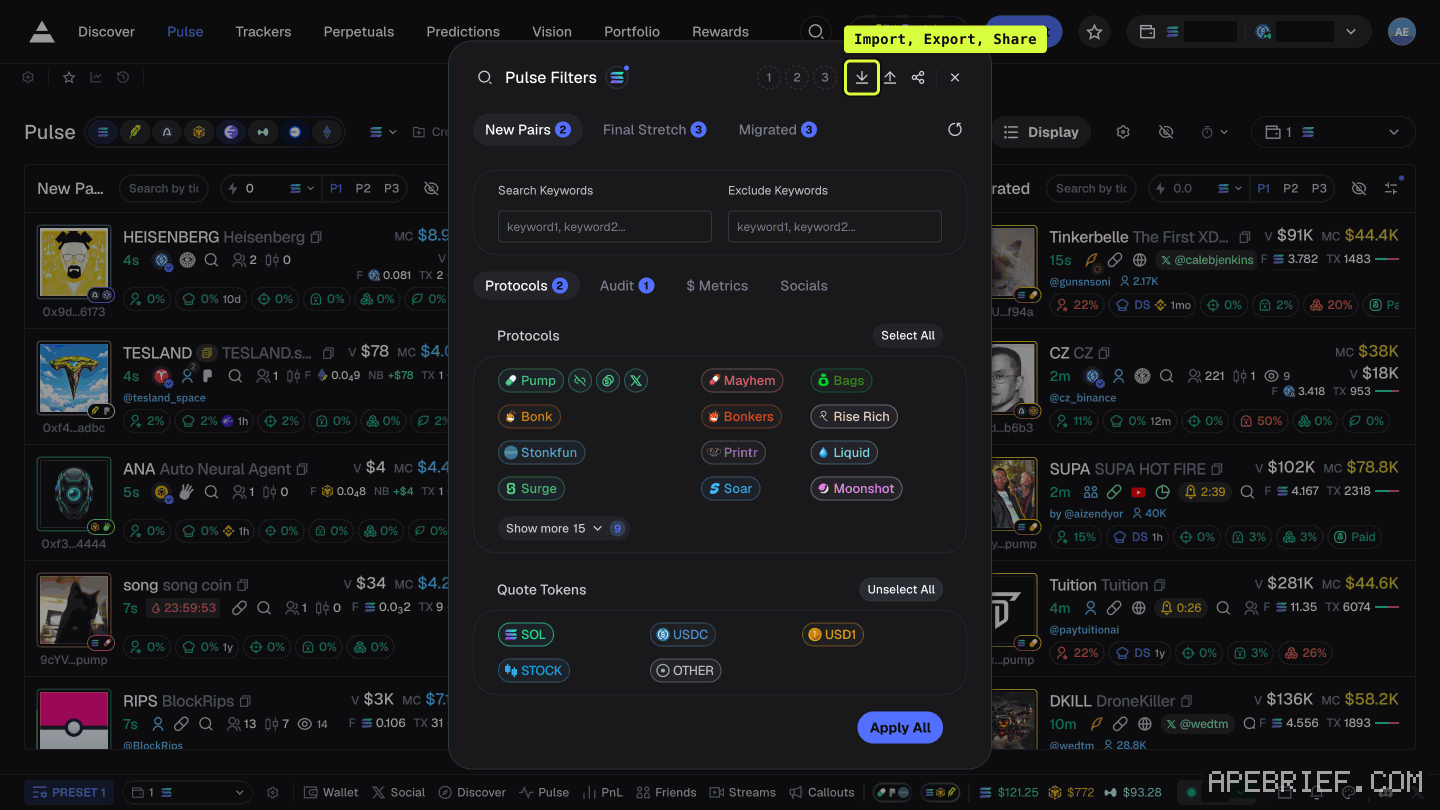
- The panel is titled Pulse Filters. It has a tab per column, Search Keywords and Exclude Keywords, and Protocols, Audit, $ Metrics and Socials sub-tabs.
- Axiom describes the filters as ranges: Top 10 Holders % "Sets a range for the percentage of supply held by the top 10 wallets."
- Set the values, then press Apply All.
So "my filters" is a short list of ranges and keywords. If a stranger's are real, they can paste them in the chat. The pulse filters page walks every tab.
On Photon, each memescope column carries a filter button and the S1 preset. Same deal: settings you set inside the terminal you're already logged into.
a shared filter comes in through Import
The header of Pulse Filters, top right beside the title, has three icon buttons labelled Import (a down arrow), Export (an up arrow) and Share. Then Preset 1, Preset 2 and Preset 3. The footer holds only Apply All.
So if a stranger's filters are real, a file or link of them would come in through Import, inside the terminal you're already logged into. They never need a page of their own. Axiom doesn't say what Import, Export or Share do, or what Import accepts. Nothing in the panel, and nothing Axiom says about filters, involves a wallet, a signature or a phrase.
what the DM link wants
It isn't your filters. Phantom says that impersonators "send direct messages asking you to verify your wallet through a link", and that lookalike sites "prompt you to connect your wallet or enter your recovery phrase". It adds that these sites "often ask you to approve transactions that give the scammer permission to move your tokens."
MetaMask warns that attackers get a signature now "and then use it later to steal their assets", and "The attacker may not steal assets immediately." A page that worked fine yesterday proves nothing.
An import that asks you to connect, sign or type anything has stopped being about filters.
three rules
- Don't click. Axiom says to ignore DMs from "people claiming to be support or offering help". Its support happens through private tickets on its Discord.
- Don't sign. A filter is numbers on your screen. A wallet has nothing to approve there.
- Never type the recovery phrase. Axiom: "Never ever share your Secret Recovery Phrase with anyone!" Phantom: enter it into a site once and "the wallet is permanently compromised."
check the address before you log in
- Axiom links Pulse to axiom[.]trade/pulse. Photon sends you to photon-sol[.]tinyastro[.]io.
- Axiom publishes no list of official domains, so the address it links is the best reference there is.
- Phantom: "Check URLs carefully before clicking. Look for misspellings or unusual domains." MetaMask says the same about any site asking for a signature.
- Open the terminal from a bookmark you saved yourself, never from the DM.
- Phantom also suggests turning off DMs from strangers. Axiom shows how on its Discord server.
if you already clicked
Phantom's order: disconnect the site, then revoke approvals, because disconnecting "does not revoke spending permissions that may already exist." If you typed a recovery phrase, treat that wallet as gone and move what's left to a wallet with a new phrase.
For an Axiom wallet, move out, not sideways: Axiom doesn't say whether a wallet you add inside Axiom shares the phrase you leaked. How to withdraw from axiom: the recovery phrase route has the send.
Phantom "cannot reverse blockchain transactions, freeze assets, or recover stolen funds." Neither can the next stranger who DMs you offering recovery. Phantom: "Never send assets to anyone claiming to help recover or safeguard your funds."
that's where filters live and what the DM is after. if you're new to Axiom, the link below is our referral link. it's on our page, labelled, and we're not DMing it to you.
Signing up through this link takes 10% off your Axiom trading fees, which signing up without one does not. We get a commission from Axiom, which helps support our work, at no extra cost to you. We might add tools for people who used our code.
Tapping the button puts apebrief on your clipboard and opens Axiom. Where the signup shows a code field, paste it there.
People also ask
How do I use Pulse filters on Axiom?
Click the filters button in a column's header. The panel has a tab per column, chain icons across the top, include and exclude keywords, and Protocols, Audit, $ Metrics and Socials tabs. Axiom's docs don't say what Apply All covers, so check each column after.
the full answerHow do I withdraw on Axiom?
Tokens sit in the connected wallet. Open that wallet and send. Axiom is not holding a queue. If the token is hidden, enable the mint in the wallet list.
the full answerWhere is deposit on Axiom?
Click the labelled Deposit button in the top bar, not an arrow. It opens a panel titled Exchange, and its Deposit tab shows the address of the wallet Axiom generated for your account. Send SOL there, on Solana. Your old wallet's balance is not your Axiom balance.
I swapped on Axiom and the token is gone
Check the tx on a Solana explorer first. Destination address and mint are the ground truth. Then enable that mint in the wallet. Do not swap again to find it.
How we know: every number on this page
16 sources
- the Pulse Filters panel: column tabs, include and exclude keywords, four sub-tabs and Apply All (on 26 Sep the icons and preset slots sat in the footer; see s15 for 27 Sep) Apply · our screenshot Sep 2026: panel titled 'Pulse Filters' opened on New Pairs; tabs New Pairs, Final Stretch, Migrated; 'Search Keywords' and 'Exclude Keywords' with placeholder 'keyword1, keyword2...'; sub-tabs Protocols, Audit, $ Metrics, Socials; Protocols and Quote Tokens lists; footer, bottom left, three icon buttons with no text: a download arrow, an upload arrow and a share icon; then preset slots 1 2 3 and 'Apply All'. Nothing was clicked in the footer.2026-09-26
- each Pulse column header has its own filters button, named after the column Open · our screenshot Sep 2026: each column header ends in 'Open <column> filters', e.g. 'Open New Pairs filters'2026-09-24
- Axiom's docs define Pulse filters as ranges on token data Sets · source2026-09-26
- no Axiom docs page describes importing, exporting or sharing filters, and none lists official domains undocumented · source2026-09-26
- Axiom's docs tell you to ignore DMs from people claiming to be support or offering help, and to get help only through private tickets private · source2026-09-26
- Axiom's signup docs: never share the recovery phrase Secret · source2026-09-26
- Axiom's own docs link Pulse to axiom.trade/pulse Direct · source2026-09-26
- Phantom: impersonators DM a link to phishing sites; lookalike sites ask you to connect or enter your recovery phrase; turn off DMs from strangers and check URLs Lookalike · source2026-09-26
- Phantom: malicious sites ask for approvals that let the scammer move tokens; an entered recovery phrase means the wallet is compromised; disconnecting does not revoke approvals; Phantom cannot reverse transactions permanently · source2026-09-26
- MetaMask: signature phishing takes a signature now and uses it later; check the URL of any site asking you to sign Signature · source2026-09-26
- Photon's docs give photon-sol.tinyastro.io as the address for Photon on Solana photon-sol.tinyastro.io · source2026-09-26
- each Photon memescope column has a keyword search, a quick-buy amount, preset S1 and a filter button S1 · our screenshot Sep 2026: each column has 'Search Keywords (Max 3)', a quick-buy amount, a preset 'S1' and a filter button2026-09-24
- Axiom's docs do not say whether a wallet added inside Axiom shares the account's recovery phrase undocumented · source2026-09-26
- the only attachment mechanism Axiom documents is signing up through a referral link signup · source2026-09-26
- Pulse Filters' header carries three icon buttons labelled Import, Export and Share, then Preset 1, 2 and 3; the footer holds only Apply All Import · our screenshot Sep 2026: panel titled 'Pulse Filters' opened on New Pairs; in the header, top right beside the title, three icon buttons labelled 'Import' (down arrow), 'Export' (up arrow) and 'Share', then 'Preset 1', 'Preset 2', 'Preset 3'; the footer holds only 'Apply All'. No hover tooltip appeared. Nothing was clicked.2026-09-27
- Axiom gives users who sign up through a referral link a 10% discount on trading fees 10% · source2026-09-24
next
- How do I use Pulse filters on Axiom?Every Pulse column has its own controls in its header: a search box, a quick-buy amount, presets P1 to P3, and a filters button.
- How do I withdraw on Axiom?Axiom's screens show no control that sends funds to an outside address: Transfer moves funds between your own Axiom wallets and Convert is a cross-chain swap.
- how to set a limit order on axiomAxiom's docs give two ways: the slider bar in the trading menu, or dragging the price line on the chart.
- How do I switch chains on Axiom?The chain button sits in Axiom's header, left of Deposit.
- compareAxiom Pulse or Photon Memescope?Axiom Pulse if you trade launches on more than one chain: eight chains feed the same three columns, and every column carries its own filters and three presets.