 by cooked
uxento vision and the aio feed: what it tracks and how to set it up
Uxento Vision is Uxento's tracker feed: contract addresses from paid alpha groups, X, DEX paid, Streamflow locks, Truth Social, Instagram, Telegram and news, each as a card. Open it from the rocket icon in uxtension or sign in to the Uxento web app with an email code. Uxento AIO puts every tracker in one feed and is the default view.
getting in
- From uxtension: click the extension in your toolbar, then the rocket icon. how to install uxtension
- Without the extension: open the Uxento web app's sign-in. New here? The link at the end of this page goes there.
Enter your email, type in the code you get, and you land on the AIO feed.
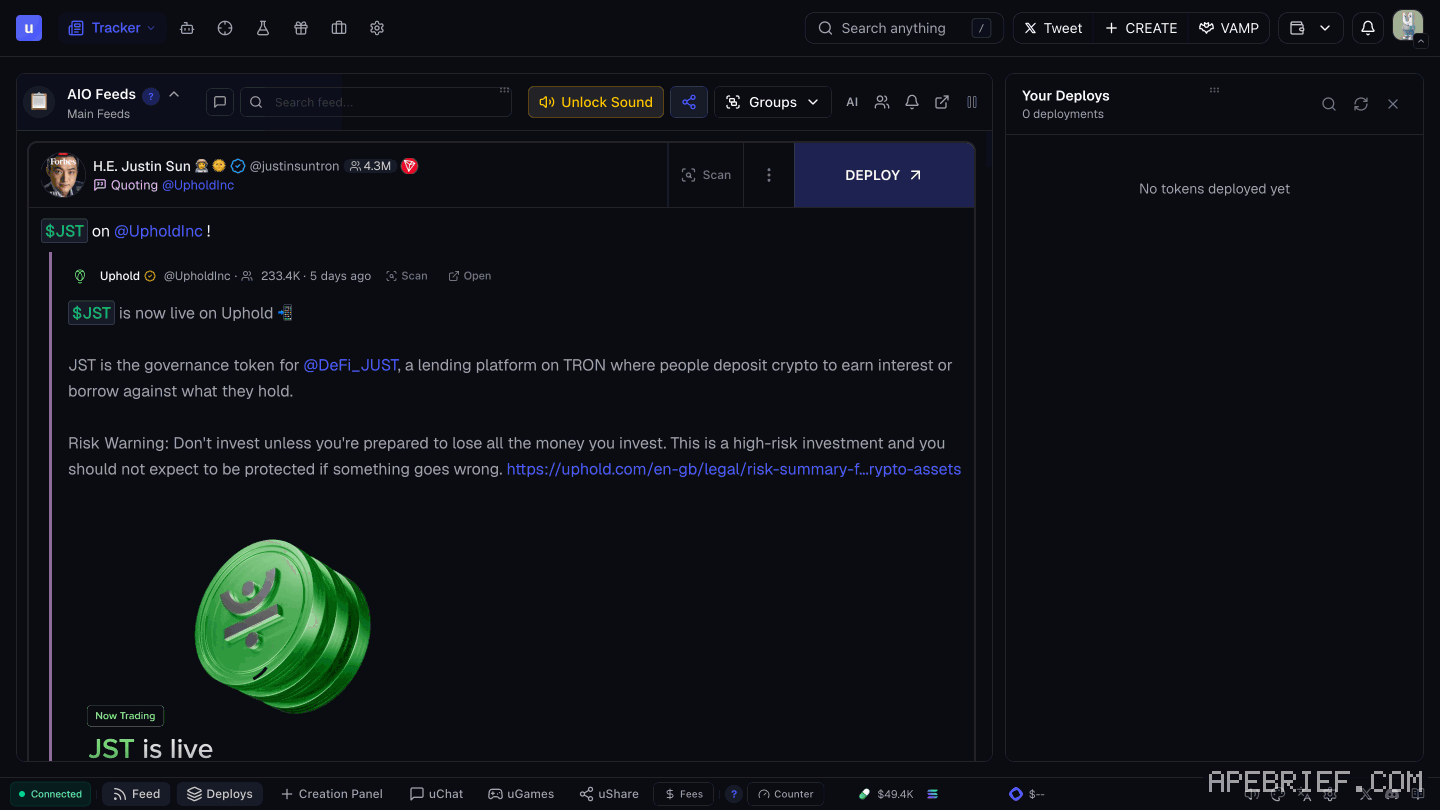
what a card shows
A coin card shows:
- the contract address
- market cap
- when the coin was created
- when it was called
- which groups called it, and how many mentions
- a button to the coin's page on Axiom
Other feeds have their own cards. An X card shows the post text, any images, the author's name and handle, and a View on X button.
the trackers
- CA tracker. Solana and BNB contract addresses posted in the alpha groups Uxento watches. Press Trade on a card to buy from the uDev Trade Panel, or Coin Communities to open the token's community page. reading callouts
- X tracker. Over 1000 accounts: posts, replies, likes, follows, profile changes and more. setting it up
- DEX tracker. Fires when DEX is paid on a Pump or Bonk token. The card has the ticker, CA, the DEX Screener banner and links. DEX Predict catches the payment as it lands, often seconds before the listing goes live; the payment isn't certain to go through.
- Streamflow locks. Token locks as they happen: how much or what share is locked, time to unlock, the lock contract's permissions, and a View Contract button.
- Truth Social, Instagram and Telegram. Posts from tracked accounts. Truth Social and Instagram each have their own filters. To get a Truth Social account added, open a ticket in Uxento's Discord.
- News feed. Posts from news outlets only, so breaking news isn't buried. Filter which outlets show.
- Charity tracker. Alerts when a charity goes live on donate.gg.
vision or aio
- Vision shows up to 3 trackers at a time.
- AIO merges all of them into one feed. It's the default.
Switch between them from the dropdown under the Tracker button at the top of the homepage. AIO's Popout button opens the feed in its own resizable window, handy on a second monitor.
settings
Three ways in: the dropdown under your profile, the cog at the bottom right, or the Settings tab at the top right of a feed (that one opens the feed's own settings).
The tracker panels:
- Trackers and Feed Accounts: which trackers, groups and accounts feed in.
- Notifications: sounds.
- Keywords: keyword, ticker and CA alerts.
- Pins & Tags: accounts and keywords pinned to the top of the feed, and custom labels on accounts.
- Appearance: themes, card size, and which parts of a card show.
The list also has Callers & Groups, Stocks and Domains panels.
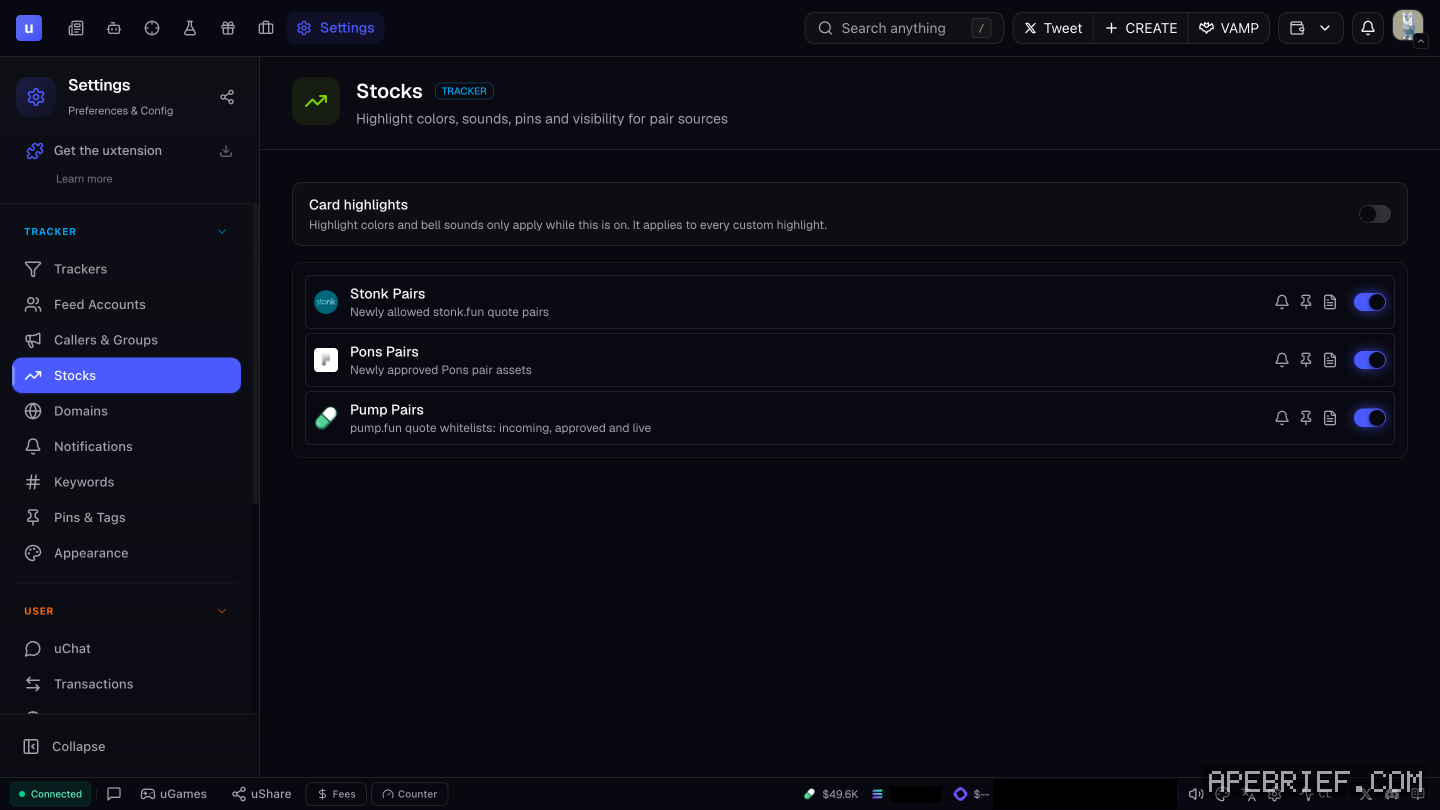
Under User, Contract Addresses sets which terminal a token opens in when you click it, and the quick buy buttons on detected CAs.
sounds and alerts
- Open Settings, then Notifications.
- Pick one of up to 6 sounds for when any tracker gets alpha.
- For one account, add its username and click Manage. On an X card, the bell icon does the same.
Keywords adds highlighted alerts with their own sound and color:
- Ticker detection: highlights tickers like $BTC or $PEPE.
- CA detection: highlights any Solana contract address posted.
- Keyword alerts: your own words. Exact matches the word alone ("Elon"); Partial matches inside other words ("Elongate").
tools on the feed
- Pause on hover. The feed stops while your mouse is over it. On by default.
- Scan. Next to an X or Truth Social post: the author's past usernames, smart followers and CA history.
- Translate. Non-English posts translate automatically; pick from 13 languages.
- Search anything. Press / to search tools, settings, or coins by name, ticker or CA.
- Deploy. Each card has a Deploy button that opens uDev. Hide it in Appearance if you only trade.
ai mode
AI Mode, switched on from the AIO header tab, adds AI tools for launching coins from the feed. Its AI Quick Suggestions put up to three token ideas, name and ticker, under new posts. It's a deploying tool; uDev covers it.
next
New to Uxento? Sign up through our referral link below with code apebrief.
We get a commission from Uxento, which helps support our work, at no extra cost to you. We might add tools for people who used our code.
Tapping the button puts on your clipboard and opens Uxento. Where the signup shows a code field, paste it there.
How we know: every number on this page
19 sources
- Uxento Vision bundles a CA, X, DEX, Streamflow lock, Truth Social, Instagram and Telegram tracker and a news feed CA · source2026-10-07
- open it from the rocket icon in uxtension, or from the web login without the extension; sign-in is by email code, secured by Turnkey, and lands on the AIO feed Rocket · source2026-10-07
- what a coin card shows, and what an X card shows market · source2026-10-07
- the CA tracker picks up SOL and BNB contract addresses from its alpha groups; Trade opens the uDev Trade Panel; presets live in Contract Addresses; a Coin Communities button; shown for reference only SOL/BNB · source2026-10-07
- the X tracker covers over 1000 accounts and picks up posts, replies, likes, follows and profile changes 1000 · source2026-10-07
- DEX tracker cards for paid DEX on Pump and Bonk tokens; DEX Predict catches the payment before the listing, and the payment is not certain to go through 100% · source2026-10-07
- Streamflow lock cards show amount or percentage locked, time to unlock, the lock contract's permissions and a View Contract button View · source2026-10-07
- Truth Social tracker; requests for new accounts go through a ticket in the Uxento Discord; Truth Social and Instagram have their own filters under Feed Accounts Truth · source2026-10-07
- News Feed shows posts from news outlets and can be filtered; Charity Tracker alerts on charities going live via donate.gg, with one-click deploy donate.gg · source2026-10-07
- the app's tracker settings panels, including Callers & Groups, Stocks and Domains, and the user panels Stocks · our screenshot, 7 Oct 2026, Settings page, signed in: 'TRACKER' 'Trackers' 'Feed Accounts' 'Callers & Groups' 'Stocks' 'Domains' 'Notifications' 'Keywords' 'Pins & Tags' 'Appearance' 'USER' 'uChat' 'Transactions' 'Auto-Sniper' 'Presets' 'Contract Addresses' 'Quick Deploy'2026-10-07
- three ways into Settings; filter groups and trackers in Trackers / Feed Accounts; Vision shows up to 3 trackers at once, AIO all 3 · source2026-10-07
- AIO merges every tracker, is the default, swaps with Vision from the Tracker dropdown, and has a Popout window Popout · source2026-10-07
- notification sounds: Notifications panel, up to 6 sounds, custom per account via Manage, bell icon on X cards 6 · source2026-10-07
- Keywords panel: ticker detection, Solana CA detection, keyword alerts with exact or partial match and custom sound and color Exact · source2026-10-07
- feed tools: pause on hover, Scan, translate into 13 languages, Search Anything on /, Pins & Tags 13 · source2026-10-07
- every card has a Deploy button that opens uDev; it can be hidden in Appearance Deploy · source2026-10-07
- AI Mode is switched on in the AIO header tab and adds AI tools for deploying from the feed, such as AI Quick Suggestions AI · source2026-10-07
- Contract Addresses panel sets the default terminal tokens open in and the quick buy buttons Contract · source2026-10-07
- Appearance covers themes and card size and parts; Pins & Tags also pins keywords and tags accounts with labels Pins · source2026-10-07
next
- how to set up the uxento x trackerOpen Settings, go to Feed Accounts and open X (Twitter).
- uxento callouts: which groups called a coin, and how to read itA callout is a contract address posted in one of the paid alpha groups Uxento watches.
- how to set up utek, uxento's sniper and copy traderuTek is Uxento's sniper and copy trader.
- how to install uxtension and connect it to uxentoAdd uxtension from the Chrome Web Store with Add to Chrome. It's free, it runs on Axiom, GMGN and Photon, and Axiom is the one Uxento recommends.