 by cooked
how to set up the uxento x tracker
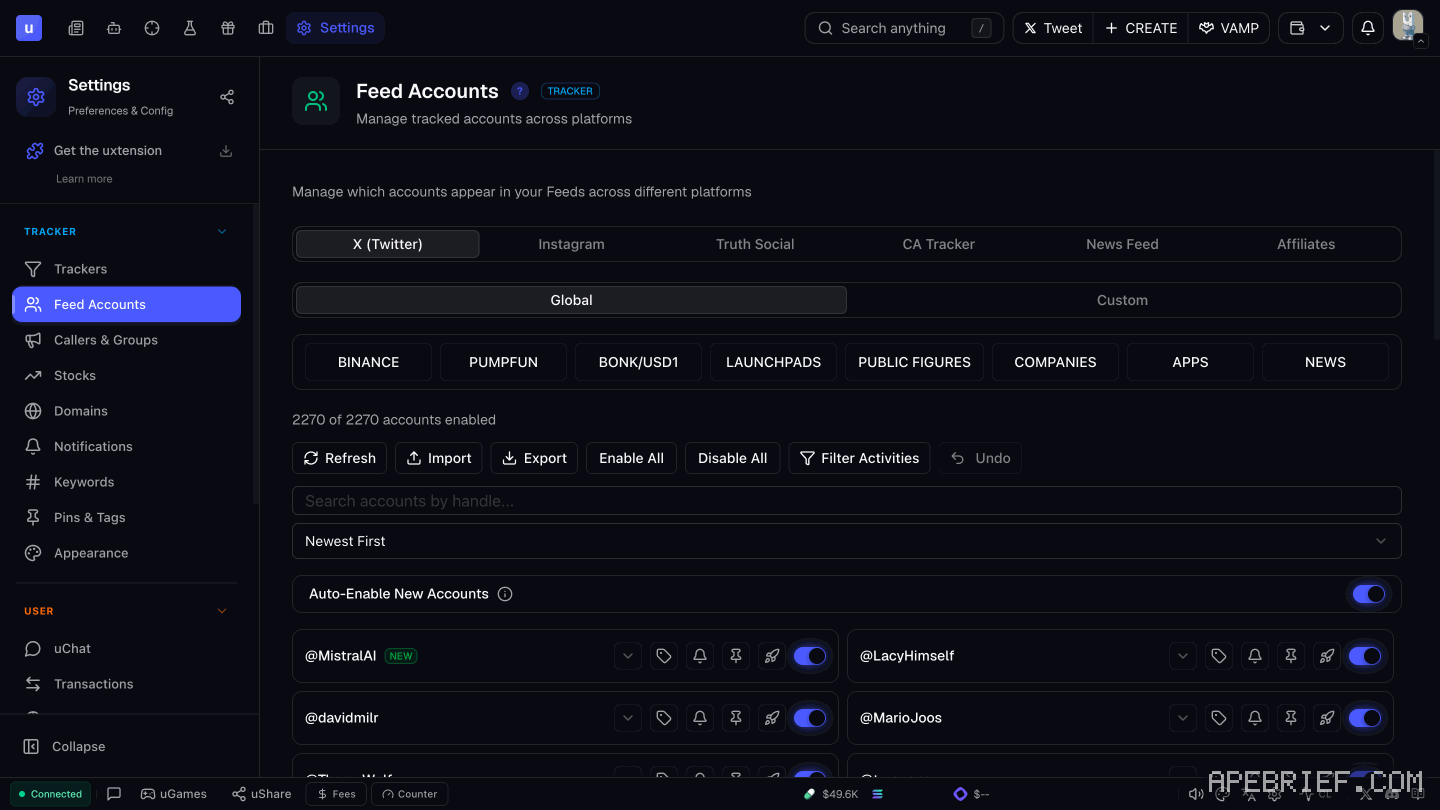
Open Settings, go to Feed Accounts and open X (Twitter). The Global list already holds over 2,000 accounts in 8 groups: switch on the ones you want, set what each one alerts on, and add a sound under Notifications. For an account that isn't listed, add it under Custom.
The tracker picks up posts, replies, likes, follows, profile changes and more. It lives in Uxento Vision.
pick your accounts
- Open Settings: the cog at the bottom right, or the Settings tab on the X feed.
- Go to Feed Accounts, then X (Twitter). The Global tab lists every account Uxento tracks, 2,270 of them, with a count of how many you have on.
- Accounts sit in 8 groups: Binance, Pumpfun, Bonk/USD1, Launchpads, Public Figures, Companies, Apps and News. Switch accounts on or off in each.
The buttons above the list: Enable All, Disable All, Auto-Enable New Accounts, Filter Activities, Undo, Refresh, Import and Export.
filters and tags per account
Click the arrow next to an account:
- Account Filters pick which kinds of its activity reach your feed.
- Custom Tags label it, so a high-priority account stands out on the feed.
On the feed itself, the Groups button switches which category you're watching.
sounds, pins and keywords
- Sounds. Under Notifications, pick one of up to 6 sounds. For one account, add its username and click Manage. Or click the bell on any X card.
- Pins. Click the pin icon next to an account in Feed Accounts. Its posts stay at the top of the feed for as long as you set, on the activity you choose.
- Keywords. Under Keywords, add words to alert on. Exact fires on the word alone ("Elon"); Partial fires inside other words too ("Elongate").
add accounts that aren't listed
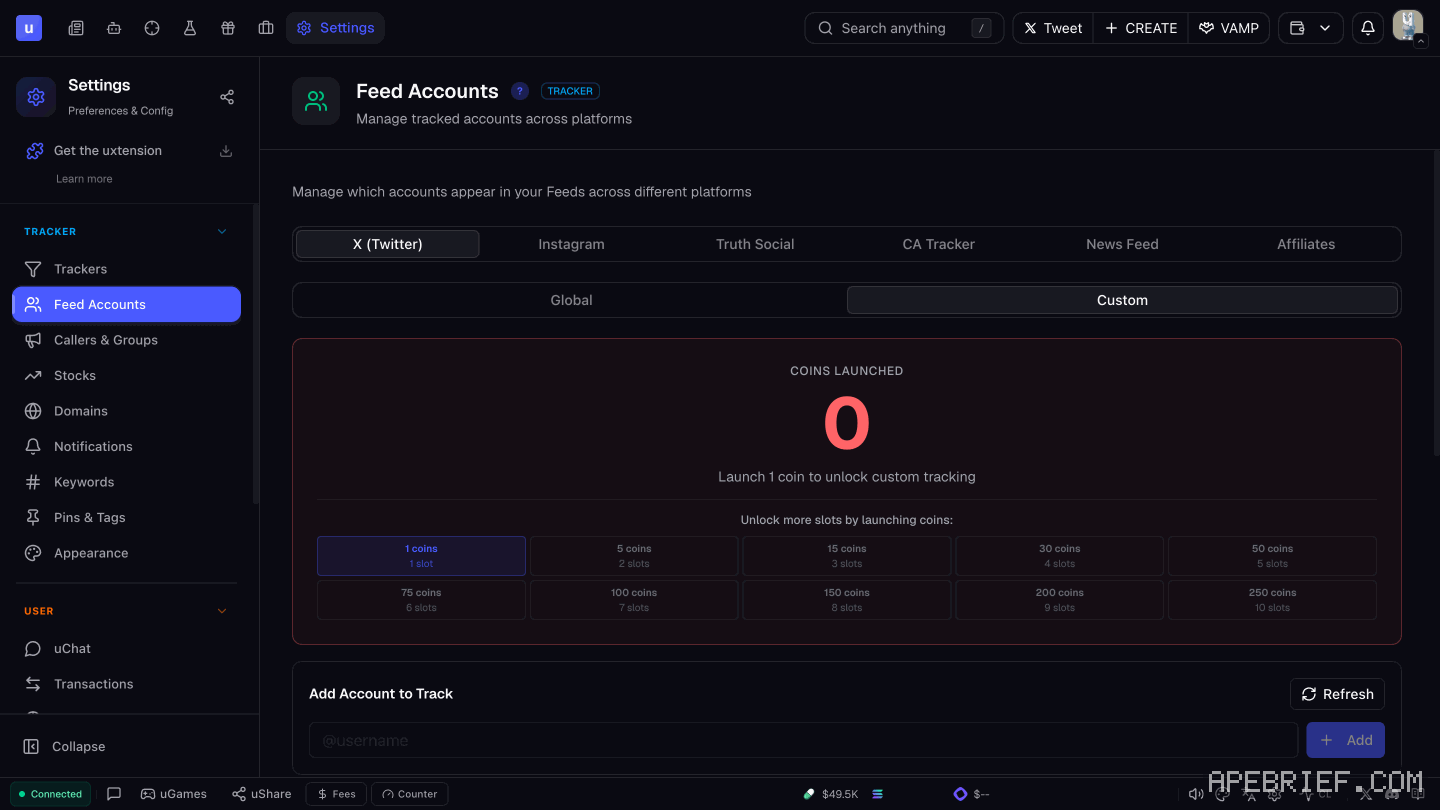
- In the feed settings, open the Custom tab.
- Click Add Account to Track and add the username.
Custom tracking unlocks once you've launched 1 coin with uDev. The Custom tab shows your coins launched and adds slots as the count grows, up to 10:
| Coins launched | Custom slots |
|---|---|
| 1 | 1 |
| 5 | 2 |
| 15 | 3 |
| 30 | 4 |
| 50 | 5 |
| 75 | 6 |
| 100 | 7 |
| 150 | 8 |
| 200 | 9 |
| 250 | 10 |
Two other ways:
- Accounts others already track. The bottom of the Custom tab lists accounts other users track privately. Add any of them free, no launches needed.
- uStore. The Extra X Account Slot perk tracks one more custom account for 100 uPoints. how rewards work
reading an x card
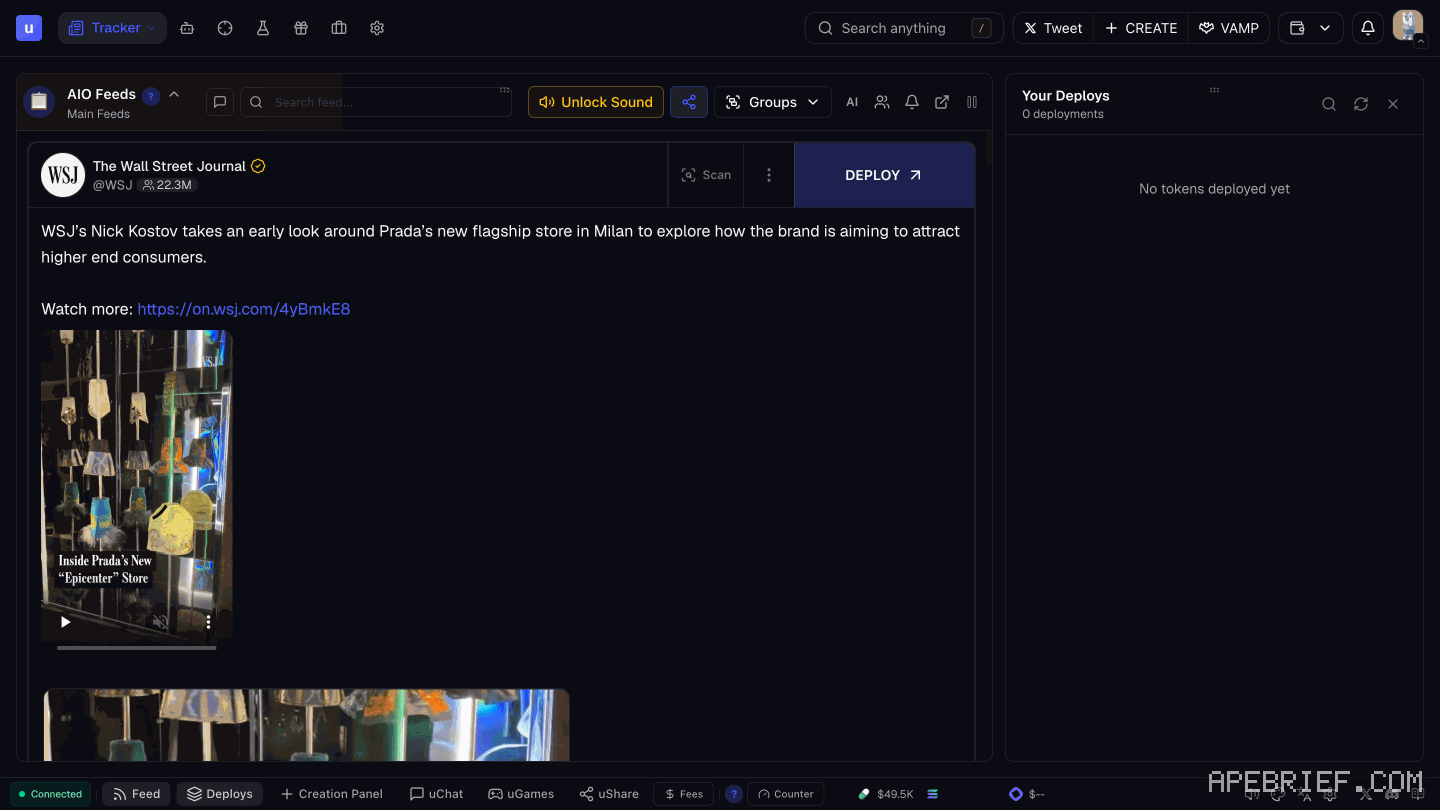
A card shows the post text, any images, the author's name and handle, and a View on X button.
- Scan shows the author's past usernames, smart followers and CA history. A renamed account shows up here.
- Translate sits at the bottom left of a post.
acting on a post
- Buy from the card. Turn on CA detection under Keywords and any Solana CA in a post is highlighted with quick buy buttons. Set the amounts in User Settings, Contract Addresses.
- Open it in your terminal. The same Contract Addresses panel sets which trading terminal a token opens in when you click it. Coin cards also carry a button straight to the coin's Axiom page.
- Buy automatically. Auto-Sniper CA Detection buys the moment a Solana CA is posted. That's uTek; test a setup first in the sandbox.
How to trade off the feed: x sniping strategy.
when a snipe misses
Snipe speed depends on X and varies. A snipe can land late or miss. Uxento isn't responsible for delays, missed snipes or losses caused by X. Size each automatic buy so a miss or a late fill doesn't matter. uTek also runs on Pump.fun only for now.
If you're signing up, the link below is our Uxento referral link, code apebrief.
We get a commission from Uxento, which helps support our work, at no extra cost to you. We might add tools for people who used our code.
Tapping the button puts on your clipboard and opens Uxento. Where the signup shows a code field, paste it there.
How we know: every number on this page
12 sources
- the X tracker picks up posts, replies, likes, follows and profile changes posts, · source2026-10-07
- the Global list under Settings > Feed Accounts > X (Twitter) holds over 2,000 accounts (2270 of 2270 enabled) in 8 groups: Binance, Pumpfun, Bonk/USD1, Launchpads, Public Figures, Companies, Apps, News; buttons Refresh, Import, Export, Enable All, Disable All, Filter Activities, Undo, Auto-Enable New Accounts 2270 · our screenshot, 7 Oct 2026, Settings > Feed Accounts > X (Twitter) > Global: 'Groups: BINANCE | PUMPFUN | BONK/USD1 | LAUNCHPADS | PUBLIC FIGURES | COMPANIES | APPS | NEWS' '\"2270 of 2270 accounts enabled\" | Refresh | Import | Export | Enable All | Disable All | Filter Activities | Undo | Auto-Enable New Accounts'2026-10-07
- per-account Account Filters and Custom Tags; Groups button on the AIO feed Custom · source2026-10-07
- custom tracking unlocks after launching 1 coin; slots by coins launched: 1 coin 1 slot, 5 coins 2, 15 coins 3, 30 coins 4, 50 coins 5, 75 coins 6, 100 coins 7, 150 coins 8, 200 coins 9, 250 coins 10 slots 10 · our screenshot, 7 Oct 2026, Settings > Feed Accounts > X (Twitter), Custom tab: 'Custom tab: COINS LAUNCHED 0 | \"Launch 1 coin to unlock custom tracking\" | Unlock more slots by launching coins: 1 coins 1 slot | 5 coins 2 slots | 15 coins 3 slots | 30 coins 4 slots | 50 coins 5 slots | 75 coins 6 slots | 100 coins 7 slots | 150 coins 8 slots | 200 coins 9 slots | 250 coins 10 slots | Add Account to Track'2026-10-07
- the uStore perk Extra X Account Slot tracks one more custom X account for 100 uPoints 100 · our screenshot, 7 Oct 2026, rewards, uStore: 'Perks (Boosts and account upgrades): Fee Discount 2.5% each · stackable · 24h | 25 uPoints per slot · 0/4 active | Extra X Account Slot, Track one more custom X account, 100'2026-10-07
- custom X accounts are added after launching coins via uDev; accounts others track privately can be added free from the bottom of the Custom tab at · source2026-10-07
- extra custom X account slots are a uStore perk bought with uPoints uStore · source2026-10-07
- notification sounds: up to 6, custom per account via Manage, bell icon on X cards 6 · source2026-10-07
- pin accounts from Feed Accounts with the Pin icon, choosing triggers and duration; keyword alerts are exact or partial Pin · source2026-10-07
- an X card shows post text, images, author name and handle and View on X; Scan shows past usernames, smart followers and CA history; Translate per post View · source2026-10-07
- CA detection highlights Solana CAs with quick buy buttons whose amounts are set in Contract Addresses, which also sets the terminal tokens open in; Auto-Sniper CA Detection buys automatically Auto-Sniper · source2026-10-07
- uTek warns snipe speeds depend on X and can vary, and Uxento is not responsible for delays, missed snipes or losses; Pump.fun only for now Pump.fun · our screenshot, 7 Oct 2026, uTek page, signed in: 'Snipe speeds depend on Twitter/X and can vary. We are not responsible for delays, missed snipes, or losses caused by Twitter/X performance.' 'Only Pump.fun is supported for now across all uTek functionalities.' 'Buy tokens automatically when something happens on Twitter — keywords, CAs, interactions, images, and more.' Button 'Migrate Auto-Sniper'. Docs, Uxento Vision, Tracker Cards: 'and a button that takes you directly to the coin’s page on Axiom'2026-10-07
next
- how to set up utek, uxento's sniper and copy traderuTek is Uxento's sniper and copy trader.
- how to test a sniper in uxento's sandboxSandbox is Uxento's test feed. You publish fake posts from any account you pick and watch whether your sniper and tracker rules fire.
- sniping off x posts with utek: the trigger, the size and the exitPick the narrowest trigger that still catches the post you want. A CA trigger buys the exact coin a tracked account posts.
- trading from the uxento vision feed on axiom: from a card to a decisionTreat every card as a lead, not a call.