 by cooked
uxento callouts: which groups called a coin, and how to read it
A callout is a contract address posted in one of the paid alpha groups Uxento watches. A coin card in Uxento Vision shows when the coin was created, when it was called, which groups called it and how many mentions it has. With uxtension, the same group badges sit on Axiom's Pulse and token pages.
where the groups come from
- Paid chats only. Uxento tracks subscription-gated chats, so only paying members can post a CA that reaches the tracker.
- Discord. Nine servers: Potion Alpha, Yogurtverse, Pastel Alpha, Shocked, TAGxAlpha, Digi World, Prosperity, Minted and IgnitedDAO.
- Telegram. Twelve channels, watched only where the owners or admins themselves post. Calls come through here less often.
- Chains. Solana and BNB contract addresses.
Groups can ask Uxento to be added.
what a callout card shows
- the contract address
- market cap
- when the coin was created
- when it was called
- which groups called it, and how many mentions
- a button to the coin's page on Axiom
set it up
- Open Settings in Uxento Vision (the cog at the bottom right).
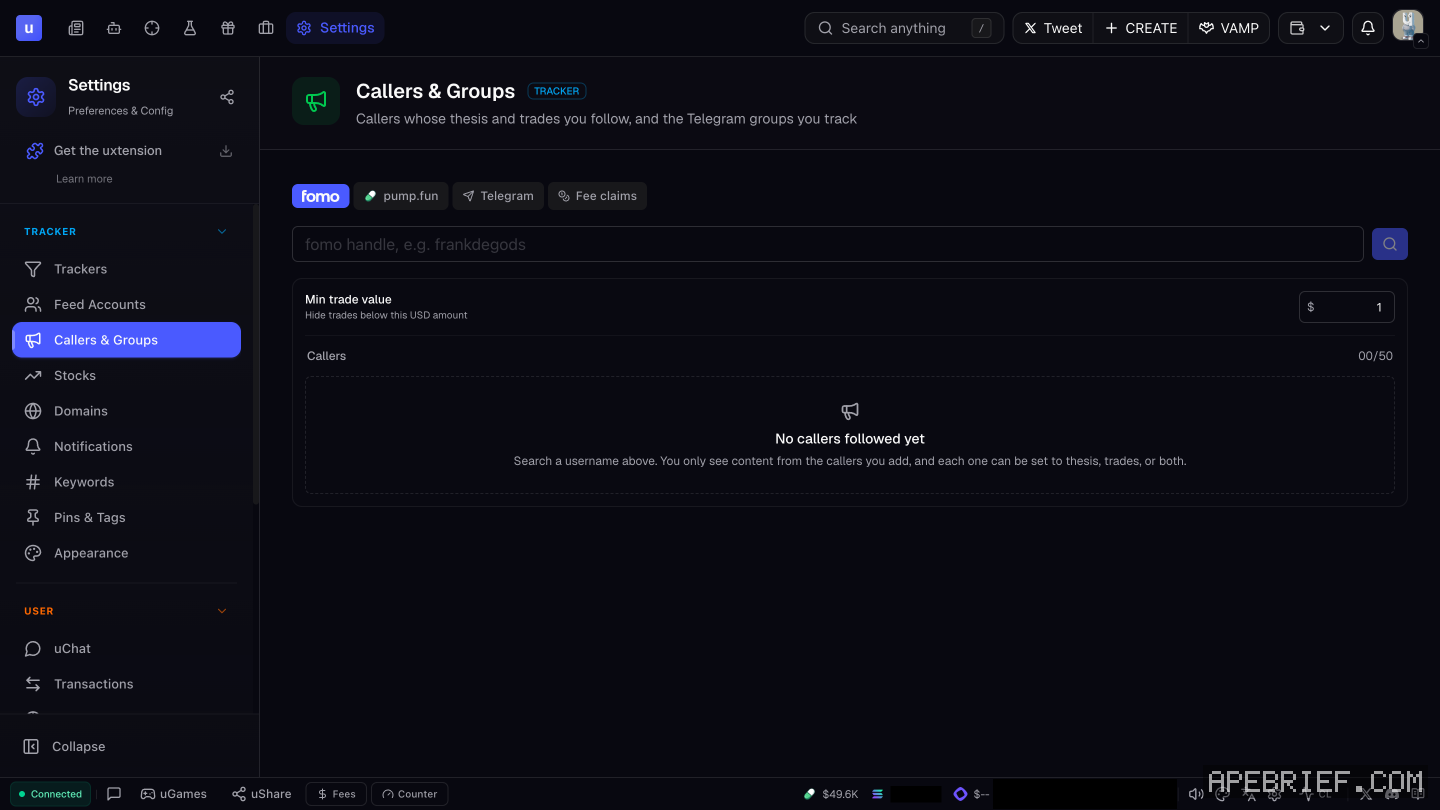
- In Trackers and Feed Accounts, choose which alpha groups feed in. Settings also has a Callers & Groups panel.
- Under Notifications, pick a sound for when a tracker gets a call.
- On the AIO feed, the Groups button switches category on the fly.
On Axiom with uxtension. Group badges show under each token on Pulse and on token pages. Telegram ones are plain text you hover to identify. Hit uxtension's Refresh button to update which groups each coin has been posted in. Turn the badges on or off under Show Groups.
acting on a call
- Open it on Axiom with the button on the card.
- Trade opens the uDev Trade Panel on the card. Set quick-buy presets in User Settings, Contract Addresses.
Group calls help spot the real runner when a meta spawns duplicates, and tell real volume from fake. That's what they're for: a filter on what to look at.
reading a call critically
A call isn't a reason to buy on its own. The group posting it may already hold, and the card shows the call, not who's selling into it. Uxento itself lists addresses for reference only, not as an endorsement.
Before you buy off a call:
- Compare created and called. A call minutes after launch and one hours after a run read differently. Know which you're looking at.
- Count the groups, not the mentions. Several separate groups calling is a different signal from one group posting the same CA again and again.
- Check the CA, not the name. When a meta takes off, duplicates launch with the same name and ticker. Make sure the CA on the card is the one you're about to buy.
- Check the holders on Axiom. Look at Bundle %, Insiders % and Snipers % before you buy. what a bundled launch looks like
- Let uxtension flag the rest. Holders over 5% show highlighted, and the Multi-Deploy Identifier marks serial deployers on New Pairs. how to spot a bundle
- Size it so you can be wrong, and know your exit before you click buy.
How to trade a tracker feed: tracker trading strategy.
If you're signing up, the link below is our Uxento referral link, code apebrief.
We get a commission from Uxento, which helps support our work, at no extra cost to you. We might add tools for people who used our code.
Tapping the button puts on your clipboard and opens Uxento. Where the signup shows a code field, paste it there.
How we know: every number on this page
11 sources
- the CA tracker picks up SOL and BNB contract addresses posted in its alpha groups SOL/BNB · source2026-10-07
- what a coin card shows how · source2026-10-07
- Groups show on Pulse and on token pages, and come only from paid, subscription-gated chats; Telegram channels where owners or admins post, shown as text icons subscription-gated · source2026-10-07
- the nine Discord servers tracked, and the twelve Telegram channels; group representatives can ask to be tracked Potion · source2026-10-07
- the app's tracker settings include a Callers & Groups panel Callers · our screenshot, 7 Oct 2026, Settings page, signed in, TRACKER panels: 'Trackers' 'Feed Accounts' 'Callers & Groups' 'Stocks' 'Domains' 'Notifications'2026-10-07
- filter groups and trackers in Trackers / Feed Accounts; the Groups button on the AIO feed switches category Feed · source2026-10-07
- a sound when a tracker receives alpha, from the Notifications panel 6 · source2026-10-07
- uxtension: Show Groups toggles for Pulse and token pages; the Refresh button updates groups Show · source2026-10-07
- Trade on a CA tracker card opens the uDev Trade Panel; quick buy presets are in Contract Addresses; addresses are shown for reference only, not endorsed Trade · source2026-10-07
- Uxento pitches groups for spotting runners among meta duplicates and real versus fake volume runners · source2026-10-07
- uxtension highlights holders over a threshold (5% by default) and flags serial deployers on New Pairs 5% · source2026-10-07
next
- trading from the uxento vision feed on axiom: from a card to a decisionTreat every card as a lead, not a call.
- how to set up the uxento x trackerOpen Settings, go to Feed Accounts and open X (Twitter).
- what a bundled launch is, and how to spot oneA bundled launch is one where the deployer buys a big part of the supply across many wallets at the moment the coin is created, so the supply looks spread out while one person controls it.
- how to launch a coin with uxento's udevuDev is Uxento's coin launcher.