 by cooked
how to copy trade a wallet with uxento's utek
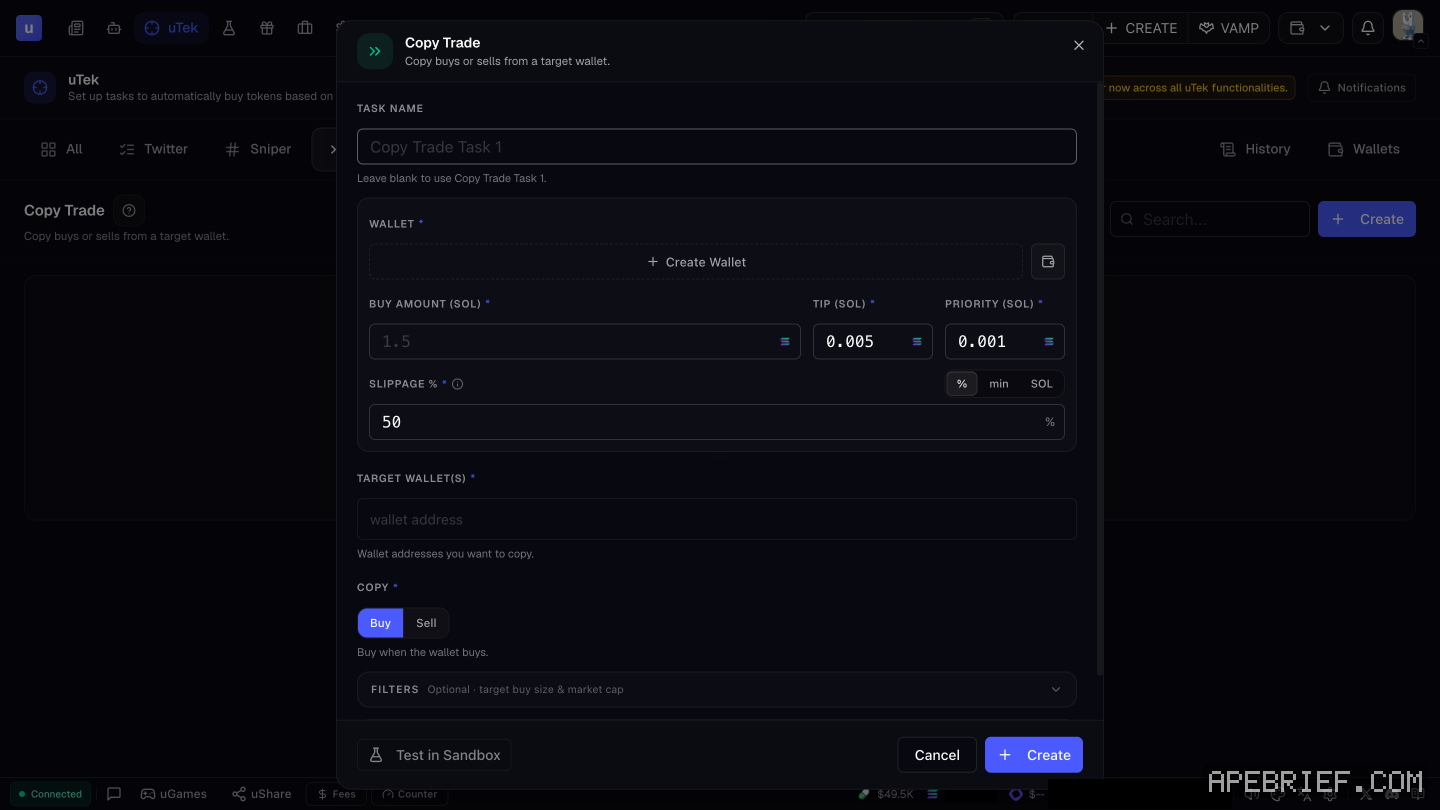
Copy trading on Uxento is a uTek task. You give it a target wallet, a wallet of yours to trade from and a buy amount in SOL, then pick Buy or Sell under Copy. Set up uTek first, pick Copy Trade in the uTek toolbar, click Create and fill in the form.
before the first task
uTek needs a wallet of yours with nonces set up on it. That's a one-time step of about 0.0116 SOL, done from the Wallets button in uTek. How to set up utek walks through it.
Fund that wallet in Portfolio with what you want the task to be able to spend.
create the task
- Open uTek and pick Copy Trade in the toolbar.
- Click Create. The Copy Trade form opens.
- Task name. Optional. Left blank, it's called Copy Trade Task 1.
- Wallet. The wallet the copies trade from. Create Wallet sits next to it if you need a new one.
- Buy amount (SOL). What each copy spends.
- Tip and priority (SOL). They start at 0.005 and 0.001.
- Slippage. Starts at 50%. You can set it in %, min or SOL.
- Target wallet(s). The wallet address, or addresses, you want to copy.
- Copy. Pick Buy or Sell.
- Filters. Optional: limits on the target's buy size and on market cap.
- Click Test in Sandbox to try it first, or Create to save it.
buy or sell
Copy has two options, Buy and Sell. With Buy picked, the form reads "Buy when the wallet buys."
A Buy task covers the way in, so know how you'll get out before it runs.
sizing
Three things cap what a copy task spends:
- Buy amount. Set in the form, in SOL.
- Filters. They can skip the target's buys by buy size and by market cap, so a task leaves alone what's outside your range.
- The wallet's balance. A task can only spend what the assigned wallet holds. Keep only what you're prepared to let the task use in it.
stop a task
- Open the Copy Trade overview, or All Tasks to see every sniper's tasks together.
- Select the task.
- Pause it to stop it for now, or delete it to remove it.
The quick buttons top left of the overview stop every task at once, and show or hide paused ones. To see what a task actually did, open History. It lists each successful execution.
worth knowing
uTek supports only Pump.fun for now, across all its functions, copy trading included. A copy goes in after the target's own trade, so your fill price can differ from theirs.
Picking which wallets to copy and when to stop is its own subject: copy trading strategy on uxento.
New to Uxento? Sign up through our referral link below with code .
We get a commission from Uxento, which helps support our work, at no extra cost to you. We might add tools for people who used our code.
Tapping the button puts on your clipboard and opens Uxento. Where the signup shows a code field, paste it there.
How we know: every number on this page
7 sources
- the Copy Trade form: copy buys or sells from a target wallet; task name (blank uses Copy Trade Task 1), wallet with Create Wallet, buy amount in SOL, tip 0.005 SOL, priority 0.001 SOL, slippage 50% (units % | min | SOL), target wallet(s), Copy Buy | Sell, optional filters on target buy size and market cap, Test in Sandbox, Create Buy · our screenshot, 7 Oct 2026, uTek > Copy Trade > Create: 'Copy Trade | Copy buys or sells from a target wallet.' 'TASK NAME (Leave blank to use Copy Trade Task 1.) | WALLET * (Create Wallet)' 'BUY AMOUNT (SOL) * (placeholder 1.5) | TIP (SOL) * (0.005) | PRIORITY (SOL) * (0.001) | SLIPPAGE % * (50; % | min | SOL)' 'TARGET WALLET(S) * (\"Wallet addresses you want to copy.\")' 'COPY * : Buy | Sell (with Buy selected: \"Buy when the wallet buys.\")' 'FILTERS (Optional · target buy size & market cap) | Test in Sandbox | Cancel | Create'2026-10-07
- uTek needs an assigned wallet with nonces set up before tasks are created; nonces cost about 0.0116 SOL ~0.0116 · source2026-10-07
- a sniper is picked in the uTek toolbar and Create opens the uTek Module Create · source2026-10-07
- Test in Sandbox or Create to save Test · source2026-10-07
- stopping a task: pause, edit, delete, duplicate or test from the overview or All Tasks; start and stop all; show or hide paused tasks pause, · source2026-10-07
- History lists successful executions History · source2026-10-07
- uTek screen shows Copy Trade in its toolbar and says only Pump.fun is supported across all uTek functions Copy · our screenshot, 7 Oct 2026, uTek, signed in, no tasks: 'Only Pump.fun is supported for now across all uTek functionalities.' / 'All' 'Twitter' 'Sniper' 'Copy Trade' 'Fee Claim' 'History' 'Wallets'2026-10-07
next
- copy trading with utek: picking the wallet, sizing, and when to stopWatch a wallet before you copy it.
- how to test a sniper in uxento's sandboxSandbox is Uxento's test feed. You publish fake posts from any account you pick and watch whether your sniper and tracker rules fire.
- uxento automations: the auto-sniper, presets and the image libraryAutomations is where Uxento runs things for you.
- uxento ugames: six quick games for speed and aimuGames is a set of six quick skill games built into Uxento, for practicing accuracy and speed between trades. Click uGames in the footer to open it.