 by cooked
copy trading with utek: picking the wallet, sizing, and when to stop
Watch a wallet before you copy it. Track its buys for a while, check how fast it sells and whether it sells into the people buying after it, then copy its buys with a uTek Copy Trade task at one small fixed size, set up how you'll follow it out, and stop the task as soon as its trades stop looking like what you watched.
what the copy trader does
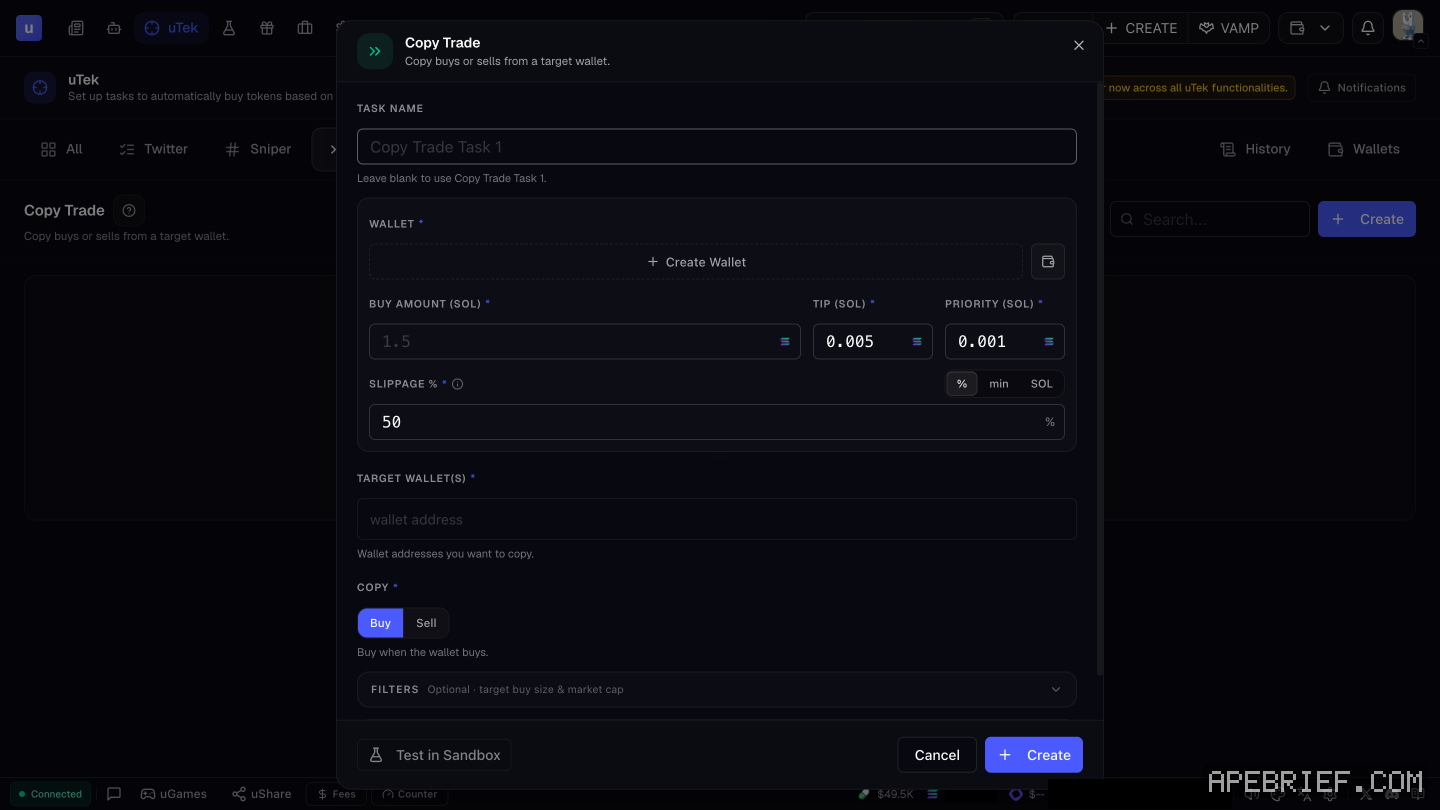
A Copy Trade task in uTek copies a target wallet. Its form takes the wallet it trades from, a buy amount in SOL, tip, priority and slippage, the target wallet(s), and a choice under Copy: Buy or Sell. With Buy picked, it buys when the wallet buys. Optional Filters limit copies by the target's buy size and by market cap. It runs on Pump.fun only for now. setting up copy trades
watch it first
Before a wallet gets a task, it gets a watch period. Your money stays out while you see how it actually trades.
- Axiom's wallet tracker. Add the address and watch its buys come in.
- PumpFun Lookup in Vision. Search the wallet or a username and see what coins it has deployed via Pump. A wallet that launches its own coins and buys them is a deployer, not a trader to follow. Turn it on with Show PumpFun Lookup in Appearance settings.
- Scan in Vision. If the wallet belongs to someone who posts on X, Scan their post: past usernames, smart followers, CA history.
what to check before copying
- How fast it sells. Your copy fills after its buy, never with it. If the wallet is in and out within moments, you're buying around the time it's selling.
- Whether it sells into its followers. A wallet with an audience can buy, let the followers' buys lift the price, and sell into them. Copying it makes you one of those followers. Look at its past trades: if its sells keep landing right after a wave of buys from other wallets, that's the pattern.
- What it buys. Fresh launches with heavy early holders are a different game from coins with a spread-out holder list. Check a few of its coins the way you'd check your own. bundles
- Whether it moves tokens out. A wallet that sends tokens to another wallet and sells from there leaves your copy holding with no sell to mirror.
size it small and fixed
Set one buy amount you can lose in full, and keep it the same on every copy. The wallet's own size says something about its money, not yours. A fixed amount means every row in History is the same bet, so you can read it.
Use Filters to skip the buys you don't want to follow. The target buy size filter can skip its tiny buys and its outsized ones, and the market cap filter keeps copies inside the range you watched it trade.
Copy from a wallet that holds only what you've set aside for this. Assign it under Wallets in uTek, or create a new one there. your wallets
Every copy pays a fee, including the ones that don't work. A wallet that trades all day can cost you more in fees than its trades are worth at your size. uxento fees
plan the way out
A copy that buys with the wallet and doesn't sell with it leaves you holding after it's gone. The form's Copy setting is Buy or Sell, and Buy means "Buy when the wallet buys." So a Buy task gets you in, not out.
To copy its exits as well, set up a second task on the same target wallet with Sell picked, trading from the same wallet as the buy task. Then check History after its first sells to see both tasks fire.
Keep your own exit written down as a backstop, for the times the wallet sells somewhere you can't follow or its sell copy lands late, and sell those by hand.
when to stop copying
Pause the task from the overview when any of these happens:
- Its trades change. Faster flips, a new kind of coin, much bigger or smaller size than what you watched.
- Your fills trail its fills. If History keeps showing your copies landing after the move, the edge you watched isn't reaching you.
- It goes quiet, then bursts. A long gap followed by a run of buys is a different wallet from the one you studied.
- You can't explain a copy. If you can't say why the wallet bought it, you're following, not copying a method.
To see the whole picture, add your copy wallet to uxtension's PNL tracker with its starting balance. It overlays your trading platform and tracks several wallets at once. Stop all tasks with one click from the overview if you need to.
testing a copy task
The Copy Trade form has a Test in Sandbox button. Sandbox is built to test keywords and snipers against fake tweets, so it can't show you how the wallet really trades. The first live run is the real test: run it at your smallest size and read History after.
New to Uxento? Sign up through our link below with code . It's our Uxento referral link.
We get a commission from Uxento, which helps support our work, at no extra cost to you. We might add tools for people who used our code.
Tapping the button puts on your clipboard and opens Uxento. Where the signup shows a code field, paste it there.
How we know: every number on this page
9 sources
- the Copy Trade form copies buys or sells from target wallets: wallet, buy amount in SOL, fees, target wallet(s), Copy Buy | Sell (Buy = buy when the wallet buys), optional filters on target buy size and market cap, Test in Sandbox Buy · our screenshot, 7 Oct 2026, uTek > Copy Trade > Create: 'Copy Trade | Copy buys or sells from a target wallet.' 'TASK NAME (Leave blank to use Copy Trade Task 1.) | WALLET * (Create Wallet)' 'BUY AMOUNT (SOL) * (placeholder 1.5) | TIP (SOL) * (0.005) | PRIORITY (SOL) * (0.001) | SLIPPAGE % * (50; % | min | SOL)' 'TARGET WALLET(S) * (\"Wallet addresses you want to copy.\")' 'COPY * : Buy | Sell (with Buy selected: \"Buy when the wallet buys.\")' 'FILTERS (Optional · target buy size & market cap) | Test in Sandbox | Cancel | Create'2026-10-07
- uTek supports Pump.fun only for now; its notifications have a Copy Trade tab Pump.fun · our screenshot, 7 Oct 2026, uTek page, signed in, no tasks: 'Only Pump.fun is supported for now across all uTek functionalities.' Notifications tabs: 'All' 'Twitter' 'Sniper' 'Copy Trade' 'Fee Claim'.2026-10-07
- Sandbox tests keywords and snipers against fake tweets fake · our screenshot, 7 Oct 2026, Sandbox: 'Test your keywords and snipers against fake tweets'2026-10-07
- tasks can be paused, edited, deleted, duplicated or tested from the overviews, all started or stopped at once; History lists successful executions History · source2026-10-07
- uTek wallets are assigned from the Wallets button, where you can also create a new one Wallets · source2026-10-07
- PumpFun Lookup searches a wallet address or username for the coins it deployed via Pump; it is turned on in Appearance settings PumpFun · source2026-10-07
- Scan next to an X post shows the author's past usernames, smart followers and CA history Scan · source2026-10-07
- Sandbox tests configurations against simulated posts; its event types are post events such as tweets, follows and PFP changes simulated · source2026-10-07
- uxtension's PNL tracker overlays the trading platform and tracks several wallets, each entered with a starting balance PNL · source2026-10-07
next
- how to copy trade a wallet with uxento's utekCopy trading on Uxento is a uTek task. You give it a target wallet, a wallet of yours to trade from and a buy amount in SOL, then pick Buy or Sell under Copy.
- how to set up utek, uxento's sniper and copy traderuTek is Uxento's sniper and copy trader.
- sniping off x posts with utek: the trigger, the size and the exitPick the narrowest trigger that still catches the post you want. A CA trigger buys the exact coin a tracked account posts.
- what is uxento: every tool on one pageUxento is a trenching toolkit.