 by cooked
what a vamp is, and how to tell the original coin from a copy
A vamp is a new coin launched as a copy of another one: same name, ticker, image and links, pulled from the original's contract address, but under a CA of its own. To tell them apart, get the CA from the project's own socials and compare the whole address, check which coin was created first, and use uxtension's Multi-Deploy Identifier and DexScreener link to see both side by side.
what it is
Someone takes a coin that's getting attention, copies its identity onto a fresh launch, and lets buyers find the copy by name. Everything you'd recognize at a glance matches. The contract address doesn't.
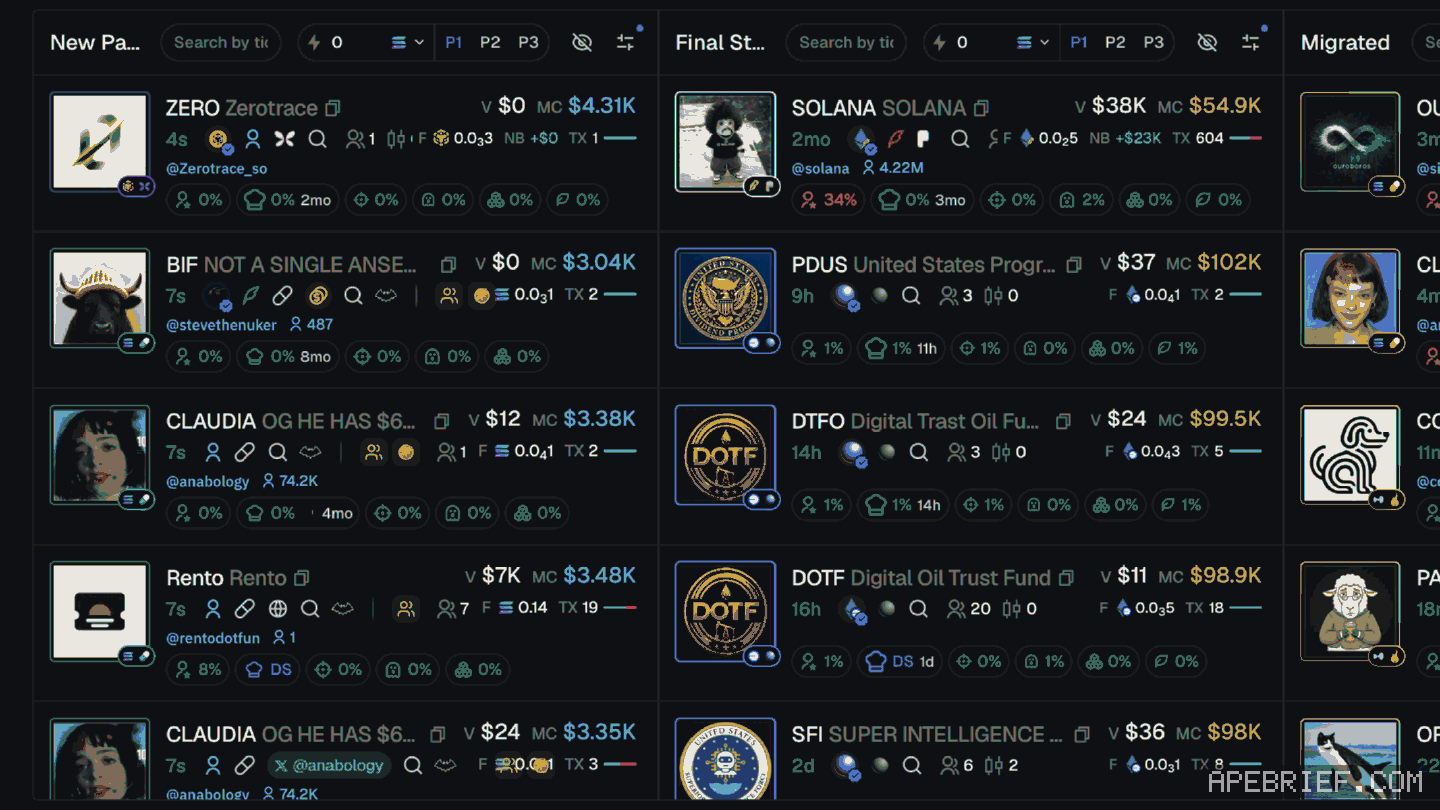
Uxento's uDev has a Vamp tool that builds a new token from another coin's CA, and three variations: Insta-Vamp launches the copy as soon as a CA is entered, a Chinese/Hebrew mode launches it translated, and Tweet Vamp puts a newer tweet on an older coin's name. With uxtension, Axiom's Pulse cards carry Vamp and Insta Vamp buttons. what udev is
So copies can appear within seconds of a coin getting noticed, and in more than one language.
why it matters to you
You search the ticker, see the right name and the right image, and buy. If it's the copy, your money went to a different coin with its own deployer and its own holder list. The original's community, posts and volume don't carry over to it.
A translated copy is the same trap in another script. It can look like an official version for another market. It isn't, unless the original's own accounts say so.
how to tell the original from a copy
- Get the CA from the source. Go to the project's own X account, website or Telegram and take the CA they post. On a website, open uxtension and click Find CA to pull any CA on the page, and Check Age to see when the domain was registered. A copy reuses the original's links, so its "website" and "X" lead to the original, and the original's accounts post the original's CA, not the copy's.
- Compare the whole address. Not the first and last few characters. Paste both and check every one.
- Check creation time. The original was created first. A Vision card shows when a coin was created and when it was called; the copy is the newer one, sometimes by seconds.
- Turn on the Multi-Deploy Identifier. In uxtension's Analysis & Data panel. On New Pairs, a serial deployer's first coin shows green and later ones are hidden or orange.
- Look at Groups. uxtension's Groups badges show which tracked paid chats posted that exact CA. They help tell coins apart when duplicates launch.
- Open DexScreener for both. uxtension puts a DEX Screener icon on the token page that links to the coin's DexScreener page. Open the original's and the copy's and compare them side by side.
- Check the deployer. In Vision, PumpFun Lookup searches a wallet or username for the coins it has deployed via Pump. A deployer whose history is a list of other coins' names is a copier. Turn it on with Show PumpFun Lookup in Appearance settings.
when there's no original
A post can set off a wave of launches with the same name, none of them from the person who posted. Then there's no real one to find, only the first of many. If the person behind the post never posts a CA, none of the coins is theirs.
Same name, different CA, different coin. When the CA doesn't match the one the project posts, skip it.
New to Uxento? Sign up through our link below with code . It's our Uxento referral link.
We get a commission from Uxento, which helps support our work, at no extra cost to you. We might add tools for people who used our code.
Tapping the button puts on your clipboard and opens Uxento. Where the signup shows a code field, paste it there.
How we know: every number on this page
10 sources
- uDev's Vamp creates a token from another coin's contract address, retrieving the information needed to launch it Vamp · source2026-10-07
- the Creator Module covers name, ticker, images and links name, · source2026-10-07
- Insta-Vamp deploys at once when a CA is entered; Chinese/Hebrew mode translates the vamped token; Tweet Vamp attaches new tweets to previous coins Insta-Vamp · source2026-10-07
- with uxtension, Axiom Pulse cards carry Vamp and Insta Vamp buttons Pulse · source2026-10-07
- uxtension's Find CA fetches any CA on a website; Domain Age Check finds when the domain was registered Find · source2026-10-07
- the Multi-Deploy Identifier flags serial deployers on New Pairs: first coin green, later coins hidden or orange Multi-Deploy · source2026-10-07
- uxtension shows a DEX Screener icon on token pages linking to the token's DexScreener page DEX · source2026-10-07
- Groups badges show which tracked paid chats posted a coin's CA; Uxento pitches them for telling runners apart when duplicates launch Groups · source2026-10-07
- a Vision coin card shows when the coin was created and when it was called when · source2026-10-07
- PumpFun Lookup searches a wallet address or username for the coins it deployed via Pump; it is turned on in Appearance settings PumpFun · source2026-10-07
next
- what a bundled launch is, and how to spot oneA bundled launch is one where the deployer buys a big part of the supply across many wallets at the moment the coin is created, so the supply looks spread out while one person controls it.
- trading from the uxento vision feed on axiom: from a card to a decisionTreat every card as a lead, not a call.
- uxtension settings: what each one doesClick uxtension in your toolbar and press the Settings icon.
- how to copy trade a wallet with uxento's utekCopy trading on Uxento is a uTek task. You give it a target wallet, a wallet of yours to trade from and a buy amount in SOL, then pick Buy or Sell under Copy.