 by cooked
withdraw from bybit to a wallet: chain, memo, fee and minimum
Pick the chain your wallet receives on: SOL for a Phantom Solana address, and for an 0x address the EVM chain you mean to use it on. Enter a tag or memo only if the receiving side shows you one; Bybit sends without one and won't answer for coins lost that way. The fee and the minimum show on the form once you pick the chain.
before the first one
Bybit wants email and Google Authenticator set up before any on-chain withdrawal, and Google 2FA before you can save an address.
the steps
On the website:
- Assets, then Withdraw.
- Pick the coin. Paste the address from your wallet's receive screen, or pick one from your address book.
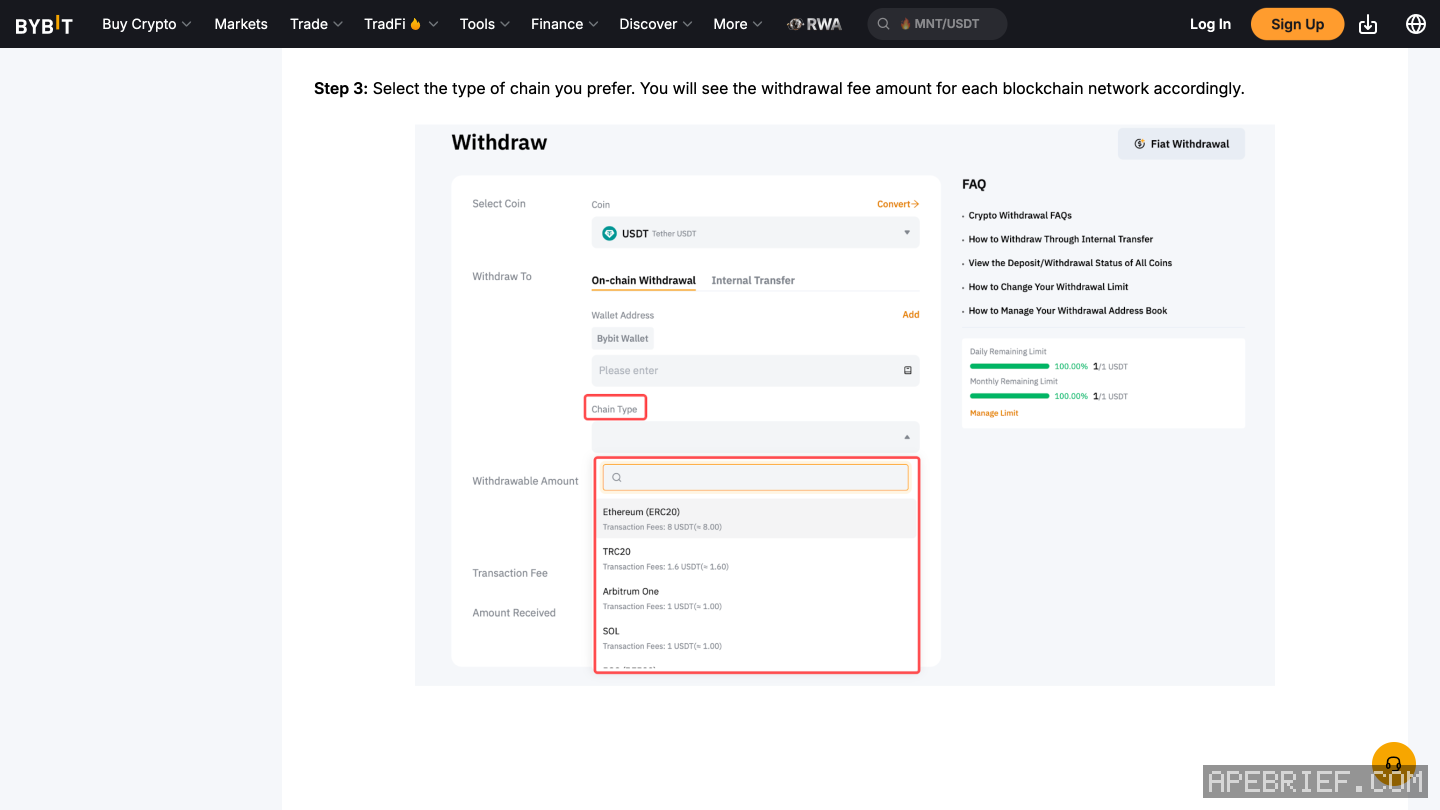
- Pick the chain. Each chain shows its fee here.
- Type the amount, or All. The minimum for that coin and chain shows in the amount field.
- Confirm, then enter the email code (it lasts five minutes) and your Google Authenticator code, and Submit.
Bybit says it can take as long as 30 minutes or an hour, longer if the chain is busy.
the chain
Bybit calls it the chain type. Pick the one the receiving wallet uses, not the one with the lowest fee.
- Phantom. It has one receive address per network. Pick the chain that matches the network Phantom showed you: SOL for SOL or USDC on Solana.
- MetaMask, or any 0x address. The same address works on every EVM chain, so the chain you pick decides where the funds land. Pick the one you plan to use them on.
Bybit's chain list has SOL on one chain, SOL, and USDC on chains including ARBI, BASE, ETH, OP and SOL. Those are the list's own short codes; ARBI reads as Arbitrum, which the list doesn't spell out.
tag or memo
Some chains, XRP and XLM among them, route a deposit by a tag or memo because many users share one address. That is how exchanges take deposits. Phantom's receive steps ask only for the address and the network.
If the receiving side shows you a tag or memo, enter it exactly. Bybit will send without one if you leave it blank, and says checking is your job and it won't answer for coins lost that way.
fee and minimum
Bybit charges a fixed withdrawal fee per coin and chain, and the minimum is set per coin and chain too. Both show on the form once you pick the chain, and on Bybit's Deposit/Withdrawal Status page. By default the fee comes out of the amount you type; Set Up on the form switches it to come on top. Sends to another Bybit account by internal transfer carry no fee.
save the address, lock the rest
Bybit's address book takes the coin, the address, the chain type and an optional tag or memo. A Universal address works for every coin on one chain; a Regular one for a single coin on a single chain. The locks sit under Account, Security, Scenario-based protection.
- Withdrawal Address Whitelist means verified addresses can skip the email and 2FA codes.
- Withdraw via Address Book stops anyone from typing a new address into the form.
- New Address Withdrawal Lock keeps a newly saved address on hold for 24 hours.
test small, then send the rest
Bybit doesn't ask for a test send. Send a small one to a new address anyway, wait for it to show in the wallet, then send the rest. The status and the TXID are under Funding Account, History, Withdraw. A withdrawal still Under Review can be cancelled; after that it can't. Pending Verification means Bybit wants you to confirm you own the address, from the withdrawal history.
Wrong chain already? withdrew from bybit on the wrong network. The same checks for any exchange are in sending crypto from an exchange to your own wallet, and where to take it next is in from an exchange to on-chain.
People also ask
I withdrew from Bybit on the wrong network. Can I get it back?
Not from Bybit: its FAQ sends you to the receiving wallet or exchange with the TXID. On your own 0x wallet on another EVM chain, it is at the same address there. If another exchange refunds it to Bybit, a self-service appeal credits it.
the full answerHow do I send crypto from an exchange to my own wallet?
Copy the address from the wallet's receive screen and pick the network the wallet showed you, not the cheapest one. A memo is only for a receiving side that asks for one. Send a small amount first, then the rest.
the full answerHow do I buy crypto on Bybit?
By card through One-Click Buy, P2P from another Bybit user, or a fiat deposit spent from your balance under Buy Crypto. Bybit asks for identity verification before a card buy and two-factor authentication before a fiat-balance buy.
How do I get crypto from an exchange onto Solana, Hyperliquid or Robinhood Chain?
Buy on the exchange, withdraw to your own wallet on the network your next stop uses, then trade there. SOL on Solana for Axiom, Photon or Jupiter. USDC on Arbitrum for Hyperliquid, unless the exchange sends there directly. ETH on Ethereum, then bridged, for Robinhood Chain.
How we know: every number on this page
12 sources
- Bybit's website steps: Assets, Withdraw; coin and address (typed, from the address book, or added); chain, with each chain's fee shown; amount or All, with the minimum shown once the chain is picked; Confirm, then email and Google Authenticator codes; email and Google Authentication must be set up first Withdraw · source2026-09-26
- the email code lasts five minutes; a withdrawal may take up to 30 minutes or one hour, longer when the network is congested five · source2026-09-26
- Bybit sends to an address without a tag or memo if you leave it blank; checking whether one is needed is on you, and Bybit won't answer for coins lost without one; XRP, XLM and others need one tag/memo · source2026-09-26
- the fee and minimum per coin and chain are on Bybit's Deposit/Withdrawal Status page and in the withdrawal window; by default the fee comes out of the amount you enter, changeable under Set Up; Bybit charges a fixed fee for all withdrawals; internal transfers to Bybit accounts have no fee fixed · source2026-09-26
- status and TXID are under Funding Account History, Withdraw; a completed withdrawal that hasn't arrived is for the receiving wallet or exchange, with the TXID; a request can only be cancelled while under review TXID · source2026-09-26
- the address book: Google 2FA first; each entry takes a coin, the address, a chain type and an optional tag/memo; a Universal address works for every coin on one chain, a Regular one for one coin on one chain; up to ten per batch ten · source2026-09-26
- withdrawal security: the whitelist skips the email and 2FA codes for verified addresses; Withdraw via Address Book blocks new addresses at the form; the New Address Withdrawal Lock holds new addresses for 24 hours; settings under Account, Security, Scenario-based protection 24 · source2026-09-26
- Bybit's public chain list for USDC includes ARBI, BASE, ETH, OP and SOL, and no chain named Hyperliquid ARBI · source2026-09-27
- Bybit's public chain list has SOL on one chain, SOL SOL · source2026-09-27
- Bybit lists no Hyperliquid chain for USDC, and Hyperliquid names Arbitrum as the common route when an exchange does not support Hyperliquid directly Arbitrum · source2026-09-26
- Phantom has one receive address per network and says to pick the same network in the exchange's withdrawal same · source2026-09-26
- one MetaMask address works on every EVM network, so the chain you pick decides where the funds land EVM · source2026-09-26
next
- I withdrew from Bybit on the wrong network. Can I get it back?Bybit offers no way to pull a withdrawal back: it sends you to the receiving wallet or exchange with the TXID. Where it landed decides the rest.
- How do I send crypto from an exchange to my own wallet?Copy the address from your wallet's receive screen, pick the network the wallet showed you for it, send a small amount first, then the rest.
- How do I buy crypto on Bybit?Three routes: a card through One-Click Buy, P2P from another Bybit user, or a fiat deposit and a buy with that balance.
- I withdrew from OKX on the wrong network. Can I get it back?If it went to your own wallet, OKX says you can get it back yourself: the funds sit at your address on the chain you picked, and you send them back from that chain, which needs your wallet's recovery phrase or key and that chain's gas.