 by cooked
withdraw from binance to a wallet: network, memo, fee and minimum
Pick the network your wallet receives on, not the cheapest one: Solana for a Phantom Solana address, and for an 0x address the EVM chain you mean to use it on. Enter a memo only if the receiving side shows you one. The fee and the minimum depend on the network and show on the form before you confirm, and Binance suggests a small test to any new address.
the steps
On the website:
- Assets, then Overview, then Withdraw, then Withdraw Asset.
- Pick the coin. Paste the address from your wallet's receive screen.
- Binance picks a network from the address. Check it against the network your wallet showed you.
- Withdraw. A prompt asks whether the receiving address supports that network. Not sure? No, I'm not sure lets you pick the platform you're sending to and Check.
- Review, then pass the security check.
In the app it starts at Assets, Overview, Send, then Withdraw Asset, and ends with a slide to confirm and your passkey or 2FA.
the network
Binance's own words: "DO NOT select the cheapest fee option." Choose the network that the receiving wallet supports. Choose the wrong one and, as Binance says, the funds may be lost for good.
- Phantom. It has one receive address per network. Choose the network you saw on Phantom's receive screen: Solana for SOL or USDC on Solana.
- MetaMask, or any 0x address. The same address works on every EVM chain, so the network you pick decides which chain the funds land on. Pick the chain you plan to use them on.
Binance lists SOL on two networks, Solana and BNB Smart Chain (BEP20). A Solana address wants Solana. USDC is on 24, among them Arbitrum One, Base, Ethereum (ERC20) and Solana.
memo or tag
A memo tells an address shared by many users which account the funds belong to. That is how exchanges take deposits on networks such as XRP and EOS, and some platforms call it a tag. Phantom's receive steps ask only for the address and the network.
If the receiving side shows you a memo, enter it exactly. Forget it and Binance can't recover the funds. Only the receiving platform's support can trace them.
fee and minimum
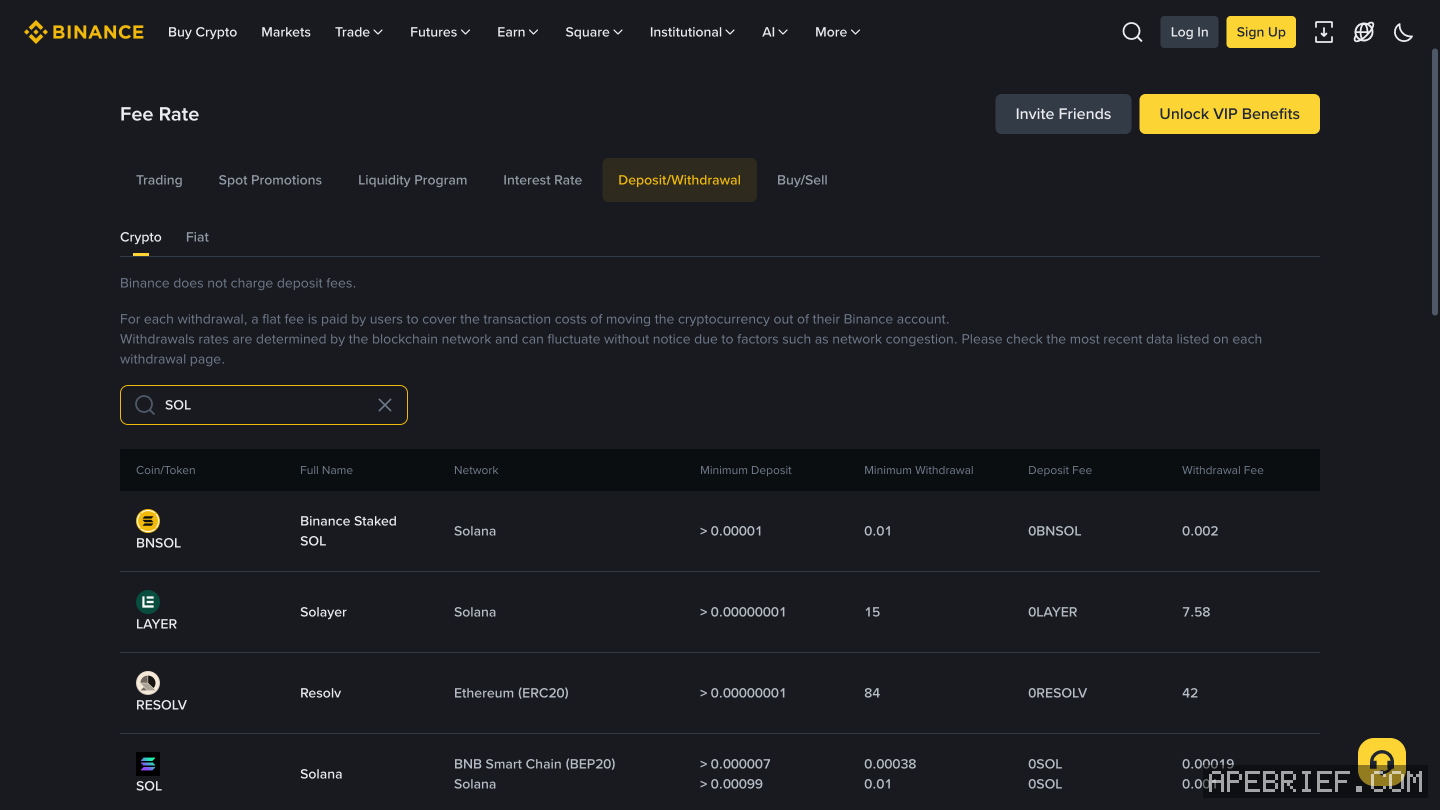
The fee is a network fee paid to validators, not to Binance. It and the minimum change with the network you pick and with how busy it is, so the form's figures are the ones that count. In the app you choose whether the fee comes on top (Receive amount) or out of what you type (Withdrawal amount).
| coin, network | fee | minimum |
|---|---|---|
| SOL, Solana | 0.001 SOL | 0.01 SOL |
| USDC, Arbitrum One | 0.2 USDC | 3 USDC |
| USDC, Solana | 0.3 USDC | 3 USDC |
| USDC, Ethereum (ERC20) | 0.6 USDC | 5 USDC |
test small, then send the rest
The first time you withdraw to a new address, Binance shows a safety pop-up and suggests a small amount first. Send it, wait for it to show in the wallet, then send the rest.
Wrong network already? withdrew from binance on the wrong network. The same checks for any exchange are in sending crypto from an exchange to your own wallet, and where to take it next is in from an exchange to on-chain.
People also ask
I withdrew from Binance on the wrong network. Can I get it back?
Not from Binance: once crypto leaves for another platform, Binance says it can't help. On your own 0x wallet on another EVM chain, it is at the same address there; switch networks. At another exchange, ask that exchange with the TxID.
the full answerHow do I send crypto from an exchange to my own wallet?
Copy the address from the wallet's receive screen and pick the network the wallet showed you, not the cheapest one. A memo is only for a receiving side that asks for one. Send a small amount first, then the rest.
the full answerHow do I buy crypto on Binance?
By card under Buy Crypto, P2P from another Binance user, or a bank transfer into your fiat balance and a buy with that. Binance asks for identity verification and two-factor authentication first.
How do I get crypto from an exchange onto Solana, Hyperliquid or Robinhood Chain?
Buy on the exchange, withdraw to your own wallet on the network your next stop uses, then trade there. SOL on Solana for Axiom, Photon or Jupiter. USDC on Arbitrum for Hyperliquid, unless the exchange sends there directly. ETH on Ethereum, then bridged, for Robinhood Chain.
How we know: every number on this page
11 sources
- Binance's web steps: Assets, Overview, Withdraw, Withdraw Asset, pick the coin, paste the address; the network is auto-selected from the address and has to be checked; a prompt asks you to confirm the receiving address supports the network Withdraw · source2026-09-26
- Binance's app steps: Assets, Overview, Send, Withdraw Asset; slide to confirm; verify with a passkey or 2FA Send · source2026-09-26
- pick the network the receiving platform supports, never the cheapest; the wrong network can lose the funds for good cheapest · source2026-09-26
- Binance suggests sending a small amount first to a new address small · source2026-09-26
- a memo identifies one user at an address many users share; networks such as XRP and EOS need one; a withdrawal without one is the receiving platform's to trace, not Binance's Memo/Tag · source2026-09-26
- the withdrawal fee is a network fee paid to validators, not to Binance; it and the minimum move with the network and are shown on the withdrawal page network · source2026-09-26
- in the app you choose whether the fee is added on top (Receive amount) or taken out of what you enter (Withdrawal amount) Receive · source2026-09-26
- Binance's public network list on 26 Sep 2026: SOL withdraws on Solana (fee 0.001 SOL, minimum 0.01 SOL) and on BNB Smart Chain (BEP20); USDC on Arbitrum One (fee 0.2, minimum 3), Solana (fee 0.3, minimum 3) and Ethereum (ERC20) (fee 0.6, minimum 5), among 24 networks 0.001 · source2026-09-26
- Binance lists no Hyperliquid network for USDC, and Hyperliquid names Arbitrum as the common route when an exchange does not support Hyperliquid directly Arbitrum · source2026-09-26
- Phantom has one receive address per network and says to pick the same network in the exchange's withdrawal same · source2026-09-26
- one MetaMask address works on every EVM network, so the network you pick decides where the funds land EVM · source2026-09-26
next
- I withdrew from Binance on the wrong network. Can I get it back?Binance can't pull it back: once crypto leaves Binance for another platform, Binance can no longer help. Where it landed decides the rest.
- How do I send crypto from an exchange to my own wallet?Copy the address from your wallet's receive screen, pick the network the wallet showed you for it, send a small amount first, then the rest.
- How do I buy crypto on Binance?Three routes: a Visa or Mastercard card under Buy Crypto, P2P from another Binance user, or a bank transfer into your fiat balance and a buy with that.
- I withdrew from Bybit on the wrong network. Can I get it back?Bybit offers no way to pull a withdrawal back: it sends you to the receiving wallet or exchange with the TXID. Where it landed decides the rest.