 by cooked
how to deposit on lighter
Deposit on Lighter from the Deposit button. With a wallet connected and nothing deposited, the positions panel says your first deposit opens the account. Until then the order button reads Create Account.
the deposit window
The window is titled for the token you're depositing into: "Deposit USDC Perps" by default. Change it under Select destination token; what crypto can i deposit on lighter has the full list and which one to pick.
Then choose how the money gets there.
| Tab | Route | What it says |
|---|---|---|
| Use Crypto | Wallet | the connected wallet's balance, Instant |
| Use Crypto | Transfer Crypto | No limit, Instant: a deposit address for any chain listed |
| Use Crypto | Connect Exchange | No limit, 2 min: Bybit Pay and Coinbase (Binance, Kraken and Gate say Coming Soon) |
| Use Cash | Card, Apple Pay, Google Pay | $114k limit, Instant |
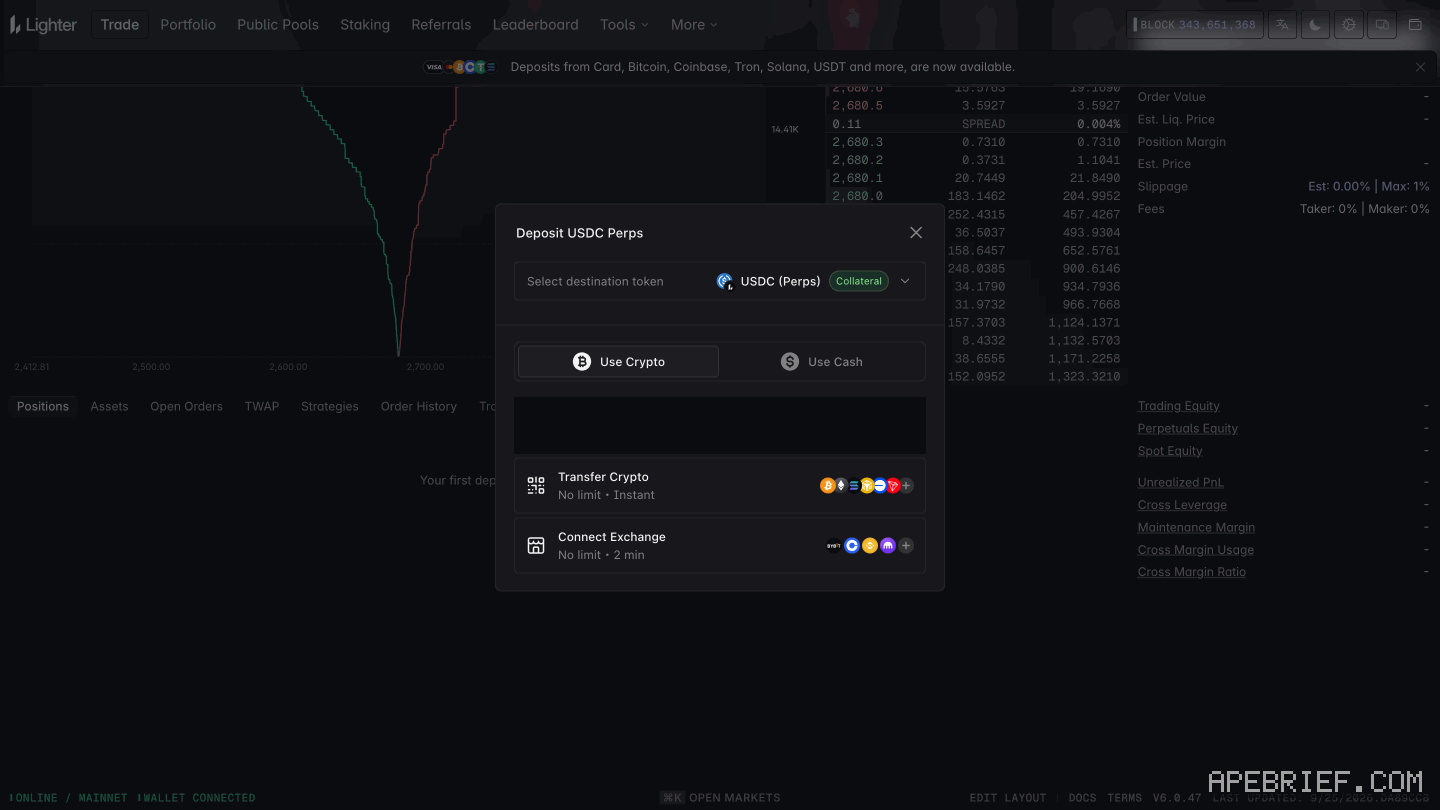
Wallet is the short one: the funds already sit in the wallet you connected. Transfer Crypto is for funds somewhere else. Pick a token and a chain, then send to "Your deposit address" or scan the QR code. Each chain has a minimum, $3 or $10, and the window shows the price impact (0.00%), max slippage (Auto, 0.01%) and a processing time of 2 min.
after the first deposit
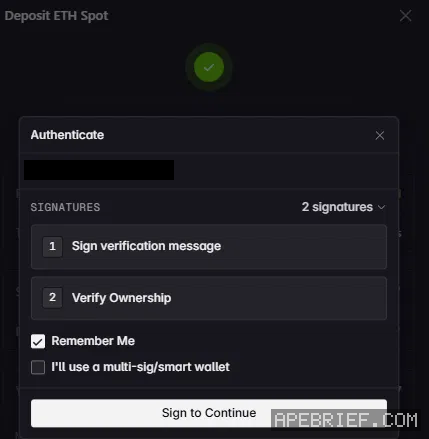
"Deposit successful" comes up, and three windows follow, in this order.
- Authenticate. Two signatures: "Sign verification message", then "Verify Ownership". There's a Remember Me tick box, and an "I'll use a multi-sig/smart wallet" option if that's what you deposited from. Press Sign to Continue.
- New fees for advanced order types. A one-time message: RFQ, Chase, Iceberg and TWAP orders carry a 0.01% fee on Standard, 0.005% on Plus, and regular limit and market orders stay free. Signing it (Agree & Sign) is what turns those four order types on. lighter fees has the rest.
- Choose your account. A Premium card, then Continue with Plus instead, and "No thanks, continue with the Standard account". You can switch account types anytime from Portfolio. lighter standard vs plus vs premium helps you pick.
A referral code only counts at sign-up, and on Lighter the first deposit is what opens the account. the lighter referral has what the code gets you. If you haven't deposited yet, the link below is our referral link. Already on Lighter without a code? Connect a new wallet through it; its first deposit opens a new account with the code.
Signing up through this link gets you your first week of Lighter Premium free: the fees you pay that week are rebated to you in USDC, which signing up without one does not. We get a commission from Lighter, which helps support our work, at no extra cost to you. We might add tools for people who used our code.
Tapping the button puts apebrief on your clipboard and opens Lighter. Where the signup shows a code field, paste it there.
How we know: every number on this page
10 sources
- with a wallet connected and nothing deposited, the Trade page has no account: the order button reads Create Account and the positions panel says the first deposit opens an account, with a Deposit button NO · our screenshot, 28 Sep 2026, Trade page, wallet connected, nothing deposited: order button 'Create Account'; positions panel 'NO ACCOUNT YET' / 'Your first deposit opens an account, and your open positions appear here.' with a Deposit button.2026-09-28
- the Deposit window's title follows the destination token, USDC Perps by default; it has a Select destination token picker and two tabs, Use Crypto and Use Cash Deposit · our screenshot, 28 Sep 2026: title 'Deposit USDC Perps' by default, 'Deposit ETH Spot' with ETH picked; 'Select destination token'; tabs 'Use Crypto' and 'Use Cash'.2026-09-28
- Use Crypto rows and their labels; Use Cash rows and their limit $114k · our screenshot, 28 Sep 2026: Use Crypto: 'Wallet (…xxxx)' with its balance and 'Instant'; 'Transfer Crypto', 'No limit • Instant'; 'Connect Exchange', 'No limit • 2 min'. Use Cash: Card, Apple Pay, Google Pay, each '$114k limit • Instant'.2026-09-28
- Connect Exchange lists Bybit Pay and Coinbase; Binance, Kraken and Gate are marked Coming Soon Coming · our screenshot, 28 Sep 2026, Connect Exchange, 'Select an exchange': Bybit Pay, Coinbase; Binance, Kraken, Gate marked 'Coming Soon'.2026-09-28
- Transfer Crypto gives a deposit address for the wallet, with token and chain pickers, a QR code, and price impact, slippage and processing lines; each chain has a minimum of $3 or $10 $3 · our screenshot, 28 Sep 2026, Transfer Crypto: 'Tokens' and 'Chains' pickers, a QR code, 'You send USDC → You receive USDC', 'Your deposit address', 'Copy address', 'Price impact: 0.00%', 'Max slippage: Auto • 0.01%', 'Processing time: 2 min'. Chains with minimums: Arbitrum $3, Ethereum $10, Solana $10, BSC $10, Base $3, Tron $10, Bitcoin $10, Polygon $3, HyperEVM $10, Robinhood $3, Optimism $3, Monad $10.2026-09-28
- after a first deposit, the app shows Deposit successful, then Authenticate: 2 signatures, Sign verification message and Verify Ownership, a Remember Me tick box, a multi-sig/smart wallet option and Sign to Continue 2 · our screenshot, 28 Sep 2026, first deposit of ETH to ETH Spot from a wallet: 'Deposit successful', 'Your funds were successfully deposited'; window 'Authenticate': 'SIGNATURES 2 signatures', '1 Sign verification message', '2 Verify Ownership', 'Remember Me' ticked, 'I'll use a multi-sig/smart wallet' unticked, button 'Sign to Continue'.2026-09-28
- the one-time New fees for advanced order types window: 0.01% on RFQ, Chase, Iceberg and TWAP on Standard, limit and market orders free, 0.005% on Plus, a one-time signature to use them, Agree & Sign 0.01% · our screenshot, 28 Sep 2026, after a first deposit: 'New fees for advanced order types': 'RFQ, Chase, Iceberg, and TWAP orders include a 0.01% fee on Standard account. Regular limit and market orders remain free.' 'To use these features, sign a one-time message authorizing the fee. By signing, you also accept the Terms of Service.' 'On Plus Accounts these orders cost 0.005% instead.' Link 'Switch to Plus or Premium Account', button 'Agree & Sign'.2026-09-28
- the Choose your account window after a first deposit, and switching later from Portfolio Choose · our screenshot, 28 Sep 2026: 'Choose your account': card 'PREMIUM' with 'Continue with Premium'; below, 'Compare account types', 'Continue with Plus instead', 'No thanks, continue with the Standard account'; footer 'Your account is ready, you can switch account types anytime from Portfolio.'2026-09-28
- the referral code only counts at sign-up and cannot be added later permanent · source2026-09-28
- a user who joins through a Lighter referral link can activate one week of Premium free; the trial week's trading fees are rebated every Monday, on the first $10M of volume one · source2026-09-28
next
- what crypto can i deposit on lighterLighter's Deposit window takes USDC (Perps), USDC (Spot), ETH and XAUT as collateral, plus AAVE, LDO, LINK, SKY, UNI, AZTEC and LIT without the Collateral tag.
- lighter standard vs plus vs premiumStandard is free: 0% maker, 0% taker, 300 ms taker latency. Plus charges 0.005% on both sides for higher API limits.
- lighter referral code: apebrief, and the free premium weekOur Lighter referral code is apebrief.
- lighter fees: free on standard, and what costs moneyLighter charges Standard accounts 0% maker and 0% taker on perps and spot.
- comparehyperliquid vs lighter: fees, the code and getting money inHyperliquid for most perp traders: it's the more established venue, a code takes 4% off your fees for your first $25M of volume, and the code can go on after sign-up.